


Shared Expense Splitter – Flatmates, Trips & Group Bills Spreadsheet, Who Owes Who (Excel + Google Sheets)
No more arguments about who paid for what.
What it does:
Up to 8 people
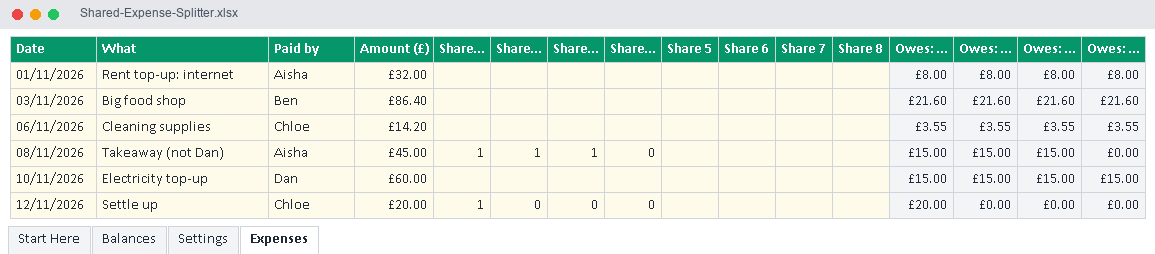
Expenses: date, what, who paid and amount
Split equally between everyone by default, or type your own shares (for example leave someone out, or split 2:1)
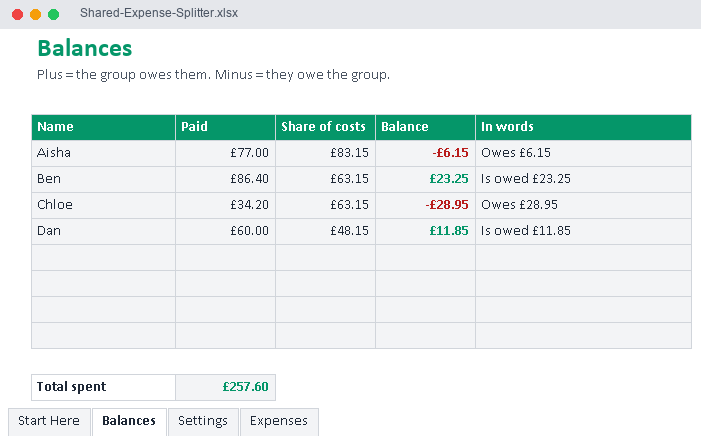
Balances: what each person paid, their share of the costs, and their balance in plain words ("Is owed £23.25" or "Owes £6.15")
Settle-up lines so you can record payments between people
What you get:
Shared-Expense-Splitter.xlsx – the blank splitter (room for 500 expenses)
Shared-Expense-Splitter-EXAMPLE.xlsx – filled with example data
Instructions are on the Start Here tab.
Works in Microsoft Excel 2016 or newer (Windows and Mac), Excel for the web, and Google Sheets (upload the .xlsx to Google Drive and open it with Google Sheets). No macros.
This is a digital download. No physical item will be shipped. For personal use only.