
Cash Flow Forecast UK
Instant download, three files: two spreadsheets and a one page quick start PDF.
Will your bank balance last until the next big payment lands?
This is a plain spreadsheet for UK sole traders and small businesses. You type what's coming in and what's going out, say how often each one happens, and it adds everything up week by week for 13 weeks and month by month for 12 months. It shows your closing balance each time, names the tightest week and month, and flags any that fall below a cushion you choose.
What it does
- You pick your start date and type your bank balance.
- Each row of money in or money out gets its own timing: weekly, fortnightly, four weekly, monthly, quarterly, yearly or one off. You can add a last date for anything that ends, such as a loan.
- A row only counts when it has an amount, a timing and a first date. The Check column tells you why if a row isn't counted, so nothing slips in by accident.
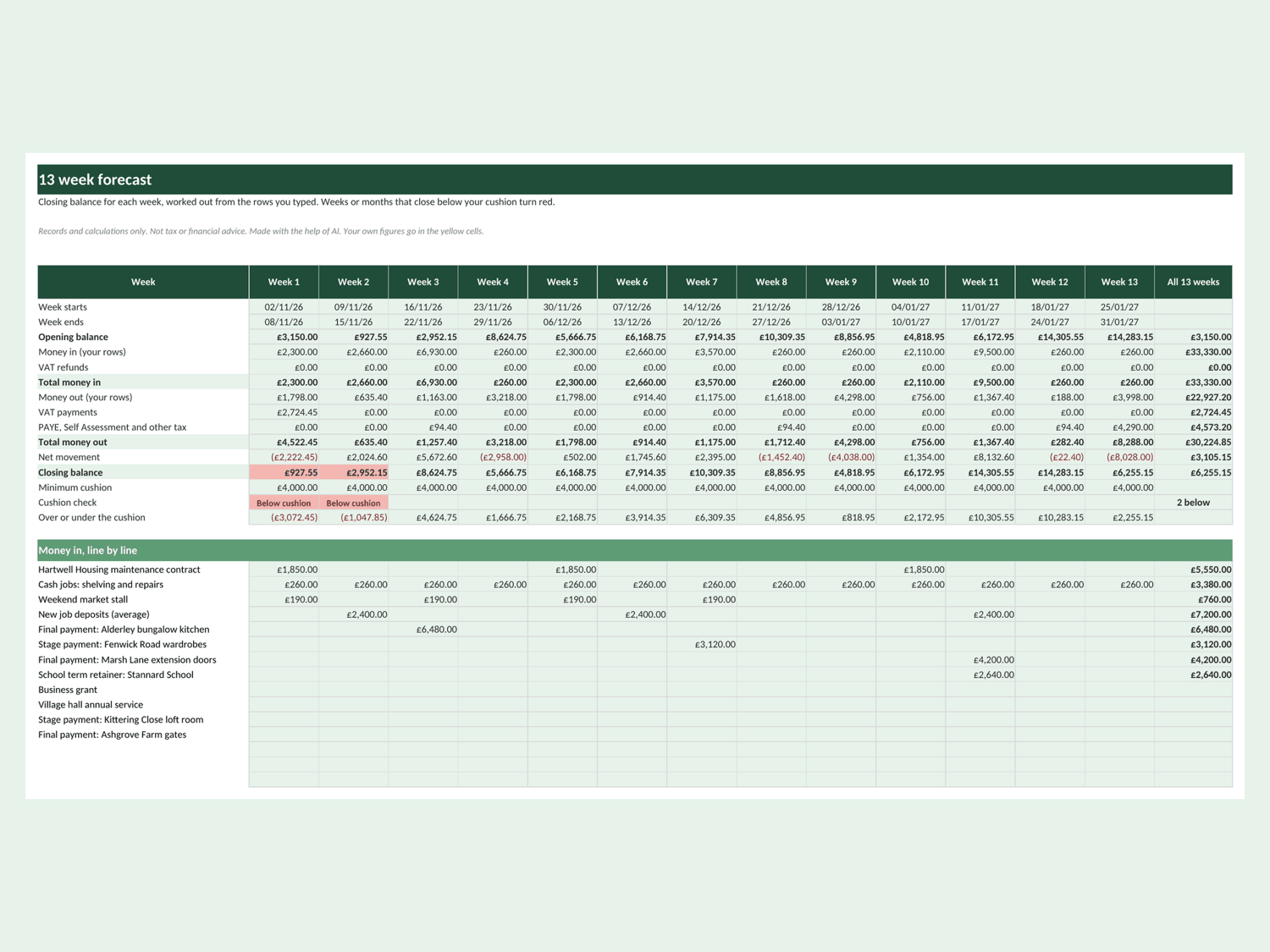
- You set a minimum cushion. Any week or month that closes below it turns red, and the Lowest balance tab says which one is the tightest.
What you get
Three files in one download.
- The blank forecast, ready for your own figures.
- A filled in example (an invented fitted furniture workshop with a part time assistant) so you can see how it behaves before you start. It includes a Tests tab with 28 checks, each compared with an answer worked out separately from the example figures.
- A one page quick start PDF with five short steps.
What's inside
Start here: three short steps, a dates check and what the colours mean.
Settings: your first day, opening balances, and your minimum cushion.
Money in: up to 15 rows, each with a type, timing, amount, first date and optional last date.
Money out: up to 24 rows, the same way.
Tax and VAT: rows for PAYE, Self Assessment and other tax payments (8 rows you type, plus two payment on account rows), and 8 VAT quarters. You type the VAT collected and the VAT paid. The sheet totals them and puts the payment in the week or month you choose. There is also a yellow cell labelled "Payment on account figure from your own Payments on Account planner or return". Type a figure and two dates and it's added to the forecast. It works on its own.
13 weeks: opening balance, money in, money out, VAT, tax rows, closing balance and a cushion check for every week, with each of your rows shown line by line.
12 months: the same for every month.
Lowest balance: the tightest week and month with their dates, how far they are over or under your cushion, how many weeks and months fall below it, money in and out by type, and two charts of your closing balance.
Lists: the dropdown types, which you can edit.
Good to know
It's a forecast made from the figures you type. Nothing is worked out for you except adding up. VAT, PAYE and Self Assessment are typed amounts and dates. The sheet doesn't calculate any tax and doesn't assume any due dates.
Type amounts as they reach or leave your bank, VAT included.
Lowest balance is judged on the closing balance of each week or month. A bill that lands mid week can dip lower inside a week.
Capacity: 13 weeks, 12 months, 15 money in rows, 24 money out rows, 8 typed tax rows plus 2 payment on account rows, and 8 VAT quarters. For a longer stretch, make a fresh copy and start it from your latest balance.
I built and tested it in LibreOffice Calc with standard formulas. I haven't tested it in Excel yet.
There are no macros. Formula cells are locked (no password), and every cell you type in is yellow with a short hint.
Dates are UK style, day then month.
Disclaimer
Records and calculations only. This isn't tax, legal or financial advice, and it doesn't replace your accountant. Check any tax rule or date yourself on GOV.UK.
How this was made
I'm Ben, and I make plain UK spreadsheets for everyday work. This one was made with the help of AI. The Tests tab in the example checks 28 of its key figures against answers worked out separately.
Digital download. Nothing is posted to you.