



Notes Collection
On Sale
$5.00
$5.00
Set of 4 Drivers for making notes in composer.
Several ICON variants, but the core driver is the same. Simple functionless drivers, with no connections, no programing, no user interface options. Just a tree icon, a tree name and a text note field property.
In drivers, serach for Note and they will all show.
You can also use Composer System Design filters, select Notes
Variants
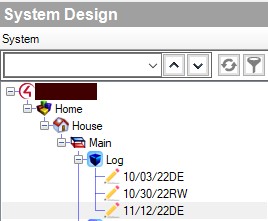
Notes: Pencil ICON. Simple text note. Use as a log feature. Create a hidden room, called LOG. Set the name as Initials Date (070122JD), and then a note stating what was done. Or use for any other purpose you want to leave a note, about how or why something was done.
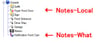
Notes-Local: Shows an arrow pointing up and location ICON. Idea is to add to tree below an object so you can leave a note as to it's real location. A light switch stuck somewhere odd for instance.
Notes-What: Shows an arrow pointing up and question ICON. Idea is to add to tree below an object so you can leave a note to what it's for. Explain an input/output converter perhaps.
Notes-Light: Upside down light bulb. Explain a light device, or location, or note an odd wiring,
Several ICON variants, but the core driver is the same. Simple functionless drivers, with no connections, no programing, no user interface options. Just a tree icon, a tree name and a text note field property.
In drivers, serach for Note and they will all show.
You can also use Composer System Design filters, select Notes
Variants
Notes: Pencil ICON. Simple text note. Use as a log feature. Create a hidden room, called LOG. Set the name as Initials Date (070122JD), and then a note stating what was done. Or use for any other purpose you want to leave a note, about how or why something was done.
Notes-Local: Shows an arrow pointing up and location ICON. Idea is to add to tree below an object so you can leave a note as to it's real location. A light switch stuck somewhere odd for instance.
Notes-What: Shows an arrow pointing up and question ICON. Idea is to add to tree below an object so you can leave a note to what it's for. Explain an input/output converter perhaps.
Notes-Light: Upside down light bulb. Explain a light device, or location, or note an odd wiring,