

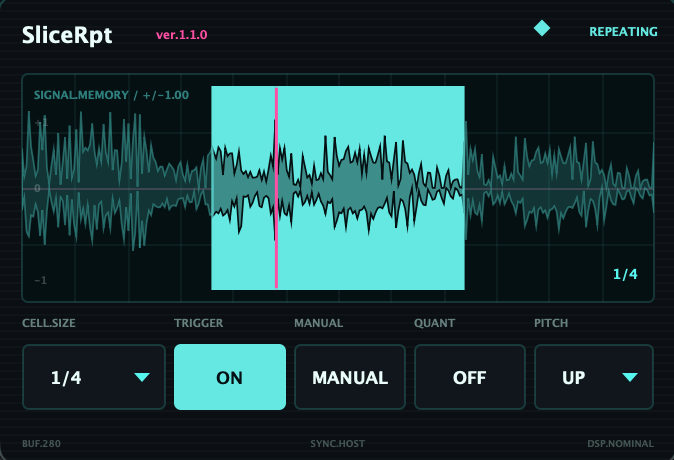


SliceRpt
EN
Update ver.1.1.0
New Features
- Added PITCH
Change the pitch on each repeat.
Select from NONE, UP, or DOWN.
- Added QUANT
Quantize the start timing of TRIGGER and MANUAL to the selected CELL.SIZE.
This makes it easier to keep repeats locked to the musical grid.
- MANUAL Button
PROBE has been renamed to MANUAL.
It lets you temporarily test the repeat behavior without affecting automation.
Improvements
- Improved waveform display accuracy for the repeated range
- CELL.SIZE changes during TRIGGER now keep the original playback start position
- SIZE / TRIGGER / QUANT / PITCH can be mapped from Live’s LFO, Envelope Follower, Macros, and other modulation tools
SliceRpt is a macOS audio effect that captures part of the incoming audio in real time and repeats it in sync with the host tempo.
With simple controls, you can create tightly chopped drum loops, vocal repeats, instantaneous glitches, and more.
Main Features
- Syncs with Ableton Live’s tempo
- Repeat sizes ranging from 1/2 to 1/64
- 11 note divisions, including triplets
- Instant repeats using the Trigger control
- Real-time display of the input waveform and repeat region
- PITCH mode for shifting pitch up or down on each repeat
- QUANT mode for aligning TRIGGER / MANUAL start timing to the musical grid
- Mappable SIZE / TRIGGER / QUANT / PITCH parameters
- Mappable from Live’s LFO, Envelope Follower, Macros, and other modulators
- Automation support
- Mono and stereo support
- Compact interface
Controls
SIZE
Selects the length of the audio region to repeat.
TRIGGER
Repeats the selected audio region while switched ON.
PROBE
Lets you temporarily test the repeat effect without affecting automation.
System Requirements
- Apple Silicon Mac
- macOS 26 or later
- Audio Unit (AUv2) compatible host
- Tested with Ableton Live 12
Intel Macs, Windows, and VST3 are not currently supported.
Installation
Open the included PKG installer and follow the on-screen instructions.
After installation, restart Ableton Live and find SliceRpt under:
JP
アップデート ver.1.1.0
新機能
・PITCHを追加
リピートごとにピッチを上昇または下降させることができます。
NONE / UP / DOWN から選択できます。
・QUANTを追加
TRIGGERおよびMANUALの開始タイミングを、選択中のCELL.SIZEに合わせてクォンタイズできます。
リピートの入りをテンポに沿って揃えやすくなりました。
・MANUALボタン
旧PROBEをMANUALに変更しました。
オートメーションへ影響を与えず、手動でリピート動作を確認できます。
改善
・リピート範囲の波形表示精度を改善
・TRIGGER中にCELL.SIZEを変更した際、再生開始位置を維持するよう改善
・LiveのLFO、Envelope Follower、Macroなどから、SIZE / TRIGGER / QUANT / PITCHをマッピング可能
SliceRptは、入力された音声の一部をリアルタイムに切り取り、テンポに同期して反復再生するmacOS用オーディオエフェクトです。
ドラムループを細かく刻んだり、ボーカルのリピート、瞬間的なグリッチなどを、シンプルな操作で作り出せます。
主な機能
- Ableton Liveのテンポに同期
- 1/2から1/64までのリピートサイズ
- 3連符を含む11種類の音価
- Triggerによる瞬間的なリピート
- 入力波形とリピート範囲をリアルタイム表示
- リピートごとにピッチを上下させるPITCH機能
- TRIGGER / MANUALの開始タイミングを音楽的に揃えるQUANT機能
- SIZE / TRIGGER / QUANT / PITCHのマッピング対応
- LiveのLFO、Envelope Follower、Macroなどからマッピング可能
- オートメーション対応
- モノラル/ステレオ対応
- コンパクトなインターフェース
コントロール
- SIZE
反復する音声の長さを選択します。
- TRIGGER
ONの間、選択した範囲を繰り返し再生します。
- PROBE
オートメーションへ影響を与えず、リピート動作を一時的に確認できます。
対応環境
- Apple Silicon Mac
- macOS 26以降
- Audio Unit(AUv2)対応ホスト
- Ableton Live 12で動作確認済み
※Intel Mac、Windows、VST3には現在対応していません。
インストール
付属のPKGインストーラーを開き、画面の案内に従ってインストールしてください。
インストール後、Ableton Liveを再起動すると、以下から選択できます。
Audio Units > noine > SliceRpt