

CYBERPULSE AI GRC: Risk Treatment Automator
On Sale
A$75.00
A$75.00
Description
Automatically assigns and escalates risk treatment tasks based on severity, organizational unit, and asset class.
Removes manual owner-assignment steps, ensures consistent routing, speeds up escalations, and provides a complete audit trail of tasks and status changes.
Who It’s For
- Compliance teams preparing audit documentation
- GRC consultants managing multiple clients
- Internal auditors requiring traceable evidence
How It Works
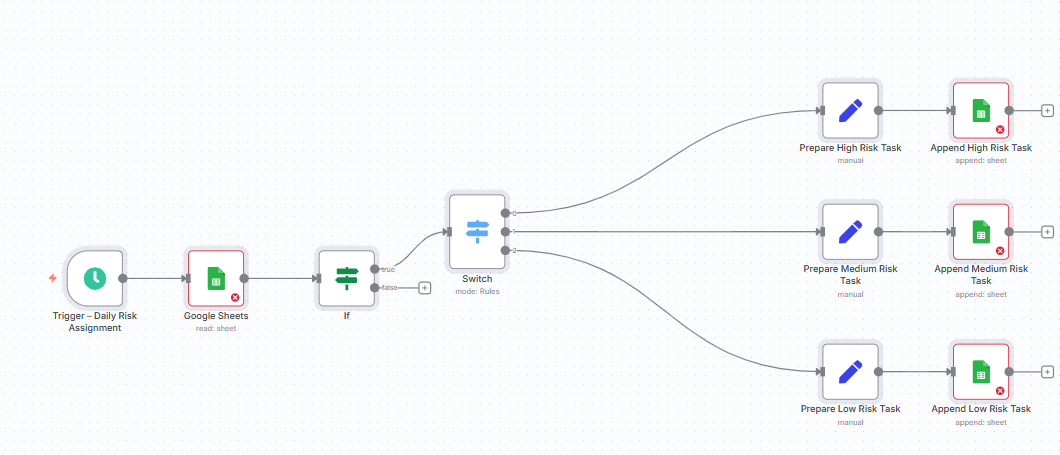
- Trigger manually or on schedule (e.g., daily)
- Reads risk register logs from Google Sheets
- Applies severity logic to assign owners and due dates
- Logs assigned treatment tasks to an “Assigned_Tasks” sheet
- Escalates overdue or critical risks within SLA thresholds
Requirements
- Gmail or SMTP node for notifications (optional)
- Google Sheets connected (OAuth2)
- Google Drive connected (OAuth2)
- Google Sheet Requirements:
- Columns: Risk ID, Severity, Status, Created At
- One row per control ID or risk entry
- Headers must be in the first row
- Sheet must be shared with your n8n service account
File Templates
- Risk_Treatment_Register.xlsx
- Assigned_Tasks (Google Sheet auto-created via workflow)
Customization Tips
- Adjust SLA timelines (High = 3 days, Medium = 7 days, Low = 14 days)
- Modify owner mapping per department (CISO, IT Security, Department Head)
- Change escalation recipients in the Gmail/SMTP node
- Extend workflow to SIEM, Slack, or Teams notifications
Compliance
- Ensures audit trail and traceability of risk treatment
- Prevents risks being missed or misrouted
- Aligns with ISO 27001 A.5.1.1 and NIST CSF ID.RA
- Supports audit evidence for PCI DSS, SOCI Act, and ACSC Essential Eight
Setup Instructions
- Copy the provided Google Sheet template (Risk_Treatment_Register.xlsx).
- Enter your risks with Risk ID, Severity, Status, and Created At.
- Connect Google Sheets node using OAuth2.
- Connect Gmail/SMTP for escalation emails (optional).
- Run manually or schedule daily with a Cron trigger.
- Review task allocations in the “Assigned_Tasks” sheet.
Supports
- ISO 27001 Information Security
- PCI DSS v4.0
- NIST CSF / SOCI Act
- ACSC Essential Eight
https://cyberpulsesolutions.com