
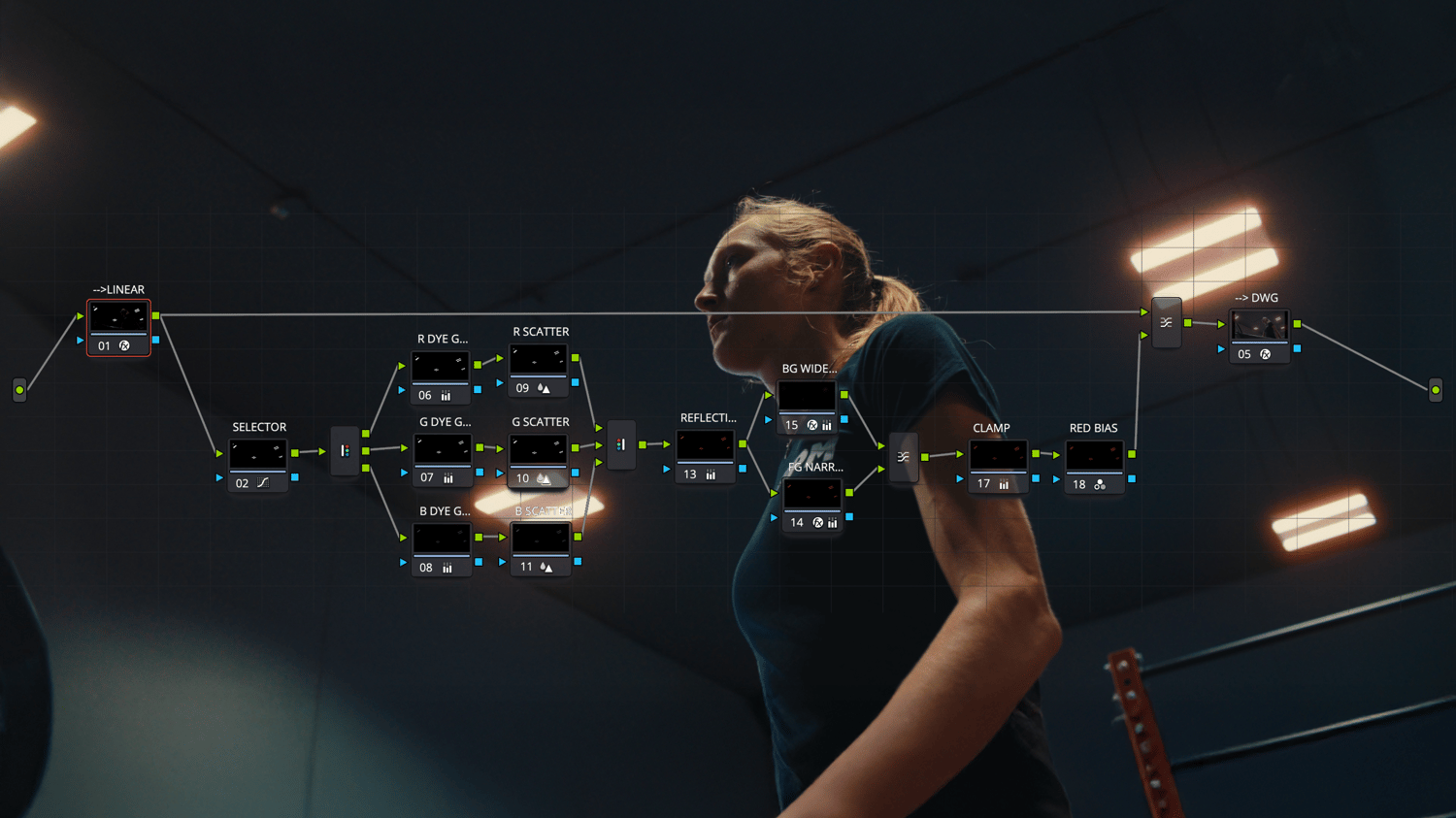
Halation Node Tree
HALATION — Kodak Vision3 Halation Node Tree for DaVinci Resolve + Test Footage
The warm red bloom that makes footage look shot on film, not slapped on in post.
That glowing red halo around every practical, window, and blown highlight? That's halation and it's one of the biggest reasons film looks like film.
Most "halation" presets fake it with a red blur that sits on top of your image and falls apart the second the light gets bright. This one doesn't.
This Halation Effect is a physically-built node tree that recreates how the effect actually happens inside Kodak Vision3 stock: light punching through the emulsion, red wavelengths reaching deepest, bouncing off the back of the film, and blooming back out as a soft warm halo. The result reads real because it's built on the real optics, not a color-blur trick.
Why it hits different
- A true red halo, not a pink glow. The color is born from separate red/green/blue behaviour, exactly like film, so it hugs your highlights instead of veiling the whole frame.
- It breathes with your exposure. Twice the light, roughly twice the halo. Bright practicals bloom hard; soft highlights stay subtle, automatically, shot to shot.
- Drag, drop, done. Built for DaVinci Wide Gamut / Intermediate. Apply it, and it works. Adjust the settings to change the intensity, hue, and style of the halation.
- Fully tunable. Dial the strength, spread, and warmth to taste, from a whisper of Vision3 restraint all the way to full CineStill red.
- Bakes into any grade. Sits cleanly in your node tree, before your output transform, so it plays nice with your look and your LUTs.
What you get
- The complete HALATION node tree (DaVinci Resolve PowerGrade). Ready to drop straight into your timeline
- Clearly labeled, tunable controls for strength, spread, and color
- Works in DaVinci Resolve — Free or Studio
- Two test clips shot on BM URSA Cine 12K LF
Who it's for
Filmmakers, colorists, and creators chasing that organic, shot-on-Kodak feel — music videos, narrative, commercials, moody interiors, anything with a light in frame that deserves to glow the right way.
**Important Nodes for Halation Look Adjustment**
- SELECTOR NODE - Allows the user to use the custom curves to dictate what portions of the image will be affected. Press SHIFT + H to view your selection.
- REFLECTION NODE - Allows the user to control the intensity of the halos, using the GAIN knob. Leaving it around 0.15 will be more aligned to a Vision3 look, whereas increasing it between 0.7 and 1.00 will provide an exaggerated halo, similar to Cinestill.
- BG WIDE BLUR - Controls the Secondary Glow affecting more of the background. If you're simply looking to have the hallows surrounding your brightest sources, simply decrease this value or disable this node.
- FG NARROW BLUR - This controls the halos directly surrounding your brightest sources. Increase the slider to increase the spread of this glow.
- RED BIAS - Allows the user to control the colour of the glow, using the RGB sliders.
Stop faking the film look. Add the physics.
Instant download. One node tree. Every project from here on out.
Full Tutorial can be found on YouTube: https://youtu.be/bOm03Zb16R8?si=wqjbkkmLKJf5xef_