
Vocal Pitch Monitor VST3
On Sale
$5.00
$5.00
Vocal Pitch Monitor (VST3) — Real-Time Pitch & Note Visualization for Windows
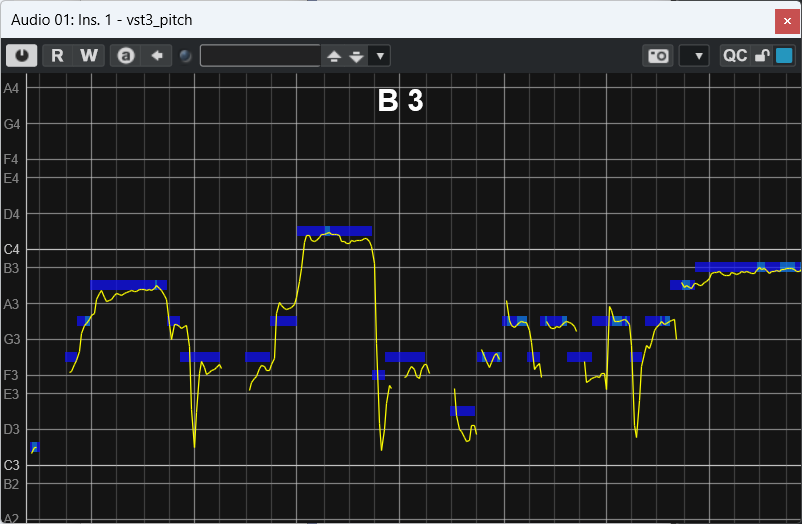
A lightweight, zero-latency pitch display you can drop on any vocal (or monophonic) track. See the current note (e.g., C4), follow your intonation over time, and line it up with your DAW’s beat/bar grid. There’s also a MIDI note overlay so you can visualize target notes while you sing or practice.
Why you’ll love it
- Clear, scrolling pitch trace with natural-note grid lines (C, D, E, F, G, A, B) for easy visual tuning.
- Big current-note readout at the top (fixed-width like “C4”, “F#3”) so it’s readable from across the room.
- Host-synced beat & bar markers to show phrasing against the tempo and time signature your DAW provides.
- MIDI note overlay: feed MIDI notes to the plugin (or a MIDI track routed to it) and see which notes are “active” across the display—great for matching targets or scale practice.
- No sound coloration: passes audio through unchanged; it’s a visual monitor only.
What’s included
- vst3_pitch.vst3.zip (Gumroad “Content” file)
- → Inside is a folder named vst3_pitch.vst3.
System requirements
- Windows 64-bit only (Windows 10/11 recommended)
- VST3-compatible DAW
- Includes support for 32-bit floating-point audio (standard in modern DAWs).
Install (Windows)
- Download and locate vst3_pitch.vst3.zip.
- Right-click → Extract All…
- You’ll get a folder named vst3_pitch.vst3 (keep it as a folder).
- Copy the entire vst3_pitch.vst3 folder to:
- C:\Program Files\Common Files\VST3
- Restart your DAW and rescan plugins if needed. Look for vst3_pitch under VST3; in some DAWs it may appear under an “Other” category.
Quick start
- Insert the plugin on your vocal track.
- Hit play to enable beat/bar sync from the host; your pitch is displayed in real time on the scrolling trace.
- (Optional) Route a MIDI track to this plugin to show target notes on the display.
Notes & limits
- Pitch analysis averages the L/R input to a mono signal for tracking (audio remains stereo pass-through).
- Beat/bar overlays require your DAW to provide tempo & time-signature context.
- This plugin is Windows-only; macOS is not supported.