
Shop Fabrication Quoting Calculator: Steel Fabrication Quote Spreadsheet (Excel)
Quoting fab work on the back of a napkin works until the job you underbid by 30 hours. This steel fabrication quote spreadsheet builds the price the way you'd build the part.
Pick each piece from a list of 150+ common shapes (flat bar, angle, square and rectangular HSS, light-gauge and round tube, pipe, plate and sheet, channel, W-beam, round and square bar). Enter pieces and length in feet, inches, metres or millimetres, and it gives you weight in lb and kg plus your steel cost. Weights come from the AISC Shapes Database or are calculated from nominal size at standard steel density, and the source is noted on every row.
Then the shop time: cutting by number of cuts, fit-up by joint, and welding by fillet size and length (or minutes per joint for tacking and odd welds). The calculator works out arc time, welding hours and how much wire or rod to buy. Consumables (wire, gas, discs, blades) can be per lb, per hour or a % of material. Coating can be per sq ft or per lb, with minimum charges for galv and powder.
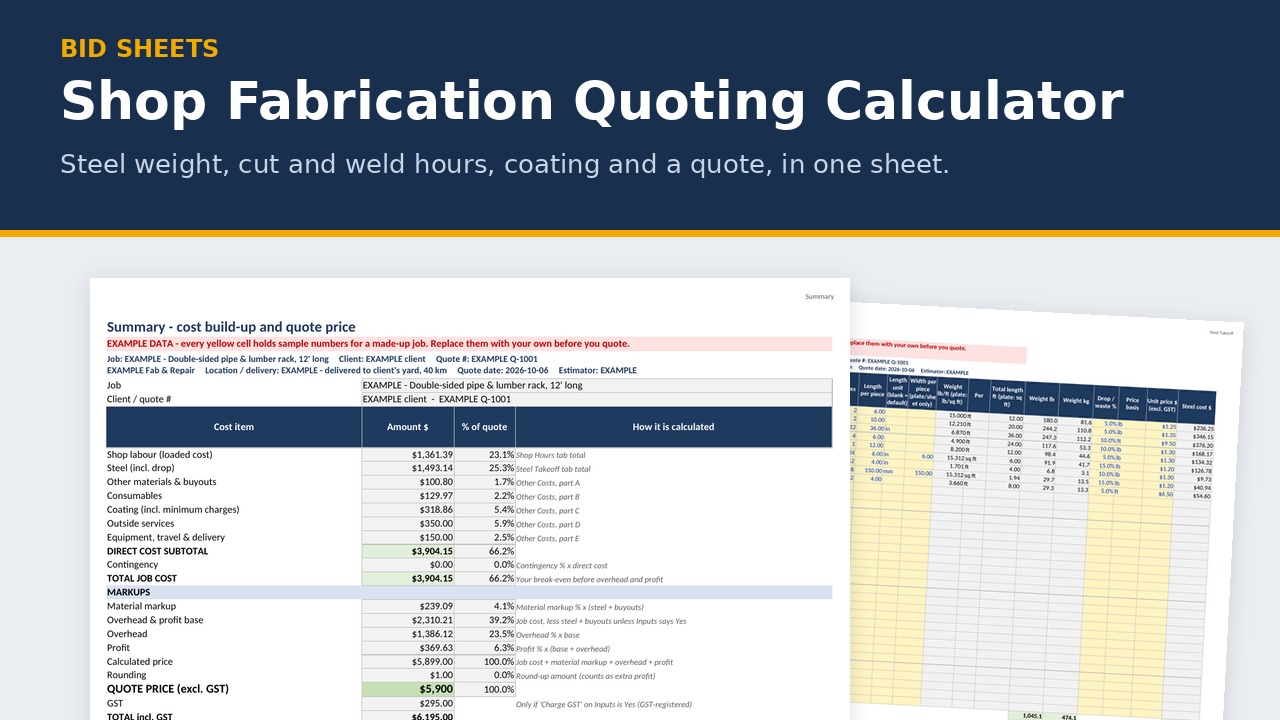
Your labour cost per hour is built from base wage plus vacation pay, holiday pay, CPP, EI and WCB. Add material markup, overhead and profit, and you get a quote price, $/lb, your effective shop rate, and a one-page client quote.
What's in the zip
- EXAMPLE calculator (.xlsx), filled in for a made-up 12' double-sided pipe and lumber rack
- BLANK calculator (.xlsx), ready for your job
- Print preview PDF showing sample printed pages
- README quick start
- 11 tabs: Instructions · Inputs · Steel Takeoff · Shop Hours · Other Costs · Summary · Client Quote · Print - Steel Takeoff · Print - Shop Hours · Shapes · Weld Data
Key features
- Shapes tab with 150+ sizes in imperial and metric, plus 10 yellow rows to add your own. They show up in the drop-down.
- Every steel line can be entered in ft, in, m or mm and priced per lb, kg, ft, m or piece (for plate and sheet, "ft" means per sq ft). Paint area is worked out per line.
- Weld Data tab you can tune to your shop: deposition rates, operating factor and filler efficiency by process. These ship as typical starting values. Time a few of your own jobs and adjust them.
- Shop Hours: cutting, fit-up, welding and other shop time (layout, drilling, grinding, painting, load-out), costed at your loaded labour rate.
- Other Costs: buyouts and hardware, consumables (six ways to charge them), coating with minimum charges, outside services, equipment, travel and delivery.
- Summary: quote price, $/lb and $/kg, markup, margin, net profit, and your effective rate per shop hour compared with your posted shop rate.
- Checks box: flags missing shapes, missing plate widths, weld lines without a process, overhead set below what you need, an effective shop rate below your posted rate, and a price below cost.
- Client Quote: one page with no header or footer. It shows price, GST, approximate weight, lead time and a validity line. Your costs and markups don't show. Room at the top right for your logo.
- Prints clean: every tab prints on letter paper with the job, client and quote number at the top and page X of Y at the bottom. The green Print - Steel Takeoff and Print - Shop Hours tabs give one-page versions of the wide sheets.
- Pairs with the Structural Steel Takeoff: its "To Fab Calculator" tab uses the same columns and shape names, so a takeoff pastes straight in (up to 35 lines in this version).
Who it's for
Small fab shops, mobile welders, ag-repair and trailer shops. Anyone quoting brackets, racks, gates, frames, repairs and one-off fabrication who wants to stop guessing at weight and hours.
FAQ
Does it work in metric? Yes. Enter each line in ft, in, m or mm, and weld lengths in inches or mm. Weight always shows in both lb and kg.
Does it read my PDF drawings? No. You enter pieces and lengths from your drawings or cut list, and it calculates the rest.
Does it size welds or check strength? No. It prices the work on your drawings. Weld sizes and structural design come from your drawings, codes and engineer.
How accurate are the weld hours? As accurate as the numbers you feed it. The Weld Data tab ships with typical starting values. Time a few of your own jobs and adjust them, and the quotes get sharper every time.
My shape isn't in the list. Add it in the yellow rows at the bottom of the Shapes tab and it shows up in the drop-down.
Can I use my posted shop rate instead? The calculator builds cost from wages so you can see what your rate really covers. Enter your posted rate and it compares the two for you.
Is it only for Alberta? The payroll defaults are Alberta 2026 (the WCB Alberta steel fabrication rate is the example). Every rate can be edited for other provinces.
Can I get a refund? It's a digital download, so there are no refunds once it's delivered. Try the free Bid Go/No-Go Scorer first to make sure the files work on your computer, and email me if you have any trouble.
Disclaimer
An estimating aid, not engineering, payroll, accounting, tax or legal advice. It doesn't size welds or check structural strength. Follow your drawings, codes and engineer. Example wages, prices and quantities are made up for illustration. Check every number before you rely on it. Steel weights are from the AISC Shapes Database v16.0 or calculated from nominal size. Bid Sheets isn't affiliated with AISC.
About the maker
Built by a tradesperson with 35 years in fabrication and construction across Western Canada.
Compatibility (spreadsheets)
- Made for Microsoft Excel 2016 or newer, Windows or Mac. Plain .xlsx with no macros.
- LibreOffice Calc (free): every workbook recalculates with no formula errors.
- Does it work in Google Sheets? You can upload the .xlsx and open it in Google Sheets, but Sheets drops the sheet protection (so grey formula cells can be typed over) and ignores the print layouts. For printing, Excel is recommended.
- Not tested in Apple Numbers.
- Type in the yellow cells. Grey formula cells are locked (no password), so you can't break a formula by accident.
- Grab the free Bid Go/No-Go Scorer first. It's built the same way, so if it opens and works on your computer, the paid sheets will too.
Licence
One-business licence: use it across your business (all its sites and crews) on as many jobs as you like. Please don't resell, share or publish the blank templates outside your business. Completed job files and filled-in forms can go to your clients, prime contractors, auditors and regulators.
Refund policy
Because these are digital downloads, I don't offer refunds once a file has been delivered. Please check the compatibility list above before you buy, and grab the free Bid Go/No-Go Scorer to test on your computer first. If a file won't open or something isn't working, email me at support@bidsheets.ca and I'll help you sort it out.
Updates
Buyers get the 2027 update free. I'll email you the new version when it's ready. Each January I refresh the payroll rates (CPP, EI, WCB) in the estimating workbook and fab calculator, re-check the Alberta OHS and prompt-payment references in the safety and billing products, and re-check the standards references in the takeoffs.
Support
Questions? Email support@bidsheets.ca. I usually answer within 2 business days.