
Scope Change Desk
Turn “one more thing” into a clear change record
Keep the original brief, new requests and extra-work estimates together. Scope Change Desk is a downloadable desktop-browser app for freelancers and small studios who want a readable record before discussing a change with a client.
$19 USD once for the delivered version. No subscription.
See the worked demo and fictional summary.
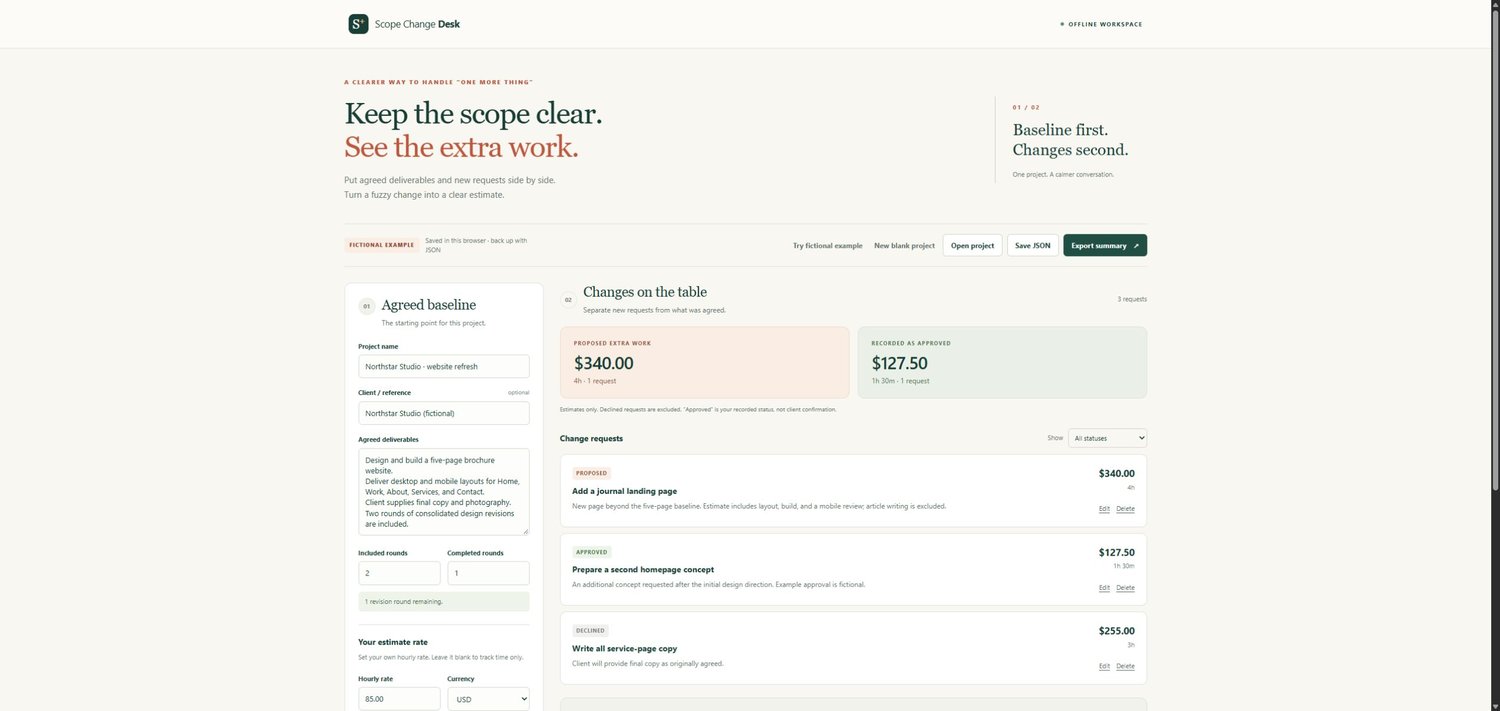
The fictional demo starts with a five-page website. An added journal landing page takes an estimated four hours at $85/hour: $340 proposed. A separate homepage concept is recorded approved at $127.50. The app keeps those totals separate; neither amount is a real customer result or a verified client sign-off.
What the app helps you do
- Record agreed deliverables and included/completed revision rounds.
- Add, edit and remove change requests with time estimates and statuses you enter.
- Calculate separate proposed and recorded-approved time and cost totals from your rate. Declined requests are excluded from those totals.
- Export a readable HTML summary for discussion and save a separate editable JSON project backup.
Use the free manual scope worksheet and example if you are happy calculating and recording everything yourself. The paid app adds the calculations, grouped totals and HTML export. The free worksheet is not an app import file.
What is included
Your ZIP contains five files:
- Scope-Change-Desk.html — the browser app.
- README.md — quick-start guide and usage limits.
- VERSION.txt — release information.
- Example-Project.json — an editable fictional project.
- Example-Summary.html — its example report.
Get started and keep your work
Extract the ZIP, open Scope-Change-Desk.html in a current desktop browser, and try the fictional example. For your own project, choose New project, enter the baseline and your hourly rate, then add requests. A blank rate tracks time without a cost estimate.
After completing your edits, choose Save JSON and confirm the file downloaded before closing or switching projects. Open project restores that backup. Browser storage can be unavailable or cleared; unfinished form edits are not autosaved. An HTML summary is a readable snapshot, not an editable backup. To make a PDF, open the exported HTML and use the browser's Print command where a PDF destination is available.
Good to know
No account, subscription, API key or AI service is required to use the delivered app. It makes no network calls. Work with one project at a time and keep separate JSON files for other projects. Each project supports up to 500 requests within a 1 MiB limit.
Statuses are records you enter, not verified client approvals. The tool does not send approval requests, invoice clients, collect payments or interpret agreements. Its report is not a contract or invoice. Changing the hourly rate recalculates all estimates; revision counts do not automatically add charges. Taxes and fees are excluded. USD, EUR, GBP, CAD and AUD are labels; currency conversion is not performed.
This purchase is for the delivered software version. Future features or upgrades are not promised. All included examples are fictional.
Permitted use
Use the delivered app for your own freelance or business projects, and share the summaries you create with clients or collaborators. Do not resell or redistribute the software itself.
Support
For product or download questions, use Contact in the store menu: https://payhip.com/TheCatalogDesk/contact. Include the product name and your order ID. Do not send passwords or private project files.