




MTD Client Spreadsheets for Accountants UK 2026/27 | White-Label Sole Trader & Landlord Pack
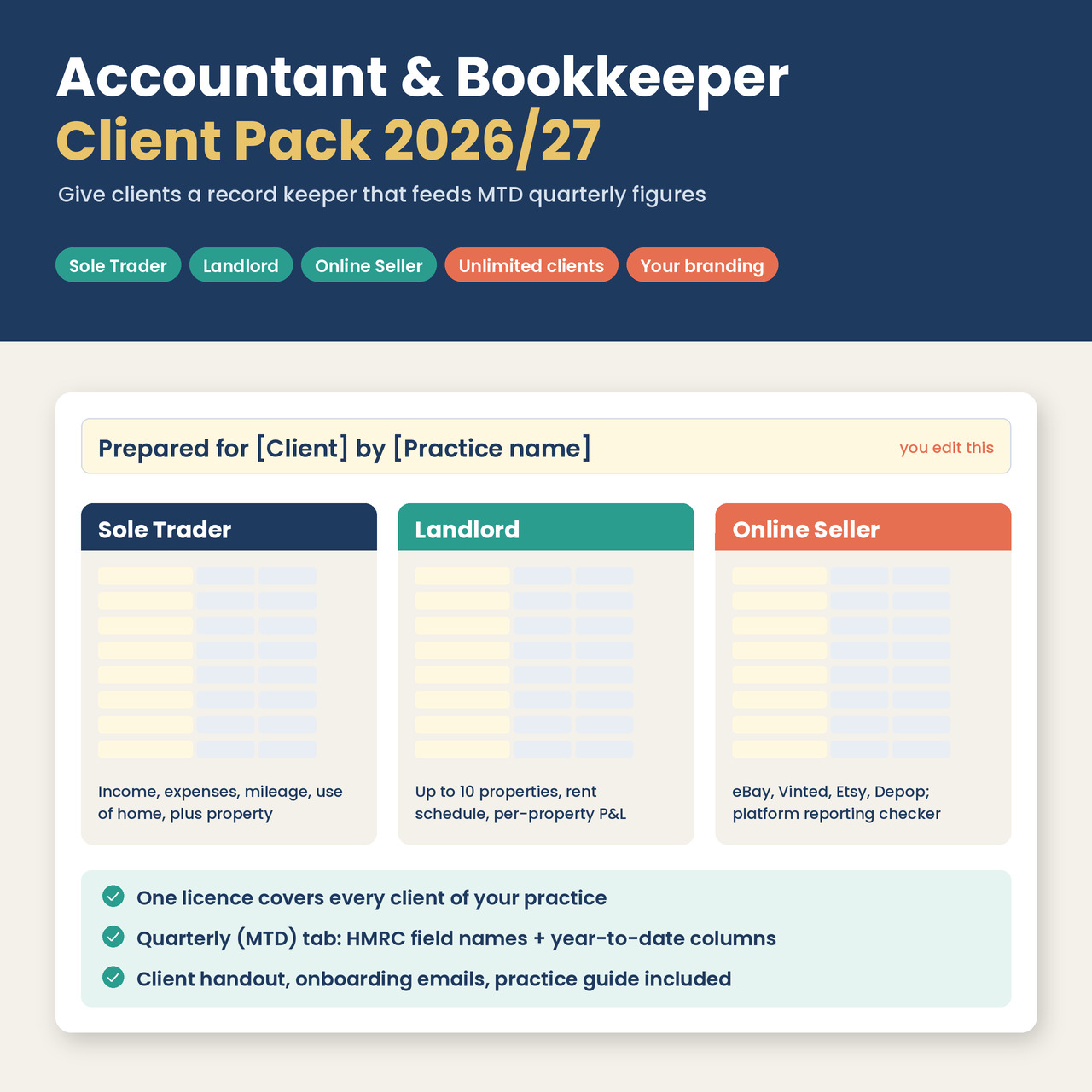
A ready-made record-keeping pack for UK accountancy and bookkeeping practices. You put your practice's name on three spreadsheets, give them to your sole-trader, landlord and online-seller clients, and every file comes back in the same layout. That means your bridging software only needs mapping once for each type of workbook.
Making Tax Digital for Income Tax started on 6 April 2026 for sole traders and landlords with qualifying income over £50,000. The threshold falls to £30,000 in April 2027 and £20,000 in April 2028. Plenty of clients will want to stick with spreadsheets, and HMRC allows that as long as the spreadsheet is digitally linked to compatible software. This pack gives those clients a consistent, tidy spreadsheet and gives your team one standard file to import.
WHO IT'S FOR
• UK accountants, bookkeepers and tax advisers with clients who are self-employed, landlords or online resellers
• Firms that want clients on one consistent spreadsheet rather than a mix of home-made ones
• Practices using MTD bridging software that can import .xlsx files or map cells
WHAT'S INCLUDED
• Sole Trader workbook: income, expenses, mileage at HMRC flat rates, use of home, a Quarterly (MTD) tab, tax estimate, dashboard and deadlines. It also covers sole traders who let property.
• Landlord workbook: up to 10 UK properties (with the client's share for joint ownership), rent schedule, per-property P&L, compliance dates, Quarterly (MTD) tab and tax estimate
• Online Seller workbook: sales by platform (eBay, Vinted, Etsy, Depop, Amazon, TikTok Shop), stock costs per item, a platform reporting checker, £1,000 trading allowance compared against actual costs, and a Quarterly (MTD) tab
• A filled-in sample of each workbook with made-up figures, for demos and training
• An editable "Prepared for [Client] by [Practice name]" header on each workbook's Start Here tab, also shown on the Dashboard, plus an editable "Your accountant" contact line
• One-page client handout, "How to keep your records" (.docx you can add your logo to, plus PDF)
• Client onboarding email templates: a welcome email and a quarterly reminder (.docx and .txt)
• Practice guide (PDF): firm setup, which workbook suits which client, a row-by-row map of each Quarterly (MTD) tab to HMRC field names, digital-link rules, and a routine for collecting files each quarter
• Practice licence (PDF, plain English)
HOW THE MTD FIGURES WORK
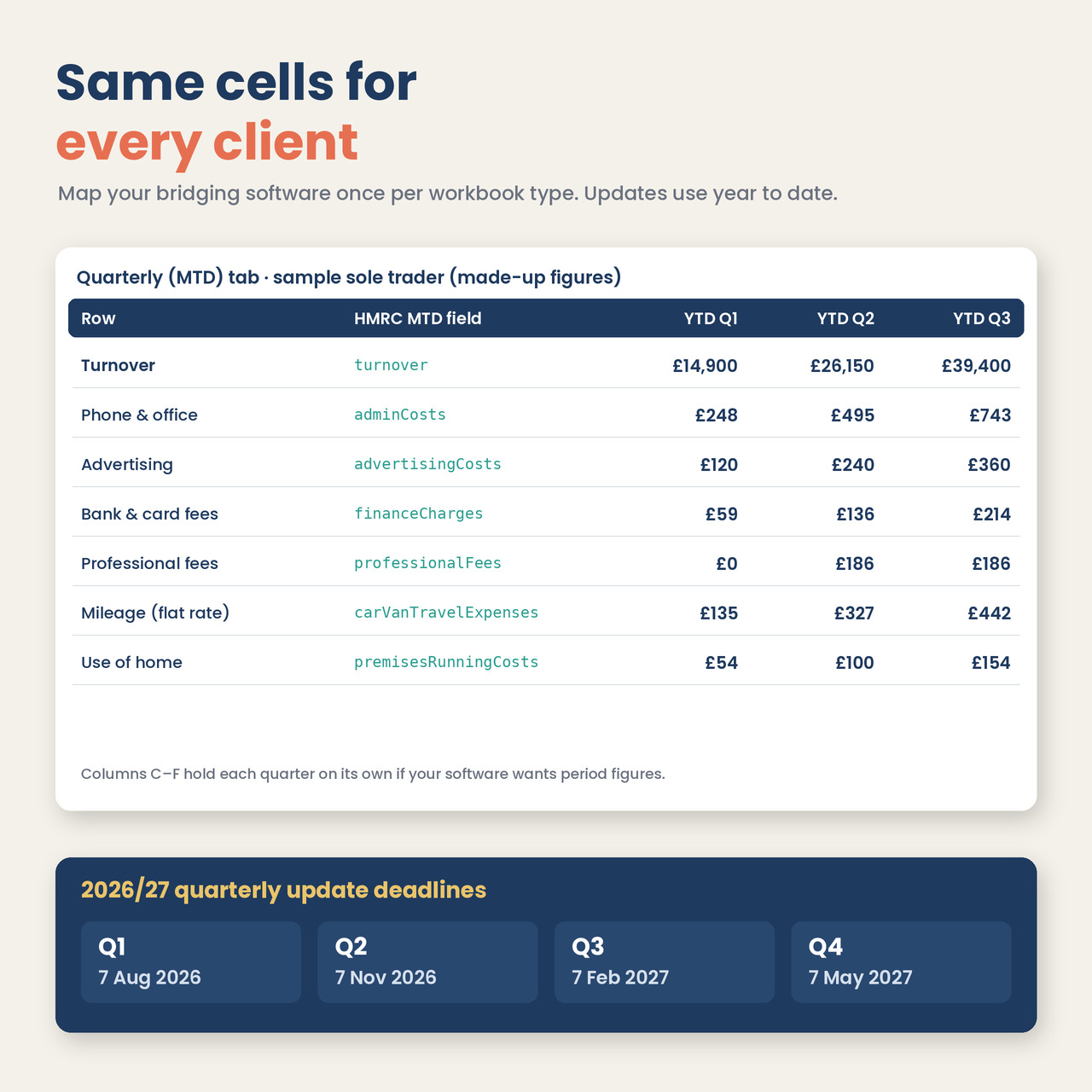
Each Quarterly (MTD) tab lists HMRC's MTD field names next to the totals, with columns for each quarter and for the year to date at Q1, Q2, Q3 and Q4. Quarterly updates are cumulative, so you point your software at the year-to-date column for the quarter you're submitting. The cell positions are identical in every copy you give out.
THE LICENCE IN BRIEF
• Give the workbooks, handout and email templates to unlimited clients of your own practice, with no per-client fee
• Rebrand and edit them: your logo, name, colours and wording. The small template credit can be kept or deleted.
• Use them as part of paid services such as bookkeeping, quarterly updates or tax returns
• Not allowed: reselling the templates, publishing them publicly (open links, marketplaces, template libraries) or sharing them with other firms. Each practice needs its own licence.
• Full terms are in LICENCE.pdf, included in the download
PLEASE NOTE
• This is a digital download (zip). Nothing will be posted.
• The workbooks keep records and produce figures. They don't submit anything to HMRC and aren't MTD software themselves. You'll need HMRC-recognised bridging or tax software to make submissions.
• We haven't tested the pack with every bridging product. Run a test import with a sample file before rolling it out.
• Rates and thresholds are for 2026/27 and were checked on GOV.UK in November 2026. Excel 2016 or later, Google Sheets and Apple Numbers are supported. No macros or add-ins.
• For UK sole traders and individual landlords. It doesn't cover VAT returns, limited companies, partnerships or Capital Gains Tax.
• This is a record-keeping and estimating tool, not tax advice. Professional judgement applies to every figure filed.
FAQ
Can I give it to all my clients?
Yes. One purchase covers every client of your practice, across all its offices and staff. There's no cap and no per-client fee.
Can I put my own logo and practice name on it?
Yes. Edit the yellow header cell on each workbook's Start Here tab and add your logo there. The handout is a Word file with a logo box. The only other credit is one small line at the bottom of Start Here, and you can delete it.
Does it submit to HMRC?
No. The spreadsheets hold the records and work out the quarterly figures. Submissions go through your MTD-compatible bridging or tax software, which has to be digitally linked to the spreadsheet (by import or cell mapping, not retyping).
Which bridging software does it work with?
Any product that can import an .xlsx file or map cells should be able to read it, because the figures sit in fixed cells with HMRC field names beside them. We haven't tested every product, so please do a test import with a sample file first.
Can clients use Google Sheets?
Yes. They can work in Google Sheets and send you the file using File > Download > Microsoft Excel (.xlsx).
Can I resell it or put it on my website as a free download?
No. You can give it to your own clients (including through a private client portal), but not sell it or publish it publicly. See LICENCE.pdf.
We're a network of several firms. Is one licence enough?
One licence covers one practice (one business, with all its offices). Separately owned firms in a network each need their own.
Will there be a 2027/28 version?
We plan to publish one. It will be a separate product. The 2026/27 rates sit in editable cells in the meantime.
Is it tax advice?
No. It's a record-keeping and estimating tool. You remain responsible for checking figures before anything is filed.