

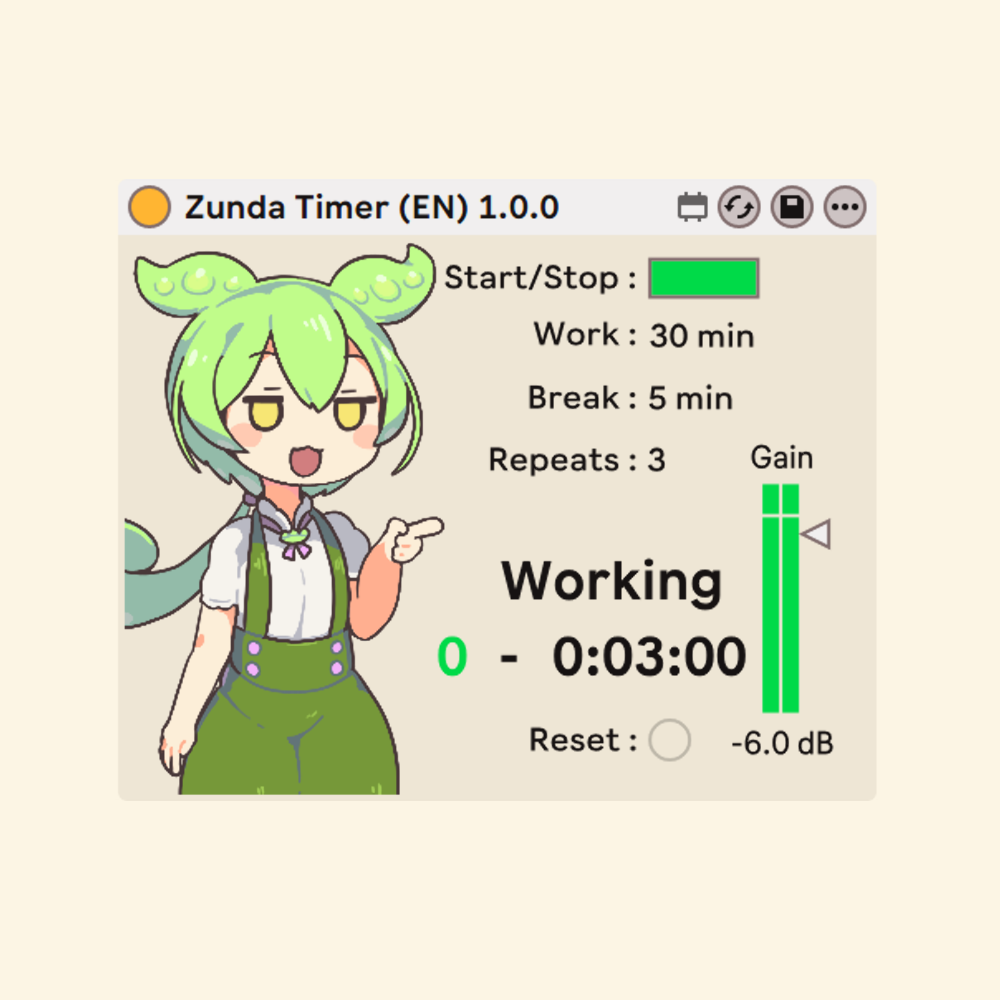
[M4L Device] Zunda Timer
A Pomodoro-style focus timer for Ableton Live — with Zundamon. Run work / break cycles right inside your Live set: a large countdown shows your remaining time, the on-screen Zundamon art changes with each phase, and friendly voice cues announce every transition, so you can keep your eyes on your project and your hands on the music.
Features
Pomodoro Workflow
- Set your Work Time, Break Time, and number of Repeats, then hit Start/Stop. The device counts down the current session and automatically switches between work and break, repeating until it has run the number of cycles you set.
Zundamon Voice & Art
- Zundamon cheers you on with a voice cue at every transition — the start of a work session, the start of a break, and completion — while the on-screen character art changes to match the current state (Ready / Working / On Break / Paused / Done). The cues are themed for music-making, so it feels like a little studio buddy keeping you on schedule.
At-a-glance Countdown
- A large, high-contrast readout shows the current repeat and the time remaining in the active session, so you always know exactly where you are without leaving your set.
Simple, labelled controls
- Start/Stop, set, Work Time, Break Time, Repeats, and a Gain control for the announcement volume (shown in dB). Every control has built-in Info View text — just hover over it and Live explains what it does.
Apply with "set"
- After changing Work Time, Break Time, or Repeats, press set to load the new values into the timer. (This also returns the timer to the start.)
Usage
This is an Audio Effect device. Place it on a track whose output reaches the Master so the voice cues are audible. Set your Work Time, Break Time, and Repeats in minutes, then press set to load them and Start/Stop to begin. Whenever you change any of these values, press set again to apply the new settings. Use the Gain control to balance the announcement volume against your music.
Important Notes
Changes to Work Time, Break Time, or Repeats do not take effect until you press set. Pressing set loads the current values and returns the timer to the start.
Because the voice cues are played through the device's audio output, make sure the device is on a track that is routed to the Master, or you may not hear them. Adjust their level with the Gain control.
Miscellaneous
This device is available for free; however, you have the option to provide a voluntary contribution. Please be advised that, due to the nature of digital downloads, refunds cannot be issued. We appreciate your understanding.
Any funds received will be utilized to support the future development of Max for Live devices and related projects.
Credits
Voice synthesis : VOICEVOX:ずんだもん
https://voicevox.hiroshiba.jp/
Illustration : Zundamon stand-in art by Sakamoto Ahiru (坂本アヒル)
https://twitter.com/sakamoto_ahr
Character : Tohoku Zunko / Zundamon Project
https://zunko.jp/guideline.html
The notification voices in this device were created with VOICEVOX.
The credit "VOICEVOX:ずんだもん" is shown in accordance with the
VOICEVOX terms of use.