

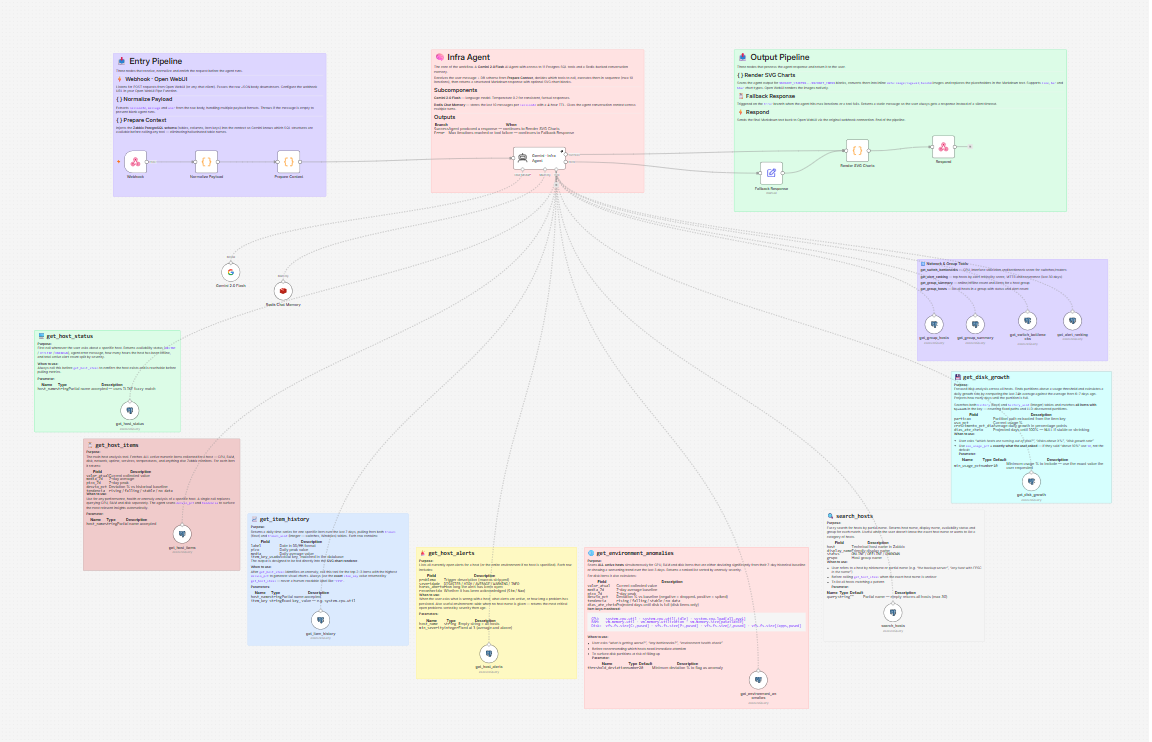
N8N - Zabbix AI Infrastructure Observability Agent
🤖 Zabbix AI Infrastructure Observability Agent
Chat with your Zabbix infrastructure in plain English. This n8n workflow connects an AI agent directly to your Zabbix PostgreSQL database and answers questions about host health, disk growth, network bottlenecks and alert history — no dashboards, no manual queries.
"Which hosts are consuming more than 20% of disk?" "What is wrong with SRV-APP-01?" "Are there any network bottlenecks in the CORE group?"
The agent fetches live data, runs the analysis and returns a structured Markdown response with inline SVG charts rendered directly in the chat window.
⚙️ How It Works
Built around an n8n AI Agent powered by Gemini 2.0 Flash with 11 direct PostgreSQL tools against the Zabbix database. Conversation memory is kept in Redis (10-message window, 4-hour TTL per session).
📥 Entry
Node Role Webhook Receives the message from Open WebUI or any HTTP client Normalize Payload Extracts sessionId, message and user from the raw body Prepare Context Injects the Zabbix DB schema so the model knows which tables and item keys are available 🧠 Agent Core
Reads the user message, decides which SQL tools to call (max 3 per response, max 10 iterations), executes them against the live Zabbix database and synthesizes the results into a structured Markdown response.
📤 Output
Node Role Render SVG Charts Converts chart blocks into inline base64 SVG images Respond Returns the final Markdown to the webhook caller Fallback Response Catches agent errors and always returns something to the user
🔧 The 11 SQL Tools
All tools use n8n-nodes-base.postgresTool with parameters injected inline via $fromAI() — no subworkflows needed.
🖥️ Host Analysis
Tool Description get_host_status Availability, offline duration and alert count for a specific host get_host_items ALL active items with current value, 7d avg/peak, deviation % and trend get_item_history Daily time-series for one item (7 days) — feeds the SVG chart renderer get_host_alerts Open alerts with severity, hours open and acknowledgement status 🌐 Environment Analysis
Tool Description get_environment_anomalies Scans all hosts for CPU/RAM/disk items with significant deviation or worsening trend get_disk_growth Disk usage with daily growth rate and days-to-full projection search_hosts Fuzzy search hosts by partial name or availability status 🔀 Network & Groups
Tool Description get_alert_ranking Top 15 hosts ranked by criticality score over the last 30 days get_switch_bottlenecks CPU and interface saturation score for switches and routers get_group_summary Online/offline count and alert totals for a host group get_group_hosts Full host list in a group with status and open alert count
📊 SVG Chart System
When the agent calls get_item_history it embeds a JSON block in the response:
%%CHART_START%%
{ "type": "line", "title": "CPU · SRV-APP-01 · D-7→today", "unit": "%", "data": [...] }
%%CHART_END%%
The Render SVG Charts node intercepts these blocks, generates an SVG and replaces the placeholder with an inline data:image/svg+xml;base64 string. Open WebUI renders it as an image — no external image hosting needed.
🔹 line — trend with area fill 🔹 bar — daily peaks 🔹 hbar — host comparison
🛠️ Stack
Component Role n8n Workflow orchestration Gemini 2.0 Flash Language model (temperature 0.2) Redis Conversation memory — 10 messages · 4h TTL PostgreSQL Direct Zabbix database queries Open WebUI Chat interface via Pipe Function
✅ Requirements
- 🔷 n8n with postgresTool node (v2.6+)
- 🔑 Google Gemini API key
- 🔴 Redis instance accessible from n8n
- 🐘 Read-only PostgreSQL user on your Zabbix database
- 💬 Open WebUI with a Pipe Function pointing to the webhook URL
🚀 Setup
- Import the workflow into n8n
- Configure credentials: Google Gemini API, PostgreSQL (Zabbix DB), Redis
- Activate the workflow and copy the webhook URL
- Set up the Open WebUI Pipe Function with the webhook URL
- Start chatting
⚠️ Use a read-only database user for the Zabbix PostgreSQL connection. The agent only runs SELECT queries, but a dedicated read-only role is a good security practice.