


Cad Settings Studio
CAD Settings & Support Profile Studio
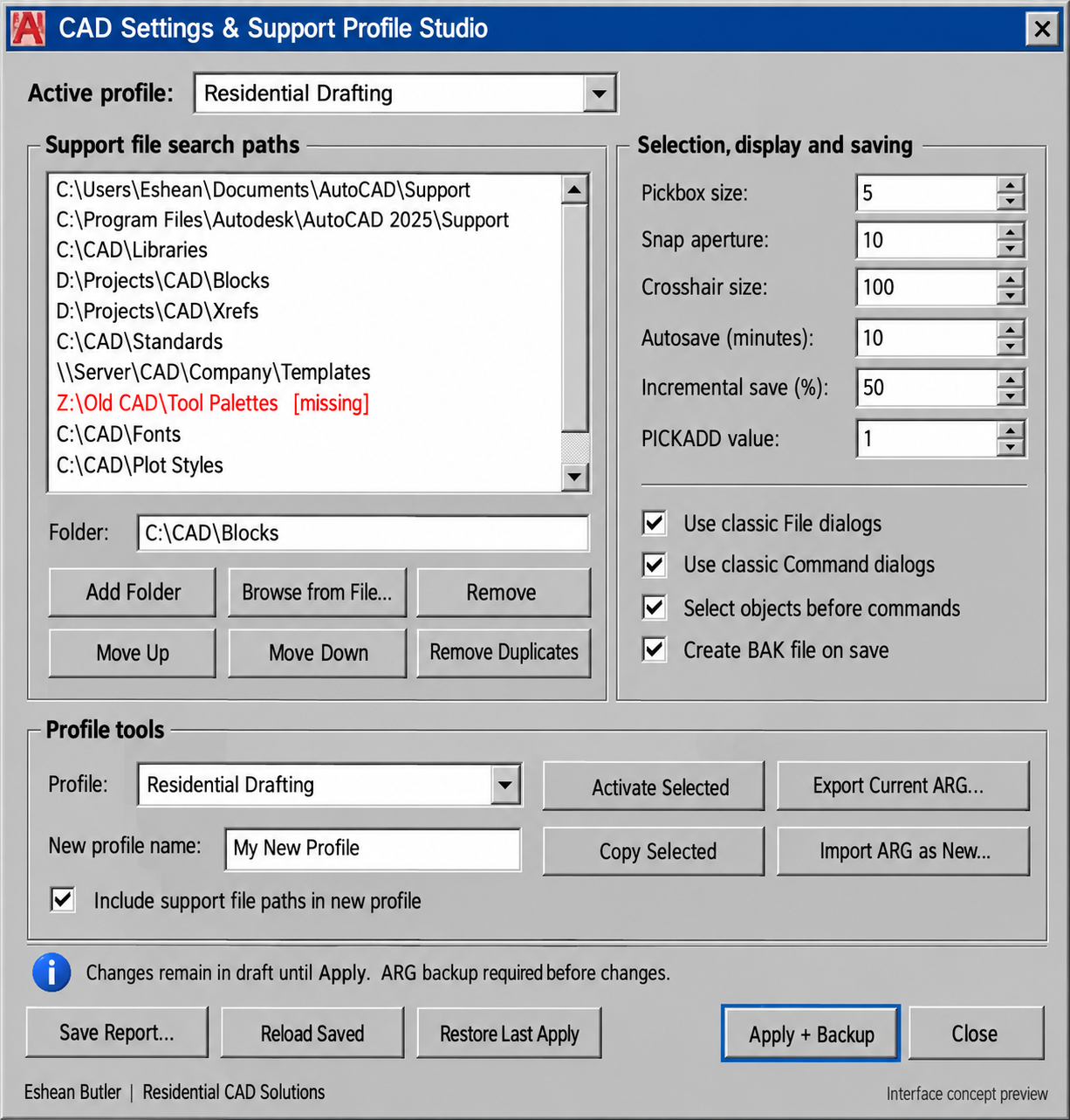
Organize your AutoCAD support folders, manage named profiles, and adjust everyday drafting settings from one convenient gray dialog.
Add support folders, change their search order, remove duplicate entries, and identify missing or unavailable locations. Prepare your changes in a draft before applying them.
Adjust selection box size, object snap aperture, crosshair size, autosave interval, incremental-save settings, file dialogs, selection behavior, and backup-file creation.
Copy an existing profile, export the active profile to an ARG file, import an ARG under a new name, or activate another profile. The utility prompts for an ARG backup before applying settings, switching profiles, or restoring managed settings.
Restore Last Apply can recover the support paths and supported settings from your previous successful apply during the same session. Save a text report for reference or troubleshooting.
Your download includes the AutoLISP routine, matching DCL dialog, installation instructions, and usage guide.
Designed for Windows full AutoCAD with Visual LISP and ActiveX. Not supported in AutoCAD LT, Mac, or Web. ARG backups contain profile settings and path references, not the files inside those folders. AutoCAD runtime testing is pending.
Created by Eshean Butler | Residential CAD Solutions