
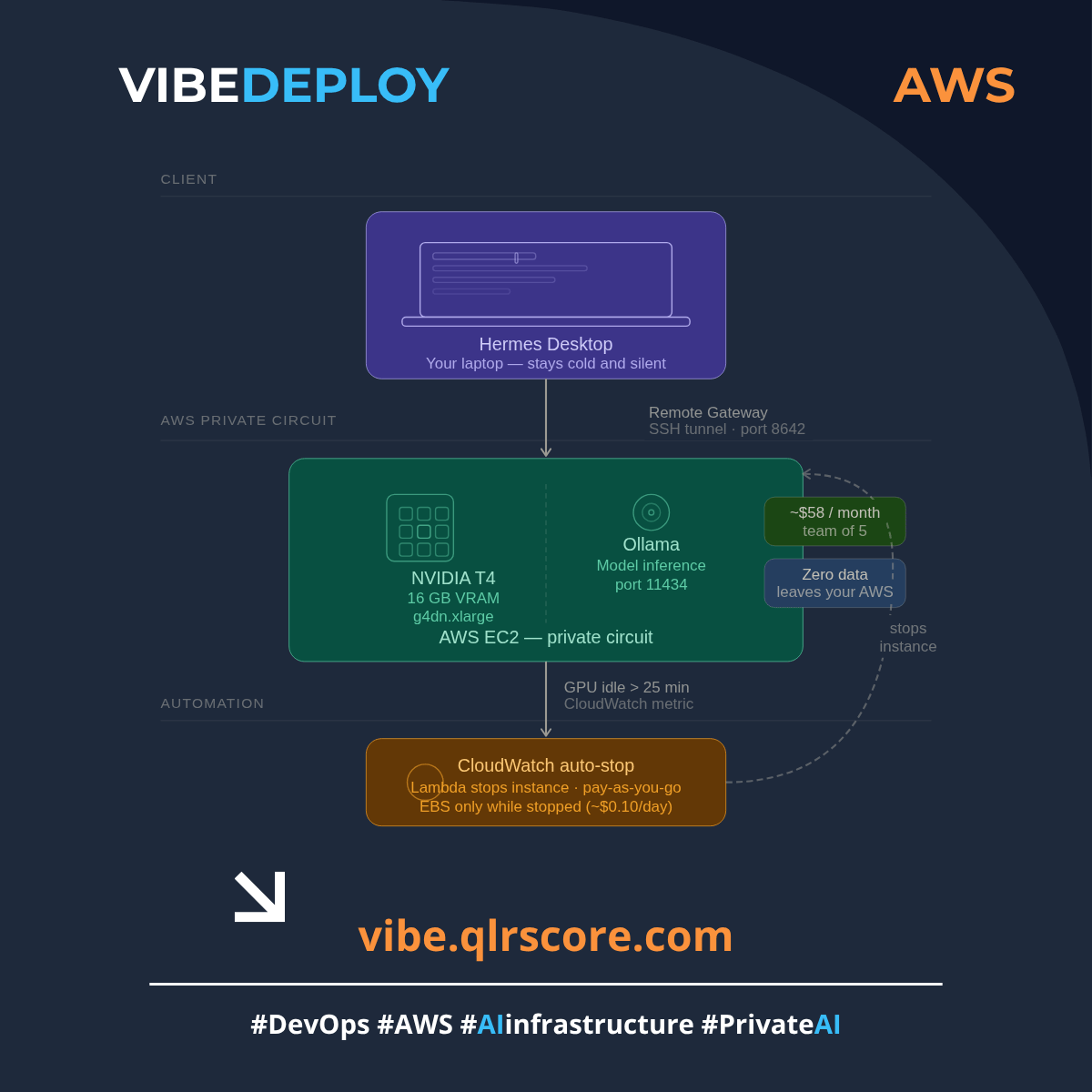
Private AI Circuit — Full Blueprint
Terraform + scripts to run a private AI agent on AWS GPU.
Hermes Desktop · Ollama · Auto-stop · Pay-as-you-go.
You can plug this private AI circuit into any modern development environment:
- VS Code / Neovim: via the popular `Continue.dev` extension.
- Cursor / Cline / Roo Code: just point the base URL to your EC2 instance IP.
- JetBrains (IntelliJ, PyCharm): via AI Assistant or third-party LLM plugins.
Your development workflow stays exactly the same — but your AI autocomplete and chat now run on a dedicated AWS GPU inside your secure perimeter.
Run a private AI agent on AWS GPU in under 20 minutes.
Your code never leaves your AWS account. Your laptop stays cold and silent.
── What's included ──
user_data.sh — auto-installs NVIDIA driver, Docker, Ollama,
and Hermes Remote Gateway on first boot (344 lines, production-tested)
pull-model.sh — interactive model selector with GPU/RAM detection.
Shows which models fit your hardware, pulls with one keypress
start.sh — starts your EC2 instance from your laptop,
waits for SSH, checks Ollama + Hermes status, shows loaded models
stop.sh — graceful shutdown: stops services first, then instance.
No corrupted model files.
Full Terraform — AMI data source (fixed), Elastic IP (static URL after every restart), GPU CloudWatch metric (auto-stop triggers on real GPU load, not CPU), least-privilege Lambda IAM
── What you get ──
→ Unlimited AI requests — no rate limits, no per-seat licensing
→ Zero data leaves your AWS account
→ Auto-stop when idle — pay only for active compute
→ ~$58/month for a team of 5 (vs $200+ in subscriptions)
→ Cold, silent laptop — all compute runs on remote GPU
── Requirements ──
→ AWS account with GPU quota approved (EC2 → Service Quotas → Running On-Demand G instances)
→ Terraform ≥ 1.5
→ AWS CLI configured
→ Hermes Desktop (free download at hermesdesktop.ai)
── After purchase ──
You receive a zip archive with the complete file structure.
Unzip → fill terraform.tfvars → terraform apply → done.
Questions? Telegram: t.me/baibakov_dmitry
── Free tier ──
Basic Terraform structure without scripts: github.com/BaibakovDmytro/private-ai-circuit