
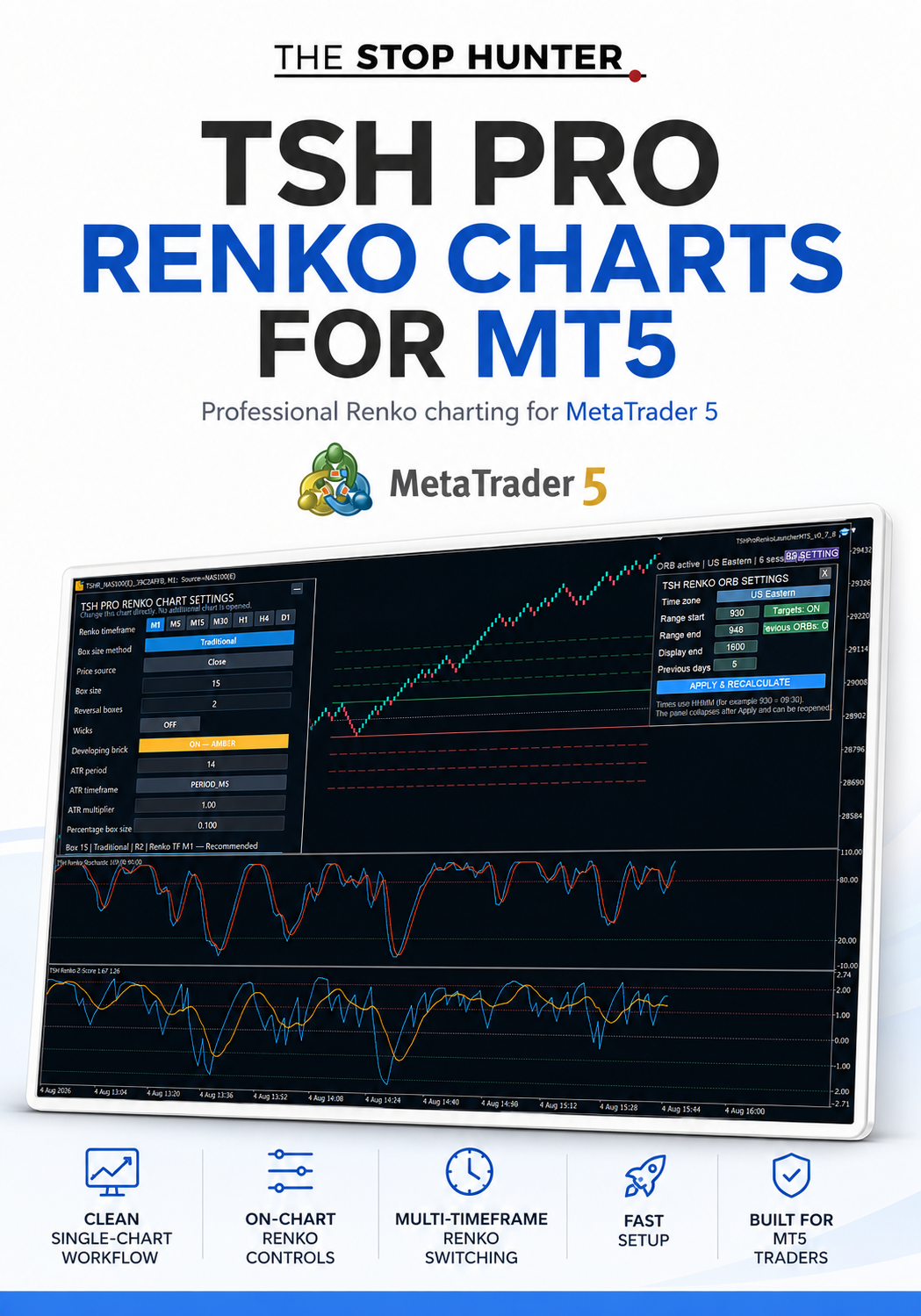
TSH RENKO PRO CHARTS FOR MT5
TSH Pro Renko Charts for MetaTrader 5
Professional Renko Charting — Built Directly Inside MT5
Transform MetaTrader 5 into a professional Renko charting platform with TSH Pro Renko Charts for MT5.
Standard MT5 does not include true native Renko chart construction. TSH Pro Renko Charts solves that problem by creating responsive, custom Renko charts directly from your broker’s market data—without forcing you to rely on a separate charting platform.
The result is a cleaner view of market structure, momentum and reversals, with substantially less time-based noise.
Designed for serious Renko traders, the software gives you direct control over how every chart is built and allows you to rebuild the same chart instantly from an intuitive on-chart control panel.
What TSH Pro Renko Charts Does
TSH Pro Renko Charts converts your broker’s ordinary MetaTrader 5 price data into a dedicated Renko chart using your chosen construction settings.
You can control:
- Renko box size
- Reversal size
- Price source
- Traditional, ATR or percentage-based construction
- Renko chart timeframe
- Wicks
- Developing-brick display
- Historical chart reconstruction
The chart is created within your MT5 platform and remains linked to the original broker market.
It is not restricted to IG and is designed for use with compatible broker-supplied MetaTrader 5 platforms.
Key Features
Three Box-Size Methods
Choose the approach that best suits your market and trading method.
Traditional Box Size
Enter a fixed price-distance box size manually.
This provides consistent Renko construction and complete control over the sensitivity of the chart.
ATR-Based Box Size
Allow the chart to calculate its box size using Average True Range.
You can configure:
- ATR period
- ATR calculation timeframe
- ATR multiplier
This allows the Renko chart to adapt to changing market volatility.
Percentage-Based Box Size
Calculate the box size as a percentage of the underlying market price.
This can be useful when applying a consistent proportional method across markets trading at very different price levels.
Configurable Reversal Size
Choose the number of boxes required to confirm a reversal.
For example:
- Two-box reversal
- Three-box reversal
- Alternative reversal structures suited to your own methodology
This gives you control over how quickly the chart responds to changes in direction.
Multiple Renko Timeframes
Rebuild the chart using a choice of Renko processing timeframes directly from the on-chart panel:
- M1
- M5
- M15
- M30
- H1
- H4
- D1
The selected timeframe determines the underlying data used to construct and update the Renko chart.
Selectable Price Source
Choose which price is used in the Renko calculation, including the chart’s closing-price data.
This provides greater control over how blocks are formed and how the chart reacts to the broker’s incoming price data.
Optional Wicks
Display or hide Renko wicks according to your preferred chart style.
With wicks enabled, the chart can provide additional information about price movement beyond the completed Renko block.
With wicks disabled, the chart maintains a cleaner block-only appearance.
Developing Brick Display
Choose whether the currently forming Renko brick is shown before it is completed.
The developing brick is displayed separately in amber, helping distinguish it from confirmed bullish and bearish blocks.
This gives you an immediate view of where the current market is trading without presenting an unfinished brick as confirmed.
Direct On-Chart Control Panel
There is no need to repeatedly open the standard MT5 indicator settings window.
The professional chart-control panel allows you to change the main construction settings directly from the Renko chart.
Adjust the settings and press:
APPLY & REBUILD THIS CHART
The existing chart is then rebuilt in place using the new configuration.
No additional Renko chart is opened each time.
Clear Chart Status
The panel displays the active configuration, including:
- Current box size
- Box-size method
- Reversal setting
- Renko processing timeframe
- Recommended operating status
This makes it easy to confirm exactly how the chart has been constructed.
Why Use Renko Charts?
Traditional time-based charts create a new candle after a fixed period, regardless of whether the market has moved meaningfully.
Renko charts operate differently.
A new block is created only after price has moved by the required box size. This can help traders:
- reduce insignificant market noise;
- identify trends more clearly;
- visualise reversals;
- recognise support and resistance;
- assess momentum;
- create more objective trading rules;
- focus on price movement rather than the passage of time.
TSH Pro Renko Charts brings this specialist charting approach directly into MetaTrader 5.
Designed for the TSH Renko Ecosystem
TSH Pro Renko Charts can be used as a standalone product, but it is also the foundation of the wider TSH MT5 Renko range.
It is compatible with the separately available:
- TSH Renko Indicator Suite for MT5
- TSH Renko Block Size Calculator for MT5
The indicator suite provides 12 specialist analysis tools tested on Renko charts.
The standalone calculator uses price, historical volatility and the proprietary TSH speed matrix to produce five suggested Renko box sizes.
Together, the three products provide a complete Renko workflow:
Construct. Calibrate. Analyse.
Suitable Markets:
The software can be used with compatible symbols available through your MetaTrader 5 broker, including:
- Stock indices
- Forex
- Commodities
- Metals
- Energy markets
- Cryptocurrencies
- Other supported CFD or broker markets
Available markets, prices, symbol names, trading sessions and historical data will vary between brokers.
What You Receive
Your download includes:
- TSH Pro Renko Chart engine for MT5
- TSH Pro Renko launcher for MT5
- Editable installation and user guide
- Clear installation instructions
- Guidance covering every chart setting
- Troubleshooting information
The customer package contains compiled MetaTrader 5 files. The source code is not included.
Installation
The files are installed through the MetaTrader 5 Data Folder.
The supplied guide explains how to:
- Open your MT5 Data Folder.
- Copy the chart engine into the correct Indicators folder.
- Copy the launcher into the correct Experts folder.
- Refresh or restart MetaTrader 5.
- Enable Algo Trading.
- Attach the launcher to a normal broker chart.
- Build and configure your first Renko chart.
No programming knowledge is required.
Platform Requirements
You will need:
- MetaTrader 5 desktop
- A compatible broker-supplied MT5 platform
- Access to the broker market you want to chart
- Sufficient historical price data
- Algo Trading enabled for the launcher
This product is for MetaTrader 5 only.
It is not compatible with MetaTrader 4, TradingView, NinjaTrader or browser-only trading platforms.
Important Broker Information
TSH Pro Renko Charts is not tied to one broker.
However, brokers may use different:
- symbol names;
- decimal places;
- price feeds;
- trading sessions;
- historical-data availability;
- minimum price increments.
Renko charts created through different brokers may therefore produce slightly different results for the same underlying market.
Who Is This For?
TSH Pro Renko Charts is designed for traders who:
- want professional Renko charts inside MT5;
- prefer price-based rather than purely time-based analysis;
- trade trends, momentum, breakouts or reversals;
- want control over box size and reversal construction;
- use Renko indicators or systematic trading rules;
- want to analyse their broker’s own market data;
- do not want to rely exclusively on an external charting platform.
Important Information
Renko charts are derived charts constructed from price movement. They do not display market activity in the same way as standard time-based candles.
The currently developing block may change before it is completed.
Results can vary according to the selected settings, broker data, available history and market conditions.
This product is a charting and analysis tool. It does not provide financial advice, guarantee trading results or automatically determine whether a trade should be taken.
Trading leveraged products involves substantial risk and may not be suitable for everyone.