



Mono Slimmer – Recover Hard-Drive Space from Dual-Mono SFX Files
Mono Slimmer
Stop Wasting Hard-Drive Space on Unnecessary Stereo Channels
Professional sound-effects libraries can contain tens of thousands of audio files. Many of these SFX files are stored as stereo even though their left and right channels contain the same audio.
These files are not genuinely stereo. They are mono recordings stored with the same signal duplicated across two channels.
Your hard disk is therefore storing the same audio information twice, without adding any stereo width, direction or spatial detail.
Mono Slimmer finds these identical stereo files and converts them into proper mono audio, helping you recover valuable storage space while keeping the sound itself intact.
Why SFX Libraries Become Unnecessarily Large
Sound-effects collections grow quickly. Foley, footsteps, impacts, doors, props, weapons, interface sounds, production audio and single-microphone recordings may all be delivered or exported as stereo files.
When both channels are identical, the second channel provides no additional audible information. It only increases the amount of data stored on your drive.
One unnecessary stereo file may not appear significant. Across thousands of SFX files, however, duplicated channel data can occupy a considerable amount of hard-drive and backup space.
Mono Slimmer is designed to find that hidden storage waste.
Built for Large Sound-Effects Collections
Mono Slimmer is particularly useful for professionals managing:
• Large sound-effects libraries
• Foley and footsteps collections
• Impacts, hits and weapon sounds
• Doors, vehicles and mechanical effects
• Props and production recordings
• User-interface and game-audio sounds
• Voiceover and dialogue recordings
• Single-microphone field recordings
• Film and television post-production archives
• Personal and commercial audio libraries
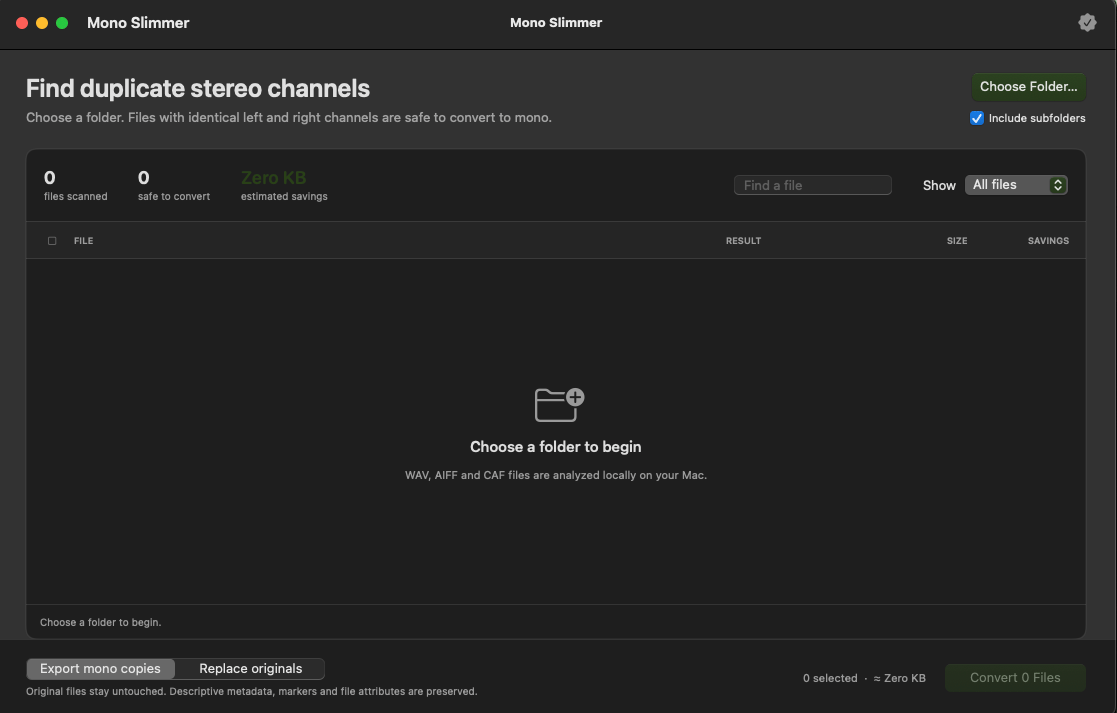
Instead of manually opening and inspecting every SFX file, Mono Slimmer scans your folders and identifies stereo files whose left and right channels contain identical audio.
What Mono Slimmer Does
Mono Slimmer analyses stereo audio files and checks whether their left and right channels contain the same signal.
When identical channels are found, the file is identified as dual-mono audio. It can then be converted into a proper single-channel mono file.
This removes the unnecessary duplicated channel while preserving the actual audio content.
Genuine stereo recordings contain different information in their left and right channels. Mono Slimmer is intended to identify only files with verified identical channels for mono conversion.
Recover More Storage from Large Libraries
Converting unnecessary dual-mono SFX files can help you:
• Recover valuable hard-drive space
• Reduce the overall size of SFX libraries
• Store more sound effects on the same drive
• Reduce backup and archive sizes
• Save space on secondary and portable drives
• Make library transfers more efficient
• Remove redundant channel data
• Maintain cleaner audio archives
• Avoid paying for additional storage unnecessarily
The larger your sound-effects collection, the more useful this process can become.
A Practical Tool for Audio Professionals
Mono Slimmer is designed for:
• Sound designers
• Sound-effects editors
• Dialogue editors
• Foley editors
• Re-recording mixers
• Production sound mixers
• Game-audio professionals
• Podcast and voiceover editors
• Film and television post-production teams
• Recording studios
• Anyone maintaining a large audio library
Simple Workflow
- Open Mono Slimmer.
- Select the folder containing your sound-effects or audio files.
- Scan the folder for stereo files with identical channels.
- Review the verified dual-mono files.
- Activate your licence to unlock conversion.
- Convert the verified files into proper mono audio.
Scanning is free, allowing you to discover how many unnecessary dual-mono files are occupying space before performing any conversion.
Your Audio Stays on Your Mac
All audio analysis and processing take place locally on your Mac.
Your sound-effects files are not uploaded to a server or cloud-processing service. This makes Mono Slimmer suitable for private recordings, commercial libraries and confidential film or television projects.
An internet connection is required only for licence activation.
Mac Compatibility
• Requires macOS 14 Sonoma or later
• Supports Apple Silicon Macs
• Supports Intel Macs
• Installs directly into the Applications folder
Licence and Activation
Your purchase includes activation for up to two Macs.
After installation:
- Open Applications → Mono Slimmer.
- Select Payhip as your purchase platform.
- Enter the email address used for your purchase.
- Enter the licence key from your Payhip receipt or download page.
- Click Activate This Mac.
You can deactivate an existing Mac from the Licence & Activation section whenever you need to free an activation seat.
What You Receive
• Mono Slimmer for macOS
• Signed macOS PKG installer
• Free scanning of your audio folders
• Full conversion functionality after activation
• Licence activation for two Macs
Product Information
Product: Mono Slimmer
Version: 0.2.1
Platform: macOS
Installer: PKG
Minimum operating system: macOS 14 Sonoma
Processor support: Apple Silicon and Intel
Important Information
Mono Slimmer is a standalone macOS application.
Scanning is free. A valid Payhip purchase email and licence key are required to unlock audio conversion.
This is a digital product. No physical item will be shipped.