
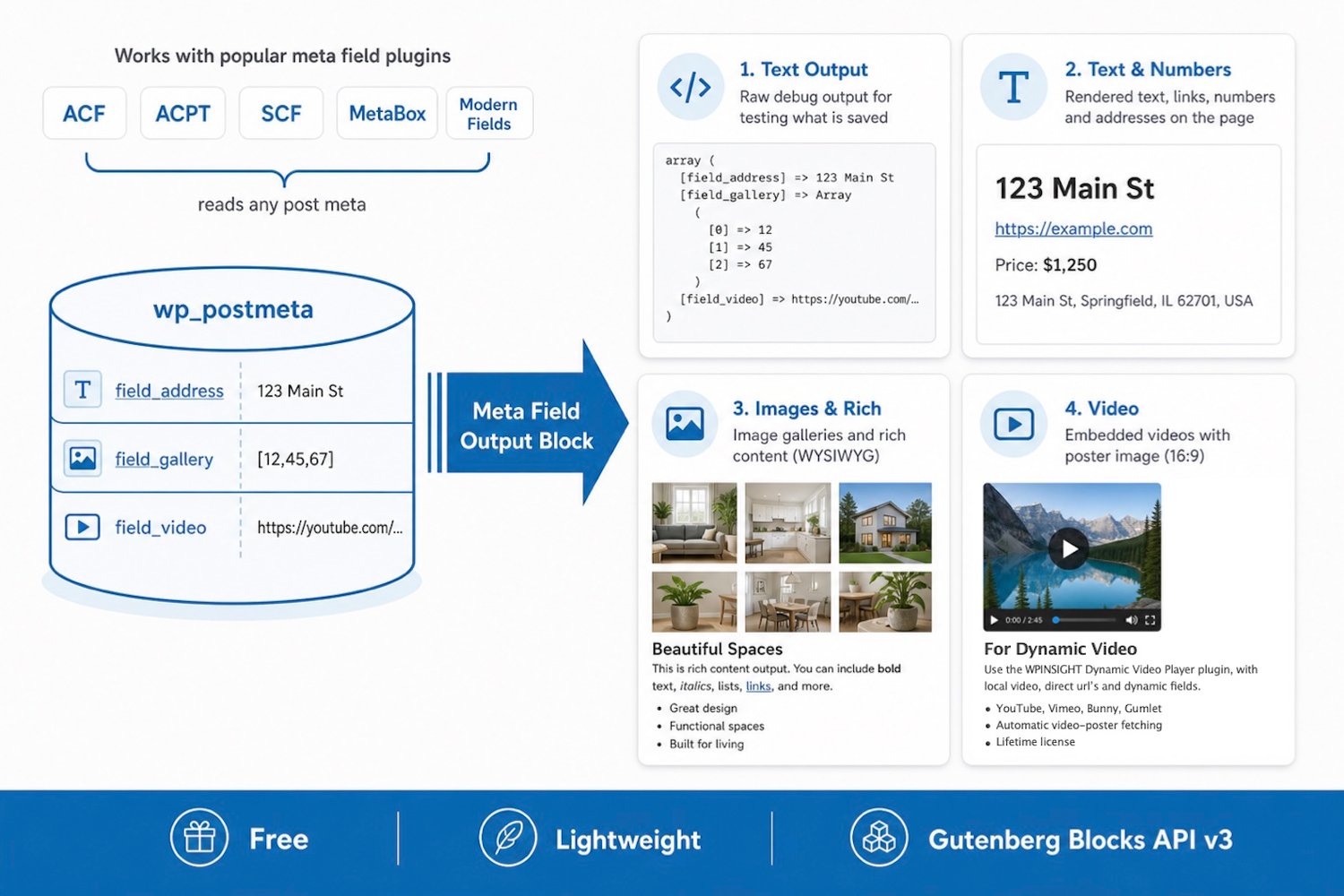
Meta Field output block
On Sale
$0.00
Do you sometimes wonder why a custom field doesn't provide the syntax you need?
Want to know why a location doesn't work with your map plugin, or just need to know the syntax of the saved custom field data?
This plugin is in permanent development. It works, is free, and does not change your custom field values in the WordPress database (so it is safe). It is intended as a test- and developer's tool.
Use this handy plugin that:
- Shows exactly what a custom field has saved in the WordPress database.
- Provide blocks to show (render) the content of your custom fields front-end.
It works with all kinds of custom fields, like ACF, SCF, ACPT, Meta Box and Modern Fields.
Meta Field (text output) block shows the saved values as a text string
- Shows the context of any custom field type as text output
- Choose a meta key, dropdown or manual override
- Spacing: margin top & bottom
- Alignment
- Can be placed in another block, like the Group block
- Additional class field
For testing purposes, you see the values as saved in the WordPress database.
Meta Field (text & numbers) block renders the values on the front-end
- Shows the context of text, URL, number, address, or coordinates
- Choose a meta key, dropdown, or manual override
- Inherit, P, h1, h2, h3, h4, h5, h6
- Spacing: margin top & bottom
- Alignment
- Max width setting
- Additional class field
- Can be placed in another block, like the Group block
Meta Field (images & rich) block renders the values on the front-end
- Shows the context of image, gallery, WYSIWYG, and embed fields
- Choose a meta key, dropdown, or manual override
- Spacing: margin top & bottom
- Alignment
- Max width setting of the content
- Numbers of images in the gallery (2-5)
- Gallery size by total width or height
- Gallery equal image height
- Gallery height for desktop, tablet, and mobile.
- Gallery custom gallery gap
- Additional class field
- Content width field in px
- Aspect for URL embed (16:9, 12:9, 4:3, 1:1, 9:16 portrait, flex)
- Can be placed in another block, like the Group block
Alignment
- All blocks have alignment.
- To keep things even more WordPress compatible, the blocks work fine with the group block.
- Just place a block in a group block, set it to group, row, or stack, and select an alignment.
- You can place the group block and its content in a row block, section, or column block from Kadence, Greenshift, etc.
- You can place the selected block in a column, and it adjusts automatically to the column width.
Plugin load
- It's a light plugin (around 37 kb).
- It's loaded on a post or page only when a Meta block is used.
- The stylesheet is light and shared (shared CSS).
Cost
- The best news: the plugin is still free; it won't be forever.
- You can use it on your site or your clients' sites; you are not permitted to sell the plugin.