


Client Update & Handoff Kit — AI Workflows + Project Tracker for Freelancers
5 tested AI prompts + project tracker for freelancers: weekly client updates, delay notices, approvals, handoff packets, testimonials.
WHO THIS IS FOR
Freelancers and solo service businesses (designers, developers, copywriters, marketers, VAs, video editors) in the middle or end of a client project, who run into:
- writing the same weekly update from scattered notes, or clients who go quiet because they don't know where things stand
- client content or feedback arriving late, and the deadline slipping onto you
- "looks good!" in a chat message instead of a written approval
- handoffs where files, logins and "how do I change this?" answers end up spread across emails
WHAT YOU GET DONE
- W1 Weekly status update: paste notes or tracker rows and get an email with Done / Next / On track? / Need from you, under 200 words, plus a private list of open questions.
- W2 Delay notice: a short, neutral email that names the late item and shows the new milestone date with the arithmetic (working days), with options A/B.
- W3 Approval request: a review request with one consolidated feedback deadline, the revision round count, and a line the client can copy to approve.
- W4 Handoff packet: turn your file and access list into a handoff document (files, accounts, how-to steps, support window, not included, acceptance line) plus a cover email. Passwords are kept out of the document.
- W5 Closeout and testimonial request: a thank-you and recap. If the client has already praised your work, you also get a draft testimonial built only from their own words, which they approve before you use it.
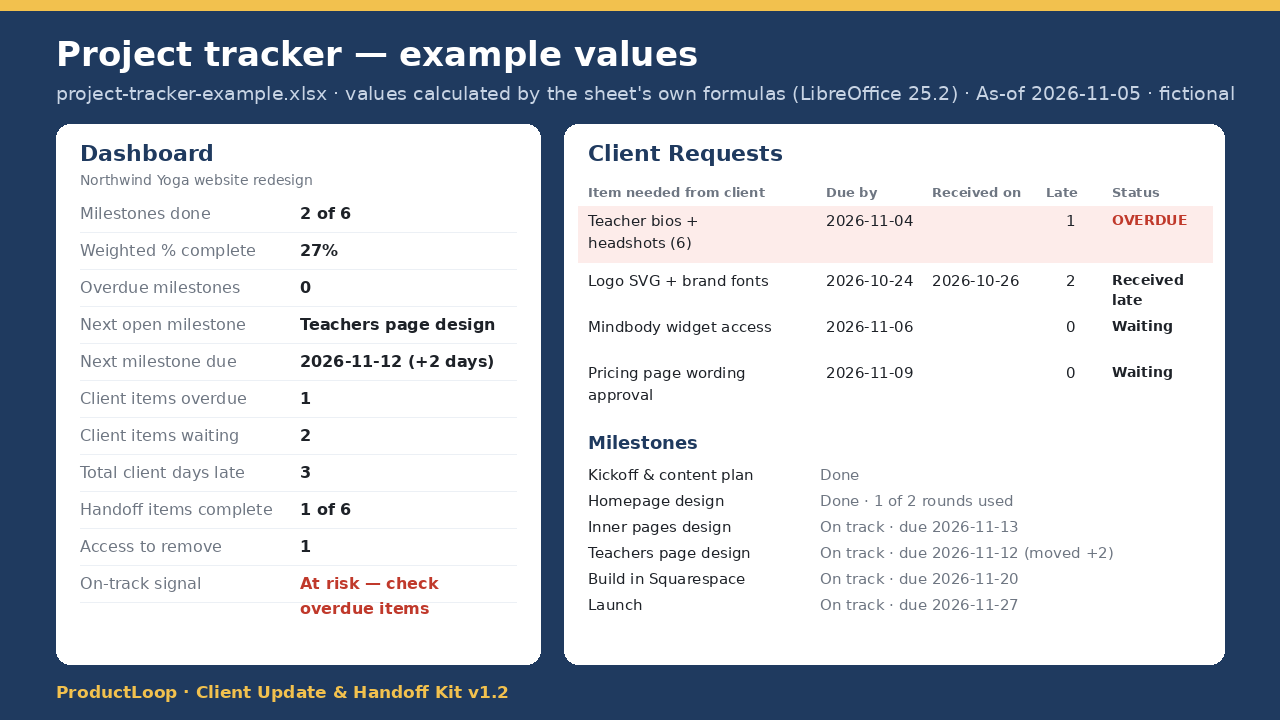
- Project tracker (.xlsx, blank + example): Milestones, Client Requests (days late, OVERDUE flags), Handoff checklist and an auto Dashboard (weighted % complete, next milestone, client days late). CSV versions included.
Every prompt tells the AI to use only your facts and to list anything missing under "Open questions" instead of guessing.
PREVIEW OF REAL OUTPUT
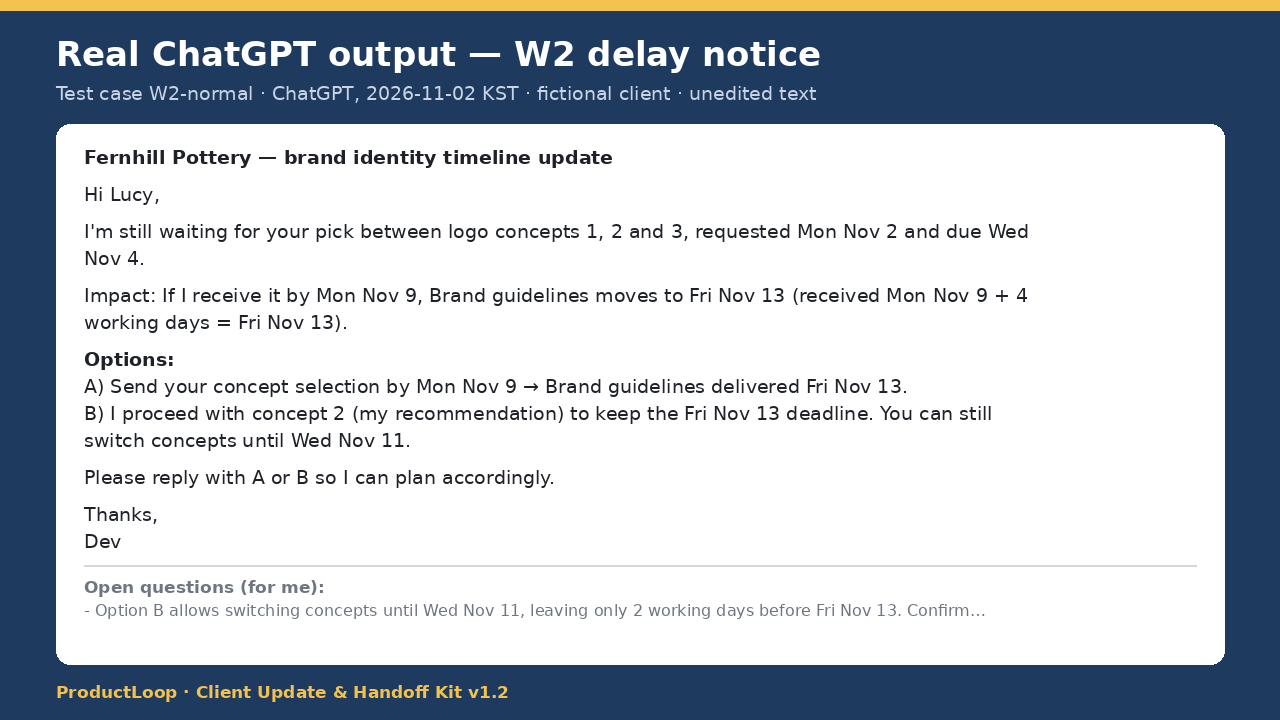
Real ChatGPT output (W2 delay notice, test run 1, 2026-11-02 KST; fictional client; excerpt, unedited):
"I'm still waiting for your pick between logo concepts 1, 2 and 3, requested Mon Nov 2 and due Wed Nov 4.
Impact: If I receive it by Mon Nov 9, Brand guidelines moves to Fri Nov 13 (received Mon Nov 9 + 4 working days = Fri Nov 13).
Options:
A) Send your concept selection by Mon Nov 9 → Brand guidelines delivered Fri Nov 13.
B) I proceed with concept 2 (my recommendation) to keep the Fri Nov 13 deadline. You can still switch concepts until Wed Nov 11.
Please reply with A or B so I can plan accordingly."
The full output also ends with a private "Open questions (for me)" list. All 5 workflows include a full real example output like this.
FILES AND ORDER OF USE
- README.md (quick start)
- templates/project-tracker-blank.xlsx (and the example file for reference)
- workflows.md: W1 each update day, W2 when a client item is OVERDUE, W3 when a deliverable is ready, W4 at handoff, W5 after acceptance
- CSVs, for use in Notion/Airtable instead
- TEST_PLAN.md (proof of testing; optional reading)
WHAT YOU NEED
- An AI chat tool. Tested in: ChatGPT only (Plus, GPT-6 as shown in the model picker during test runs 1 and 3, thinking Medium), 2026-11-02 KST. Claude, Gemini and other models were not tested (may work, unverified).
- Excel 2019/365 or Google Sheets (the Dashboard uses MINIFS). No macros or add-ons.
- No extra paid tools. If you pay for an AI subscription, that cost is yours.
TEST ENVIRONMENT AND LIMITS
- Prompts: 20 test cases (normal / missing info / ambiguous / edge case for each workflow), all passed in ChatGPT on the prompt version you get. Test inputs, pass criteria and raw outputs are included (TEST_PLAN.md).
- Tracker: formulas recalculated and checked in LibreOffice 25.2 on 2026-11-02 KST. Not opened in Excel or Google Sheets. MINIFS needs Excel 2019/365 or Google Sheets (Excel 2016 or older shows #NAME? in one Dashboard cell).
- AI can make mistakes, so check every name, date and amount before sending. Date math covers Mon–Fri only and doesn't account for holidays. English only.
- Not legal advice. Approval and support terms only reflect what your own agreement says.
FREE SAMPLE VS. PAID
- Free sample: the full W1 weekly-update workflow (with a real tested output), a preview of the tracker's values and the milestones CSV.
- Paid ($19): all 5 workflows (W1–W5), the working .xlsx tracker (blank + filled example), 3 CSVs, a README, and the test plan with all 20 test inputs and results.
LICENSE, SUPPORT AND REFUNDS
- License: personal and commercial use for your own business and clients. No resale or redistribution.
- Support: by email, reply within 3 business days.
- Refund: within 14 days if the files don't work as described.
- Updates: bug fixes to v1.2 for existing buyers. No lifetime or unlimited updates are promised.
RELATED
- Before the project starts: Scope Creep Shield (scopes of work, change-order replies, overdue invoice reminders): https://dudgh8.gumroad.com/l/ilyywz