
Charity Social Media Planner 2027 UK Weekly Post Tracker
Instant download, two spreadsheet files.
Plan a year of charity posts, and see which weeks and months are out of balance before they happen.
This is a spreadsheet for small UK charities, written for the person who looks after the social media on top of everything else. You list your posts one per row. It lays out every week of 2027 from a start date you type, compares what you planned and posted against the weekly target you set for each platform, and shows the mix of content in each month. You fill in the yellow cells and the rest works itself out.
What you get
Two files in one download: the blank calendar, ready for your own charity, and a filled in example for Fenwick Canal Trust, an invented canal restoration charity with a small team of volunteers, so you can see how every tab behaves before you start. A quick start PDF is included too.
What's inside
- Targets: your plan year start date, an As at date, and how many posts a week you want on each of six platforms. You also type your own limit for asks per thank you post.
- Content plan: room for 400 posts. Date, weekday (worked out for you), platform, pillar, post type, caption draft, asset needed, owner and status (Idea, Drafted, Approved, Scheduled, Posted). A row check tells you if a date, platform, pillar or status is missing.
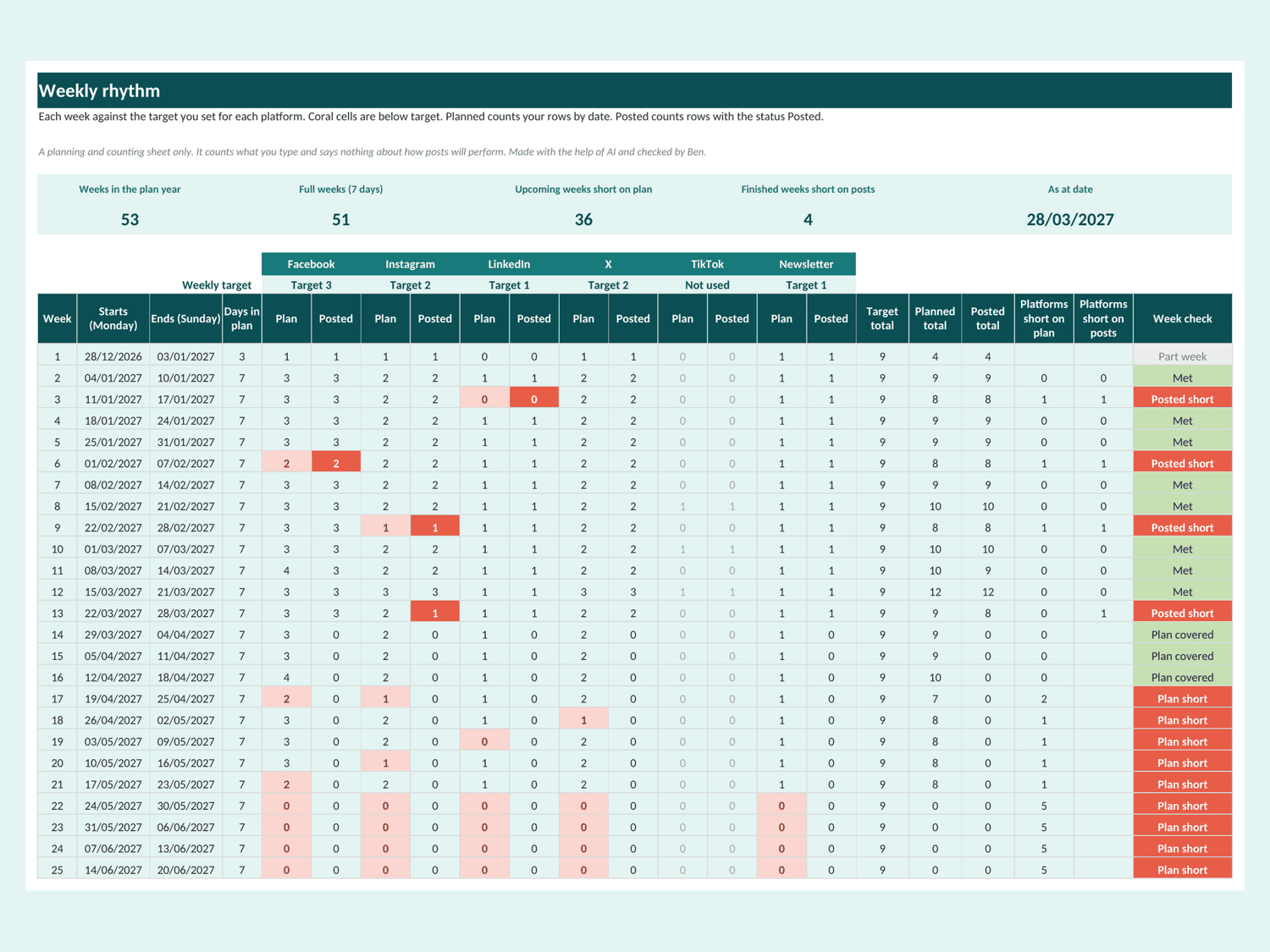
- Weekly rhythm: every week of the plan year, 53 or 54 worked out by formula, with plan against target and posted against target for each platform. Weeks that fall short turn coral, so a gap in the middle of May shows up in March. Weeks run Monday to Sunday, and part weeks at each end are shown but not judged.
- Pillar mix: for each month, how many posts fall under stories, impact, asks, thanks, behind the scenes and events, with a chart and a flag that compares asks with thanks against the limit you typed. The sheet never tells you what the limit should be. That is your call.
- Lists: platforms, pillars, post types and owners are all yours to rename. The platform names are only dropdown text, so there are no logos and nothing connects to your accounts.
How it works
- Make your own copy (Excel: save under a new name. Google Sheets: File, then Make a copy).
- Set your targets.
- Plan your posts, then read Weekly rhythm and Pillar mix.
A few honest details
It counts what you type and nothing else. It doesn't connect to any platform, and it says nothing about how posts will perform. There are no ready made awareness days in it. The sample uses the invented charity's own events, and your calendar is yours to fill.
Built and tested in LibreOffice Calc, then the example was opened and checked in Excel for the web on 1st November 2026, and the figures matched. It hasn't been tested in Google Sheets yet, so if that's what you use, open the example first. It's a standard .xlsx file with no macros or scripts. Formula cells are locked (no password) and every cell you type in is yellow with a short hint. Dates are UK style, day then month.
Who made it
I'm Ben, and I make plain UK spreadsheets for everyday jobs. This one was made with the help of AI and checked by me.
Digital download. Nothing is posted to you.