

CYBERPULSE AI GRC – Security Questionnaire AutoFill
On Sale
A$75.00
A$75.00
GRC – Security Questionnaire AutoFill
Description
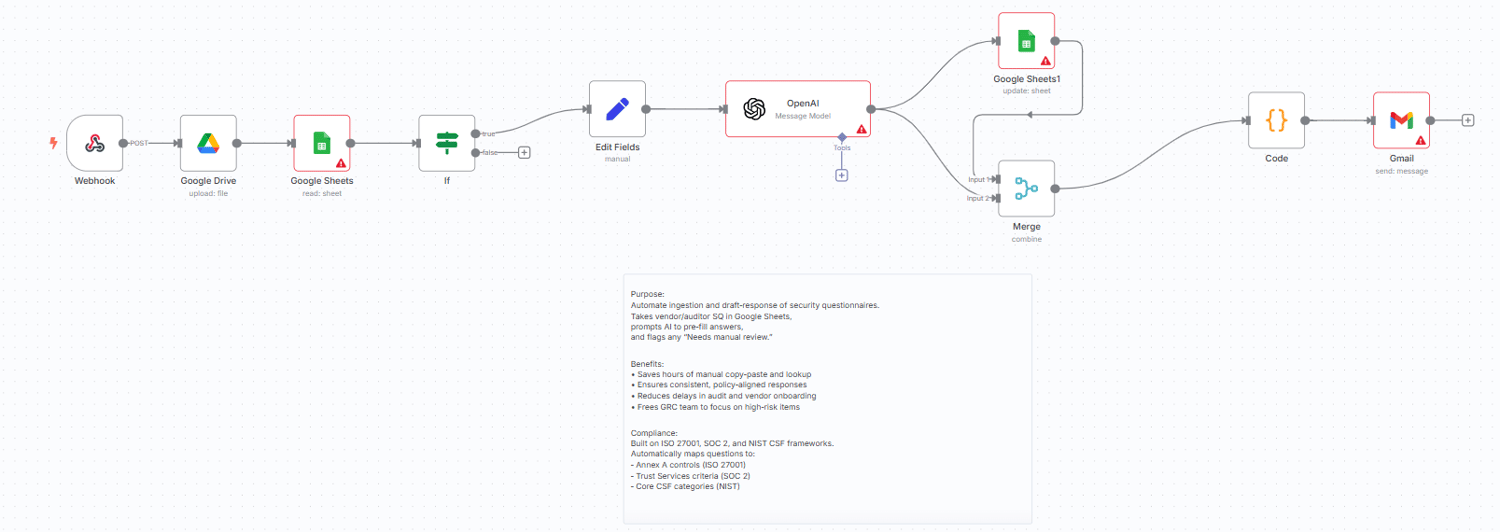
Automates vendor/customer security questionnaire responses. It ingests a questionnaire (Sheet/CSV/XLSX), matches each question to your approved answers and evidence, and writes a clean “Auto-Fill” sheet ready to review and send back. Optional alerts nudge reviewers and track progress to completion.
Who’s It For
- GRC / Compliance teams responding to customer security reviews
- Security engineers and sales engineers supporting questionnaires
- Startups that need fast, consistent, audit-ready answers
How It Works
- Trigger
- Run manually, on a schedule, or when a questionnaire file/row is added.
- Ingest & Normalize
- Reads questions from Google Sheets/CSV/XLSX.
- Normalizes columns (e.g., question, category, customer_notes) and de-duplicates.
- Classify
- Detects question type (Yes/No, multi-select, free text).
- Tags topics (encryption, access control, incident response, privacy, HR, etc.).
- Answer Retrieval
- Looks up approved answers from your Answer Library sheet (mapped by keywords/category/control).
- Falls back to templates (short form/long form) when no exact match exists.
- Evidence Linking
- Inserts Drive links for policies, diagrams, SOC2/ISO docs (from your evidence folder).
- Adds version/date so reviewers can verify what was sent.
- Auto-Fill Output
- Writes a new sheet with columns like:
- question, proposed_answer, rationale/notes, evidence_link, control_ref, owner, status, confidence, last_updated.
- Review & Notifications
- Emails the reviewer/owner with a link to the output sheet for quick approval edits.
- Status can move from draft → reviewed → ready to send.
- Export
- Optional export to CSV/XLSX to match customer’s template.
- Optional PDF of responses for audit trail.
Requirements
- Google Sheets & Drive credentials
- Destination Sheet & Evidence folder (env vars used in the template):
- GSHEET_ID, GSHEET_SHEET
- DRIVE_FOLDER_ID (or keep SANITIZED and set after import)
- Alert email: GRC_ALERT_EMAIL
File Templates
- GRC_SQ_AutoFill_Template.xlsx – target sheet with the output columns above
- Answer_Library.xlsx / Sheet tab – key-value pairs: keywords/category → approved answers
- Control_Mapping.xlsx / Sheet tab – optional mapping to ISO 27001, SOC2, NIST CSF
Output
- A populated Auto-Fill sheet ready to review/share
- Evidence links with versioning
- Email notification to the reviewer with next steps
Customization Tips
- Add your framework tags (ISO/SOC2/NIST) to enable quick mapping in the output.
- Set owners per topic (e.g., “Encryption → Security Eng”, “Privacy → Legal”).
- Add a confidence score threshold to flag answers needing human review.
- Enable “strict mode” to prevent sending answers without evidence links.
- Schedule a weekly run to pre-fill common questionnaires and keep answers fresh.