
Ae LaunchPad
On Sale
$0.00
Pay what you want:
$
🚀 Ae LaunchPad – One-Click Project Kickoff for After Effects
Speed up your creative workflow with Ae LaunchPad, a smart project launcher for Adobe After Effects that instantly sets up your entire project structure both inside AE and on your disk with just one click.
🎯 Key Features:
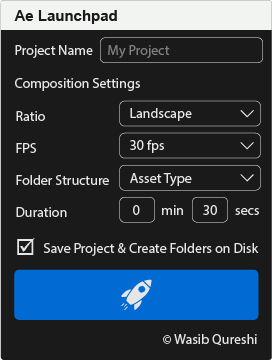
- Smart UI: Clean, modern interface with dark theme and intuitive controls.
- Custom Composition Setup: Choose from preset aspect ratios (Square, Landscape, Vertical) and FPS (24, 25, 30, 60).
- Precise Duration Control: Set duration in minutes and seconds.
- Flexible Folder Structures: Choose between Asset-Based or Scene-Based folder creation.
- Auto Folder Creation in AE & Disk: Instantly creates matching folders in your project panel and on your hard drive.
- Auto Project Save: Saves your .aep file into a neatly named versioned folder (e.g., 2025_07 - My Project v01.aep).
- Auto-Open Main Comp: Automatically opens and activates your main comp on creation.
- Fail-Safe Workflow: Includes checks for empty project name, save cancellation, and prevents duplicates.
🛠 Ideal For:
- Motion Designers
- Editors
- Content Creators
- Studios with fast-paced pipelines
🧠 Why You'll Love It:
No more wasting time building folders or setting up the same comp over and over again. Ae LaunchPad gives you a clean, consistent starting point for every project — saving hours and reducing setup errors.
💻 Compatibility:
- Adobe After Effects CC 2019+
- Works on both macOS and Windows
📦 What You Get:
- Ae LaunchPad.jsx file (ExtendScript)
- Installation & Quick Start Guide
- Lifetime Updates (manual download)
Ready to launch your creativity?
👉 Buy now and start every project like a pro!