

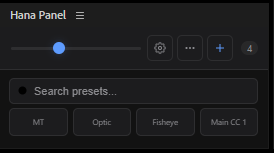
Hana Panel – Preset Manager for Adobe After Effects
Hana Tools – Preset Manager for Adobe After Effects
Speed up your After Effects workflow with Hana Tools – Preset Manager, a lightweight CEP extension designed to organize and apply your animation presets in just one click.
No more browsing through folders every time you need an .ffx preset. Import your favorite presets once, organize them your way, and access them instantly without leaving After Effects.
✨ Features
- 🚀 One-Click Apply Presets
- 📂 Import Unlimited .ffx Presets
- 🔍 Live Search to Quickly Find Presets
- 📝 Rename Presets Anytime
- 🗑️ Delete Presets with Confirmation
- ↕️ Drag & Drop to Reorder Your Library
- 📐 Adjustable Icon Size
- 🔲 Customizable Grid Layout
- 💾 Automatic Saving of Your Preset Library
- ⚡ Lightweight, Fast, and Easy to Use
Perfect For
- Motion Designers
- Video Editors
- Anime & AMV Editors
- YouTube Creators
- Freelancers
- Content Creators
- Anyone who uses After Effects presets regularly
Why Hana Tools?
If you work with dozens or even hundreds of animation presets, finding the right one can interrupt your creative flow. Hana Tools keeps your favorite presets organized in one place, allowing you to apply them instantly and focus on creating instead of searching.
Designed with productivity in mind, the extension provides a clean, modern interface while remaining lightweight and responsive.
Compatibility
- Adobe After Effects (CEP Extension)
- Windows
What's Included
- Hana Tools – Preset Manager
- Installation Guide
- Future bug-fix updates
Thank you for supporting Hana Tools. More features and workflow improvements will continue to be added in future updates.