





Highlight to Action
Highlight to Action – Transform Your Highlights into Actionable Knowledge
Highlight to Action™ is a powerful productivity and research extension designed to help users capture, organize, revisit, and act on important information from any website. Whether you're conducting research, studying online content, gathering business intelligence, writing articles, or simply saving valuable information for later, Highlight to Action transforms ordinary text highlighting into a dynamic knowledge management experience.
Unlike traditional highlighting tools that lose your selections when a page refreshes or closes, Highlight to Action intelligently remembers your highlights, restores them automatically, and provides a centralized workspace for managing your saved content across the web.
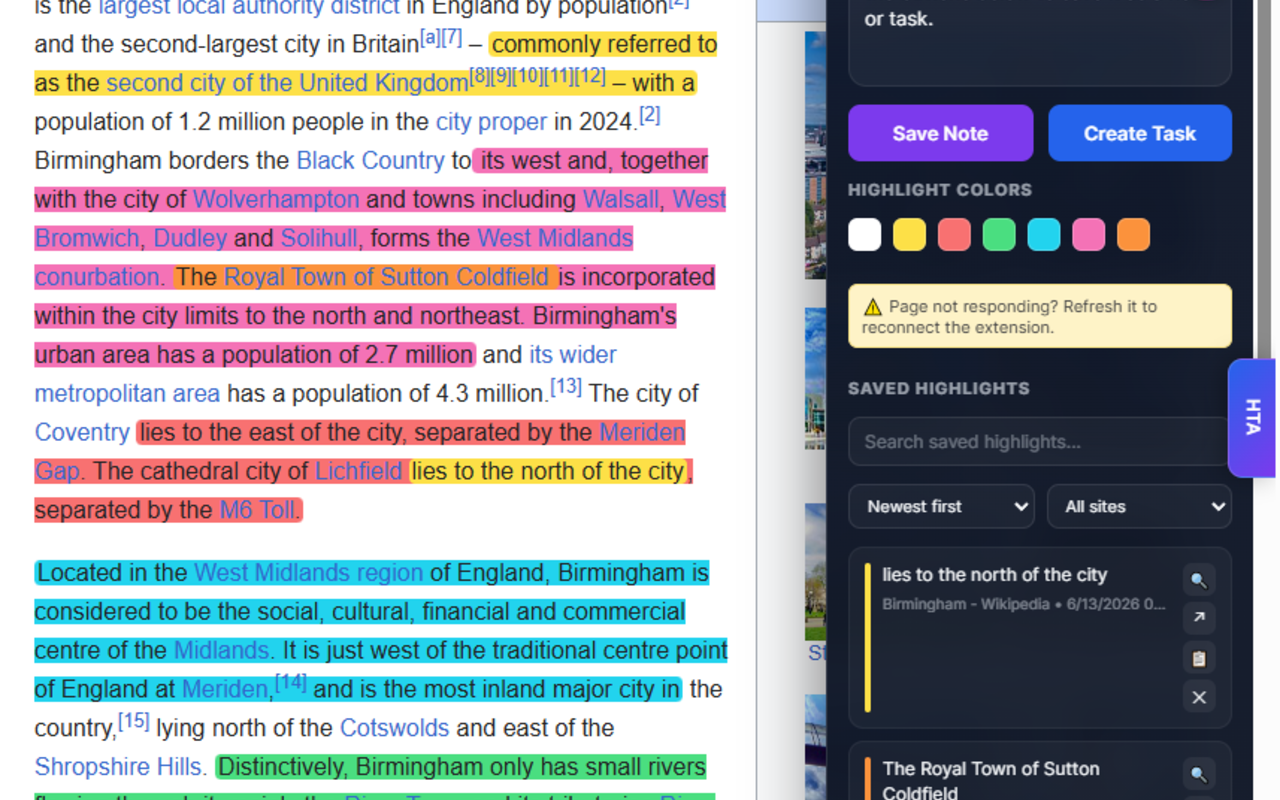
Side Highlight Panel
At the heart of Highlight to Action is its powerful and intuitive Side Highlight Panel.
With a single click, the extension opens a sleek side panel that remains visible while you browse. Positioned conveniently along the edge of your browser window, the panel provides instant access to your highlights, notes, and saved research without interrupting your workflow.
Designed with a modern user experience in mind, the Side Highlight Panel features:
- Smooth animations and transitions
- Clean, professional interface
- Expand, collapse, and close controls
- Quick access to saved highlights and notes
- Persistent workspace that stays available while browsing
The Side Highlight Panel serves as your personal research hub, allowing you to collect, organize, and review important information without opening additional tabs or menus.
Real-Time Highlight Capture
Highlight to Action captures your ideas the moment inspiration strikes.
As you select and highlight text on any webpage, your highlighted content instantly appears inside the Side Highlight Panel in real time. This live view allows you to see exactly what you've collected without leaving the page.
Each highlight entry includes:
- Highlighted text
- Date and timestamp
- Highlight color
- Optional notes and comments
Need to revisit a specific section? Simply click any saved highlight, and Highlight to Action automatically scrolls back to the exact location on the page.
Never Lose Important Information
One of the most powerful features of Highlight to Action is its intelligent persistence system.
Every highlight is securely stored and associated with its original webpage. Your information remains available even after:
- Refreshing the page
- Closing browser tabs
- Restarting Chrome
- Returning days, weeks, or months later
Each saved highlight includes:
- Highlighted text content
- Highlight color
- Page location reference
- Timestamp
- User notes and comments
Your research, annotations, and insights remain permanently connected to the content that matters most.
Automatic Highlight Restoration
Returning to a previously highlighted webpage feels effortless.
When you revisit a website, Highlight to Action automatically detects existing highlights and restores them directly onto the page. Your saved highlights reappear exactly where you left them, allowing you to continue your work without manually recreating annotations.
The extension intelligently handles page updates and content reloads whenever possible, helping maintain accurate highlight placement while preventing duplicate entries.
Website Highlight Manager
Managing highlights across multiple websites has never been easier.
Accessible through the convenient menu system, the Saved Highlights Manager provides a centralized overview of all your stored content.
For every saved website, users can view:
- Website favicon
- Website or page title
- Total number of highlights
- Last modified date and time
With a single click, users can reopen a website and instantly restore all previously saved highlights, creating a powerful research archive that spans the entire web.
Multiple Highlight Colors
Organize information visually using multiple highlight colors.
Create your own highlighting system to categorize content such as:
- Important information
- Tasks and action items
- Research references
- Questions and follow-ups
- Quotes and citations
Color-coded organization makes it easier to locate, review, and understand information at a glance.
Built for Productivity
Highlight to Action goes beyond simple highlighting by providing tools that help users work smarter and stay organized.
Additional productivity features include:
- Edit existing highlights
- Delete individual highlights
- Clear all highlights from a page
- Add personal notes and comments
- Quickly navigate back to highlighted content
- Manage highlights across multiple websites
Whether you're researching, studying, writing, or collaborating, Highlight to Action helps keep your information organized and actionable.
Export and Share Your Knowledge
Your highlights become even more valuable when they can be used outside the browser.
Highlight to Action allows users to export their saved highlights in multiple formats, making it easy to archive, share, analyze, or repurpose collected information.
Export options include:
- Plain Text (.TXT) files
- Comma-Separated Values (.CSV) files
- Markdown (.MD) files
Exported files can include:
- Highlighted text
- Website source information
- Page titles
- Highlight colors
- Timestamps
- User notes and comments
Whether you're preparing reports, writing articles, conducting academic research, creating content, managing projects, or building a personal knowledge base, your captured information remains portable and ready to use wherever you need it.
Perfect For
Highlight to Action is ideal for:
- Students
- Researchers
- Writers
- Journalists
- Content creators
- Business professionals
- Educators
- Legal professionals
- Knowledge workers
- Lifelong learners
Anyone who regularly gathers information online can benefit from a smarter and more organized highlighting experience.
Your Web Research, Organized
Highlight to Action transforms passive highlighting into an active productivity system.
By combining real-time capture, persistent storage, automatic restoration, powerful organization tools, and flexible export options, it creates a seamless way to collect, manage, and revisit important information across the web.
Stop losing valuable highlights.
Start turning your discoveries into action with Highlight to Action.