
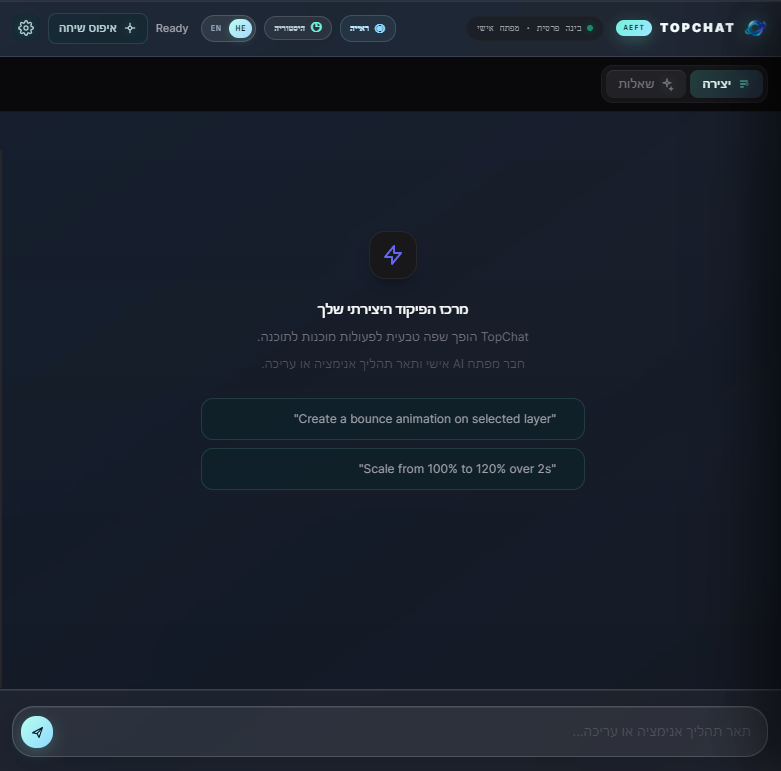
TopChat
Short Product Summary
TopChat is a free, bilingual AI creative assistant for Adobe After Effects and Premiere Pro. It turns plain-language creative requests into practical explanations, host-aware guidance, and ready-to-review ExtendScript actions. The panel runs directly inside the Adobe application, so creators can ask questions and build creative workflows without constantly switching between their editor and a separate AI chat window.
Full Product Description
TopChat is designed for editors, motion designers, video creators, and creative teams who want a faster and more natural way to work inside Adobe After Effects and Premiere Pro. Instead of searching through documentation or manually translating an idea into a technical workflow, users can describe what they want in everyday language.
A user can ask TopChat how to animate a layer, create a transition, adjust timing, build a text treatment, organize a motion workflow, or understand a specific editing task. TopChat responds with practical instructions and, when the request is suitable for automation, can generate host-ready ExtendScript that the user can review before applying inside Adobe.
The current release focuses on creative assistance, workflow guidance, and host-aware scripting. It does not include video generation, vocal separation, screen-reading AI, or an external video gateway. This makes the release lightweight, focused, and easier to install and maintain.
Core Capabilities
CapabilityDescriptionIn-app AI chatAsk questions and describe creative tasks without leaving After Effects or Premiere Pro.Host-aware guidanceWhen enabled, TopChat can use selected project context such as the active composition, sequence, layers, timing, and other relevant metadata.ExtendScript generationConvert a natural-language request into editable Adobe scripting code for supported workflows.Review before executionGenerated actions can be reviewed before the user chooses to run them.Optional automatic executionUsers can enable automatic host actions in Settings when they prefer a faster workflow.Bilingual interfaceSwitch the interface between English and Hebrew. Hebrew conversations are displayed with right-to-left text direction.Conversation historySave conversations locally, reopen previous sessions, create new chats, and rename conversations.Local API-key storageThe Groq API key is stored locally on the user’s device and is not included in the TopChat package.Premiere Pro and After Effects supportThe panel is designed to work with both supported Adobe hosts through CEP and host scripting.Free distributionTopChat is released as a free plugin. Users provide their own Groq API key through the provider’s official console.
How TopChat Works
TopChat uses a bring-your-own-key model. The user obtains an API key from Groq, saves it in the TopChat Settings panel, and then uses the assistant inside Adobe. The key is stored locally on the device and is used to communicate with the configured AI provider.
When host context is enabled, TopChat collects a compact description of the current Adobe project state. Depending on the host and the active item, this may include details such as the active composition or sequence, dimensions, frame rate, duration, current time, selected layers, layer names, object types, and selected properties. TopChat sends this structured context along with the user’s request so the response can be more relevant to the current project.
For automation requests, TopChat generates ExtendScript rather than silently changing the project. The user can inspect the generated action and decide whether it should be applied. This approach keeps the creator in control while still reducing repetitive technical work.
Who TopChat Is For
TopChat is suitable for motion designers who want help translating creative ideas into After Effects workflows. It is useful for video editors who need quick explanations for Premiere Pro tasks. It can also help students and beginners who are learning Adobe workflows and want technical concepts explained in plain language.
The plugin is also useful for experienced creators who already understand the tools but want to reduce repetitive setup, explore alternative approaches, or generate a starting point for a script. Small creative teams can use it as a shared workflow assistant without requiring a separate internal documentation system.
Example Requests
Users can write requests such as:
•“Create a smooth bounce animation for the selected layer.”
•“Explain how to make this title enter from the left and settle naturally.”
•“Help me create a subtle zoom transition for this sequence.”
•“Add a two-second fade and explain what the script changes.”
•“How can I make the selected layers move in sequence?”
•“Explain how to remove a green screen in Premiere Pro.”
•“Give me a beginner-friendly workflow for animating this logo.”
TopChat is intended to provide a useful starting point and practical guidance. Generated scripts should always be reviewed, especially when working on important or complex projects.
Privacy and User Control
TopChat is designed around local user control. The Groq API key is entered by the user and stored locally on the device. The current release does not include the previously planned video gateway, cloud video generation, or audio-separation engine.
Host context is optional. Users can disable the Include host context setting when they do not want project metadata included in an AI request. Automatic execution is also optional and can remain disabled so every generated action is reviewed manually.
Conversation history is saved locally on the device. Users can create a new conversation, rename an existing conversation, and return to previous sessions without relying on a separate account system inside the plugin.
Installation and First Use
After installing the ZXP, open TopChat from the Adobe Extensions menu. Open Settings and select Open provider to visit the official Groq API-key page. Create or copy a Groq API key, paste it into TopChat, and save it securely.
The user can then choose between English and Hebrew, decide whether host context should be included, and decide whether generated host actions should run automatically. For the safest workflow, automatic execution should remain disabled until the user is comfortable reviewing generated scripts.
Current Release Scope
The current TopChat release is intentionally focused on chat, workflow guidance, host context, and ExtendScript assistance. The following features are not included in this release:
•AI video generation.
•Vocal and instrumental separation.
•Real-time pixel-level screen or composition analysis.
•A cloud video-generation gateway.
•A bundled local AI model.
This scope keeps the plugin smaller, clearer, and more reliable for its main purpose: helping Adobe creators understand and automate creative workflows through natural language.
Availability
TopChat is distributed as a free plugin. Users do not pay for the plugin itself. AI usage is handled through the user’s own Groq account and API key, so any provider-side limits, availability rules, or usage charges are determined by Groq and are separate from TopChat.
TopChat is a creative workflow assistant. It helps users plan, understand, and automate supported Adobe tasks, but it does not replace the user’s judgment, project backups, or responsibility for reviewing generated actions.
Reusable Product-Description Prompt
Use the following prompt to generate future product pages, store listings, launch posts, or documentation while keeping the description aligned with the current release:
Write a professional, clear, and moderately detailed English product description for TopChat, a free bilingual AI creative assistant plugin for Adobe After Effects and Premiere Pro. Explain that TopChat runs inside the Adobe application, accepts natural-language creative requests, provides practical workflow guidance, can use optional structured host context, and can generate reviewable ExtendScript actions for supported workflows. Mention English and Hebrew interface support, right-to-left Hebrew display, local conversation history, local storage of the user’s Groq API key, and optional automatic execution. Explain that users must provide their own Groq API key through the official Groq console. Clearly state that the current release does not include AI video generation, vocal separation, real-time pixel-level screen vision, a cloud video gateway, or a bundled local model. Present the product as free to download and suitable for motion designers, video editors, creative students, beginners, and professional Adobe users. Keep the tone polished, trustworthy, modern, and concise enough for a product page. Do not claim unsupported capabilities. Include sections for overview, key features, how it works, target audience, privacy, installation, limitations, and free availability.
References
[2] Adobe After Effects Developer Documentation
[3] Premiere Pro Scripting Documentation
Digital Product Policy: Due to the nature of digital products, all sales are final. Since files are available for immediate download upon purchase, we do not offer refunds or exchanges. Please review the product description carefully before completing your order. If you have any technical issues with your download, please contact us at: [topedittopedit29@gmail.com]