




BMS IO & BOQ Automation Tool for Excel
Build your BMS IO list, BOQ and DDC schedule in hours, not days.
An Excel add-in made by a BMS engineer, for BMS engineers. Enter your equipment once. Get every panel's IO list, the project IO summary, the field device BOQ and (with a Pro pack) a priced DDC controller schedule.
• Works inside the Excel you already use
• Same correct result every time, no copy-paste slips
• Free 14-day trial with every feature unlocked
▶Start your free 14-day trial (no card needed)
▶Question? Chat on WhatsApp
14-days money back guarantee (full refund - no questions asked)
You know this night.
The tender is due tomorrow morning. You still have dozens of panels to count. The BOQ is half done. You are switching between datasheets to check which controller fits which panel.
One wrong count means a wrong price. Too low and the project loses money. Too high and you lose the bid.
And next week, on the next tender, you will type it all again.
This is not engineering. It is data entry. Let the tool do it.
How it works
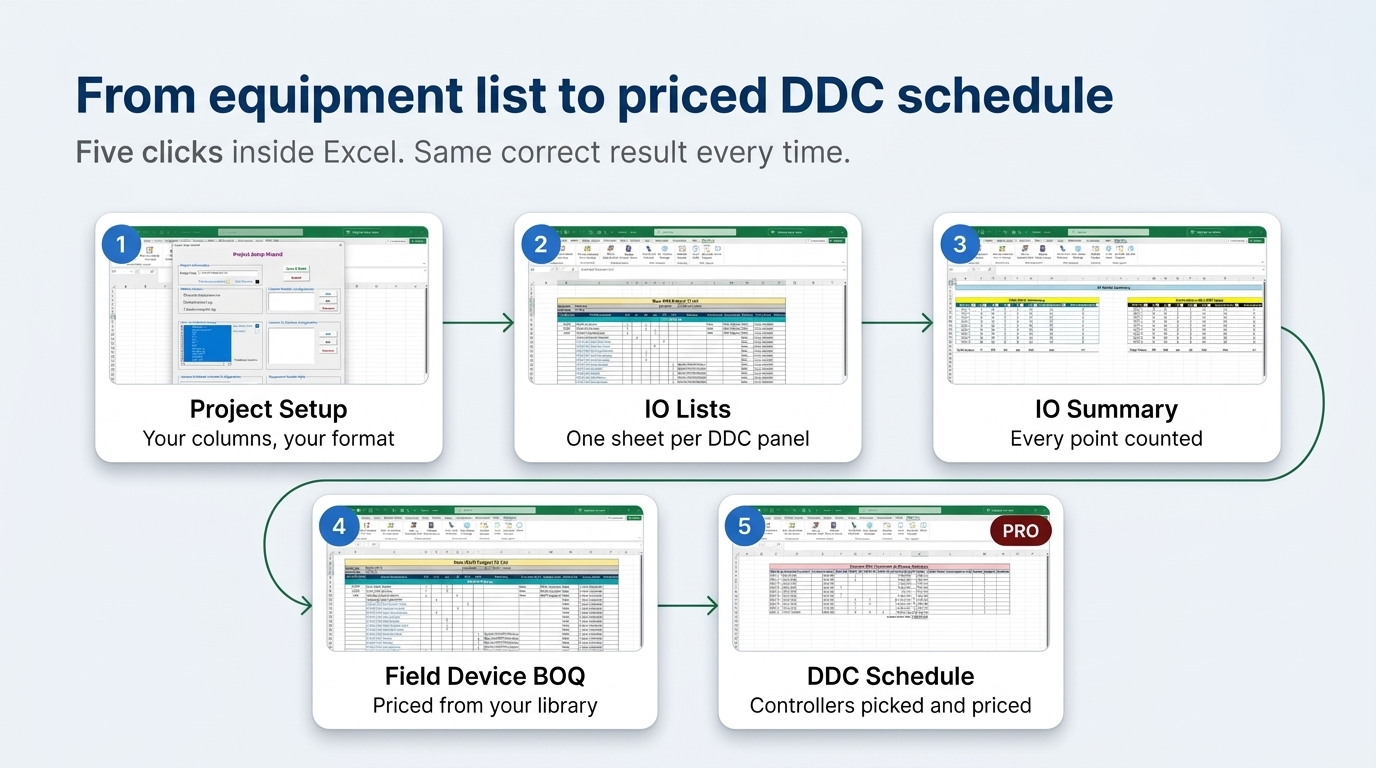
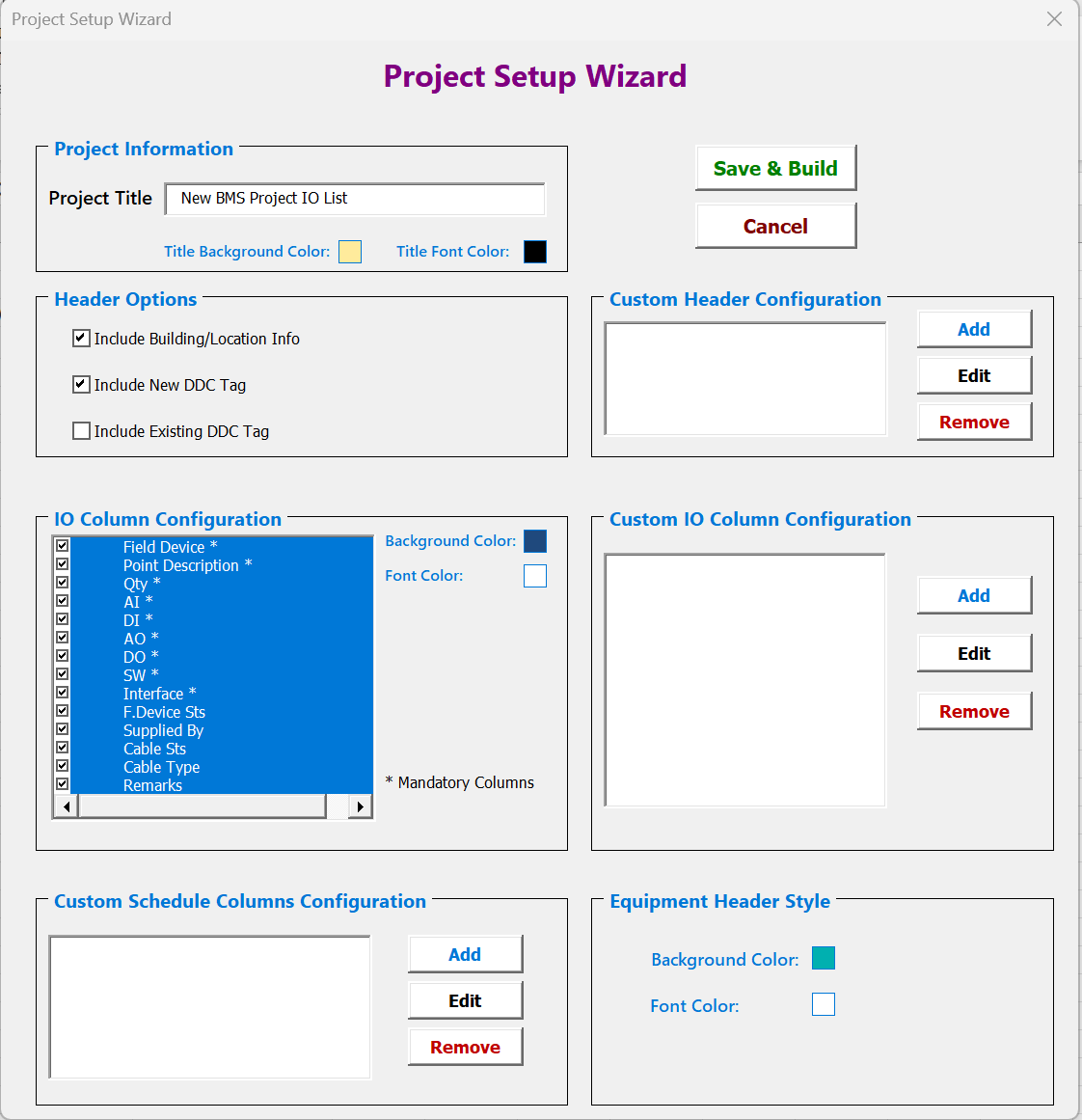
- Project Setup. Choose your IO list columns, headers and colours once. Your company format, not ours.
- Enter your equipment. Define each equipment type once (an AHU, a pump, a VAV). Then list your equipment and which DDC panel it belongs to.
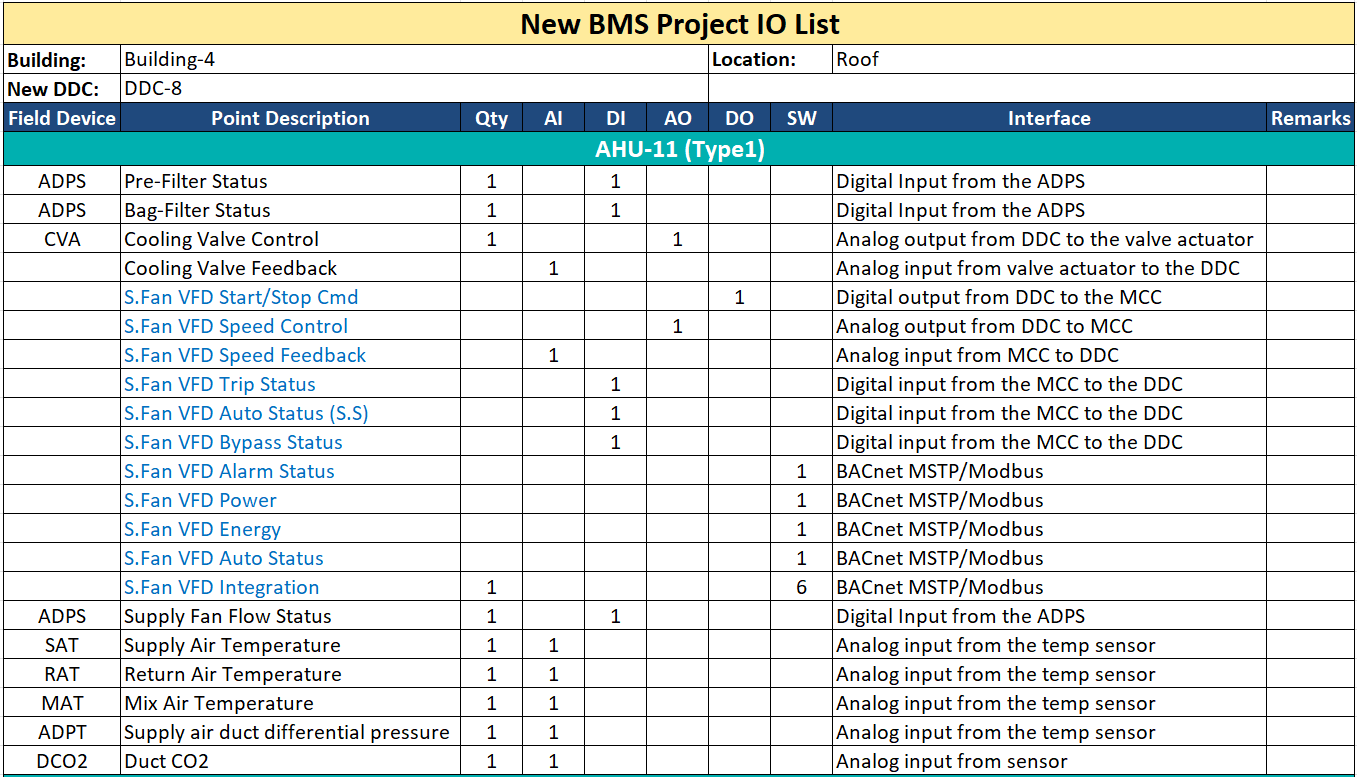
- Generate. The tool builds a complete IO list sheet for every DDC panel, adds spare points, and counts everything into one IO summary.
- BOQ. One click builds the field device BOQ from your own device library, with or without prices and brands.
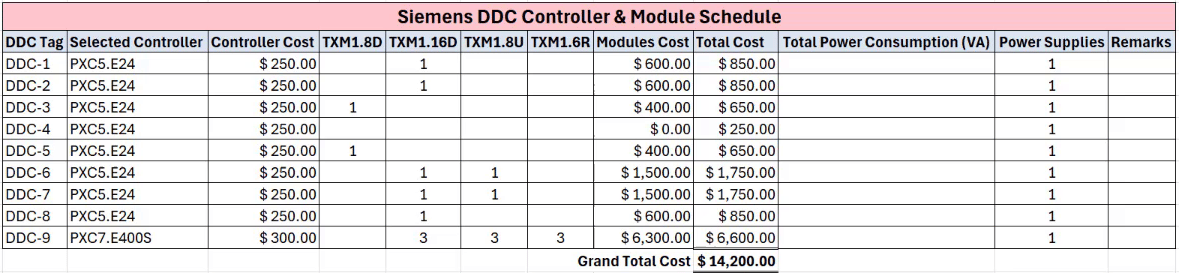
- DDC selection (Pro). The tool reads the IO summary and picks the controllers and IO modules for each panel, with a priced hardware schedule.
Change a quantity and run it again. The whole package updates in minutes.
Pro packs: the tool picks your controllers
Choosing controllers and IO modules for every panel is the slowest, riskiest part of a BMS tender. A Pro pack does it for you. It checks point capacity for each panel, selects the lowest-cost controller and module combination from your library, and gives you a priced schedule, ready for your proposal.
Available now for Siemens, Honeywell Optimizer and Centraline. Buy only the brand you quote. Add another brand later with one more key.
No Pro pack? The Standard edition still gives you IO lists, the IO summary and the field device BOQ, for any BMS brand.
Is it worth it?
Add up the hours you spend on IO lists, point counts and BOQs for one tender. If the tool saves you just one working day on one project, it has paid for itself. Every project after that is time you get back.
What engineers say:
"I tried this software, it saved me hours of manual excel work by automating I/O lists and BOQs. Super easy to use, accurate, and a real productivity booster for any BMS project. Highly recommended." — Moayad, verified buyer
"This tool has helped me saved huge amount of time in preparation of BMS IO list and field devices BOQ. The IO list layout is customizable using project setup options and the tool is super easy to use." — Zeeshan, verified buyer
Made by a BMS engineer, not a software company
I'm Abdul Rehman. I have worked in BMS for over 10 years: design, programming, testing and commissioning. I'm a Certified Energy Manager. I run the TechSystems YouTube channel (33,000+ subscribers) and teach a best-selling BMS course on Udemy (4,300+ students).
I built this tool because I was tired of typing the same IO list on every project. If you have a question, you email me, not a call center.
Choose your edition
- Standard ($149): IO lists, IO summary and field device BOQ. Works with any BMS brand.
- Pro-Siemens ($199): Everything in Standard, plus Siemens controller and IO module selection.
- Pro-Honeywell Optimizer ($199): Everything in Standard, plus Honeywell Optimizer controller and IO module selection.
- Pro-Centraline ($199): Everything in Standard, plus Centraline controller and IO module selection.
One-time payment. No subscription.
No risk
Try first. The free 14-day trial unlocks every feature, including all three Pro packs. Use it on a real project.
Then decide. Changed your mind after buying? Email support@domotixtech.com within 14 days of purchase and you get a full refund. No forms. No questions asked.
Getting your company to pay
Payhip emails you a receipt right after purchase, ready to submit as an expense. Need an approval first? Send your manager the 2-minute demo link above.
Safe for company PCs?
- Runs inside Excel. No installer, no .exe file, no admin rights.
- Your project data stays on your PC. The tool never uploads your IO lists, BOQs, prices or drawings.
- Only a license check goes online. Your license key and an anonymous machine ID, over an encrypted connection.
- Nothing hidden. It does not start other programs or change Windows settings.
IT team has questions? Email support@domotixtech.com for a one-page security summary.
Questions:
Will it work with my company's IO list format? You choose the columns, header fields and colors in Project Setup, and you can add your own columns. Try it on your format during the free trial.
Do I need Siemens, Honeywell or Centraline? No. Standard works for any BMS brand. Pro packs only add automatic controller selection for that brand.
Where do the prices come from? From your own device and DDC libraries. They come with sample data, and you enter your real supplier prices once. After that, every BOQ uses them.
What do I need? Microsoft Excel 2016 or newer on Windows. It does not work on Excel for Mac.
How do I activate? Payhip emails you a license key. In Excel, click Manage Licenses, paste the key, done. No reinstall after the trial.
Can I add another brand later? Yes. Buy the Pro pack you need and add its key in Manage Licenses. Your existing key keeps working.
Will you add more brands? Yes, more are in development. Email support@domotixtech.com or contact through WhatsApp and tell me which brand you need.
Your next tender does not have to be a late night.
→ Start your free 14-day trial
P.S. The trial needs no card and unlocks everything. Run it on the project on your desk right now and see how long it takes.