

idea 1 Project File
This product is made on Davinci Resolve 20.0.1 Build 6. It is highly suggested to use the product in the mentioned software version and any versions after it to avoid missing files and effects. Davinci Resolve does not support backwards compatibility (e.g from Davinci Resolve 20 to Davinci Resolve 19).
You will get a ZIP file containing the product.
TUTORIAL ON IMPORTING THE PROJECT FILE:
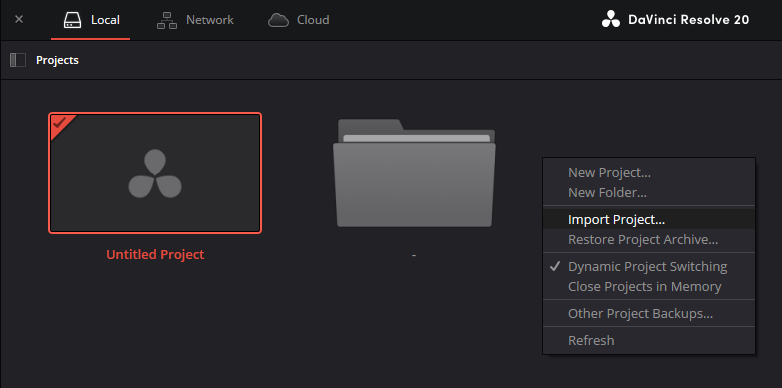
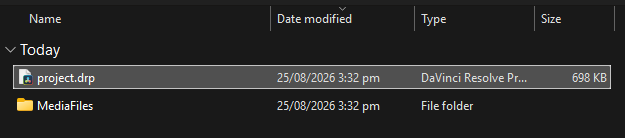
A. Open Davinci Resolve and right click on the project manager when it appears. Click on "Import Project" and select the downloaded ".drp" file.
B. After clicking the ".drp" file, the project file should appear in the project manager.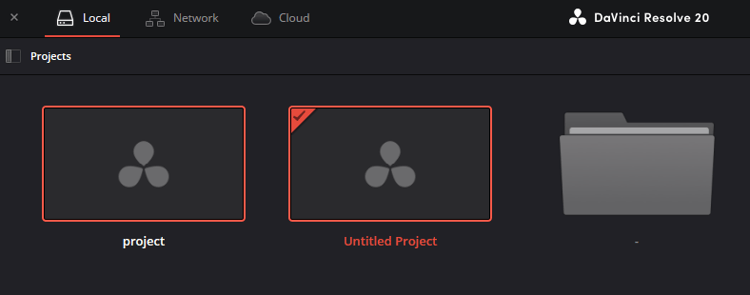
C. Open the project, and all media files and adjustment layers should appear just fine. Effects and clips are inside the compound clips.
Message me on any of my linked socials if you have any questions!
Thank you for supporting me!