
Run of Show Desk
Read the free run-of-show worksheet and rehearsal example.
Run of Show Desk
Every cue. In its place.
$29 USD once for the delivered version.
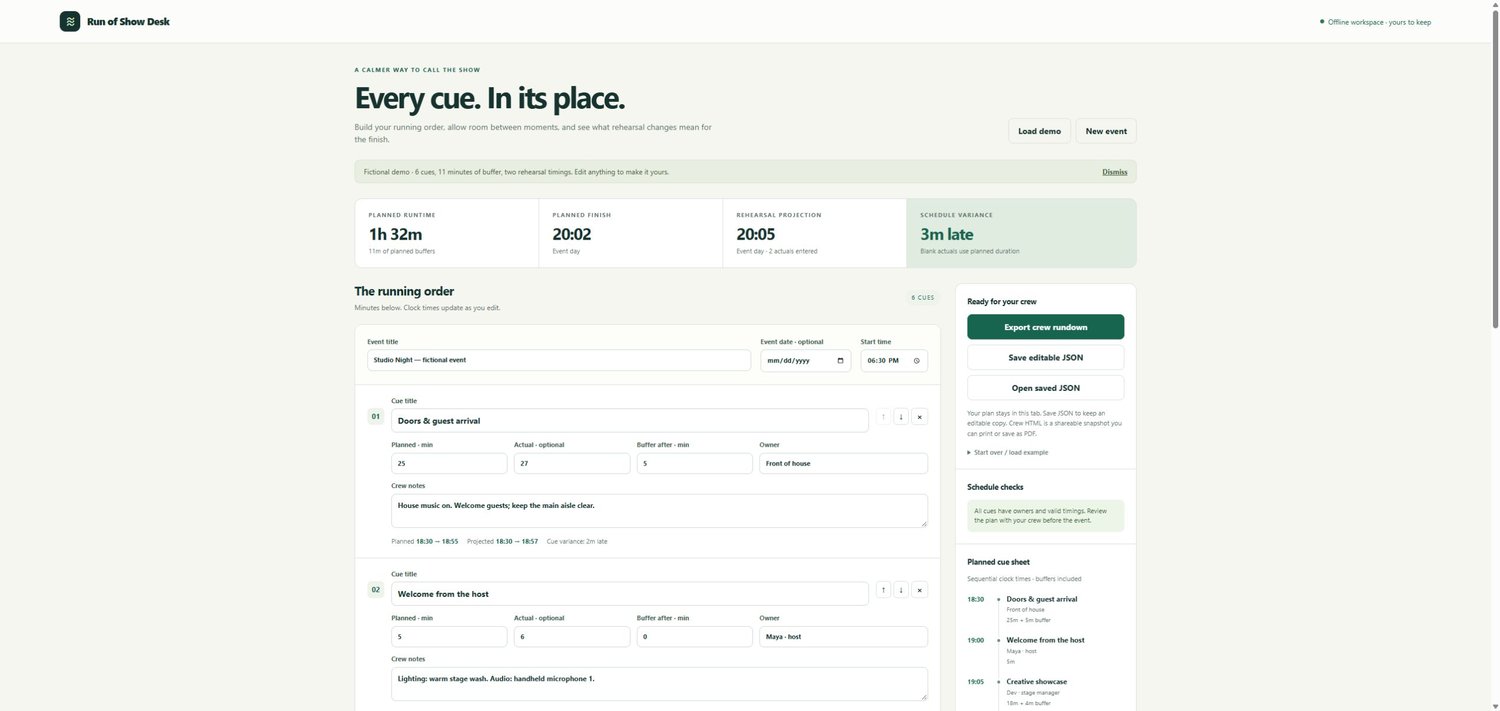
Build a running order, assign cue owners, add buffer time and see how rehearsal timings change your finish. Run of Show Desk is a compact planning workspace for workshops, showcases, community events and other single-track shows.
Add, edit and reorder cues while planned start and finish times update. Enter measured rehearsal durations to compare the original schedule with a projected running order. Blank actuals use planned durations; buffers remain as planned. Midnight crossings include next-day labels.
Save editable JSON for each event and export a crew HTML snapshot with planned and projected timings, owners, notes and review warnings.
WHAT IS INCLUDED
Your ZIP contains five files:
- Run-of-Show-Desk.html — the browser app
- README.md — quick-start guide and timing rules
- VERSION.txt — release information
- Fictional-Studio-Night.json — an editable fictional event
- Fictional-Crew-Rundown.html — an example crew export
GET STARTED
Extract the ZIP and open Run-of-Show-Desk.html in a current desktop browser. Explore the fictional event, or choose New event. Set your title, date and local start time, then build the cue list. Save editable JSON before closing. Open the exported crew HTML and use your browser's Print command for paper or PDF output.
GOOD TO KNOW
No account, subscription, server, API key or AI service is required. The app makes no network calls. It is a single-person planner with manual JSON saves; there is no autosave or cloud storage. Supports up to 300 cues and seven days per plan, within the documented file limit.
This is a planning tool, not a live countdown, show-control system or collaborative workspace. It does not send files or notify your crew. Timings use local wall-clock arithmetic without time-zone or daylight-saving conversion. Review the schedule and confirm the latest crew snapshot before the event.
Use the delivered version for your own and your clients' events, and share generated crew rundowns with them. Do not resell the editable app. Future features, upgrades and event outcomes are not promised. All included event details are fictional.
SUPPORT
For product or download questions, use Contact in the store menu: https://payhip.com/TheCatalogDesk/contact. Include the product name and your order ID. Do not send passwords or private project files.