
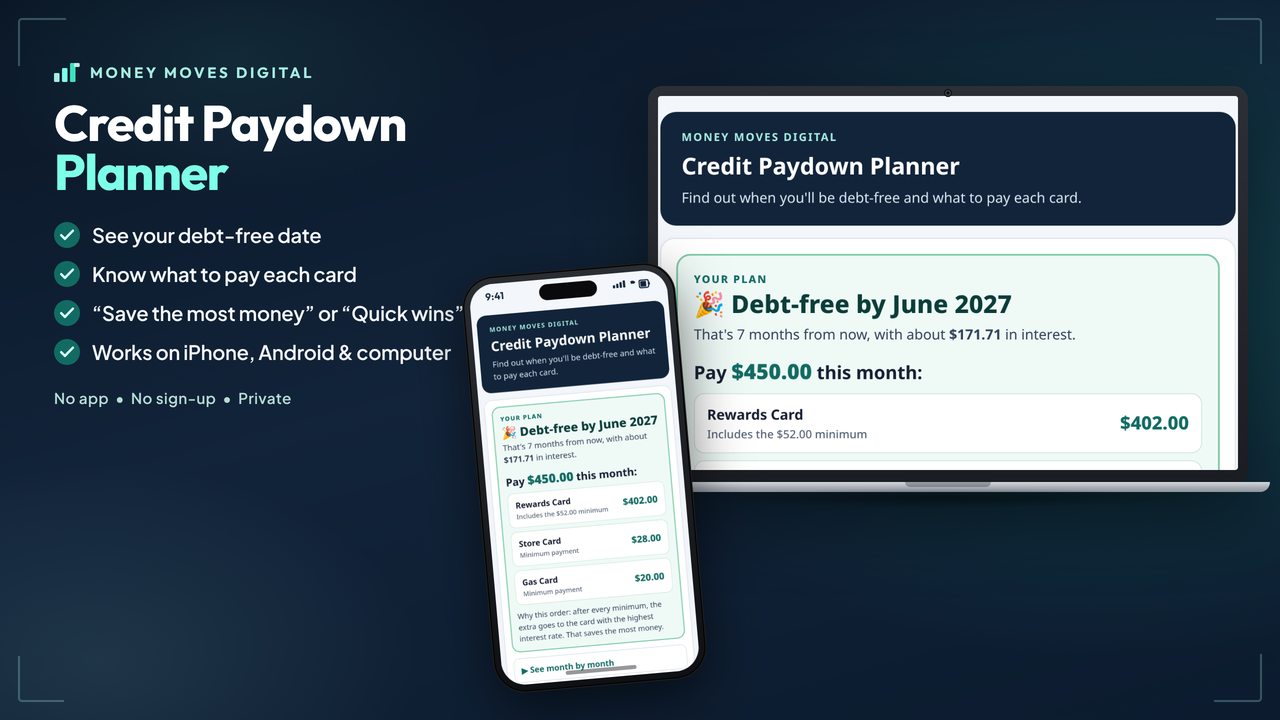
Money Moves Digital Credit Paydown Planner
Plan your next payment. See your debt-free date.
Turn your credit-card balances into a clear payment plan with the Money Moves Digital Credit Paydown Planner. Enter each card's balance, interest rate and minimum payment, then type what you can pay each month. Your debt-free date and what to pay each card show at the top. Credit limits are optional, under More options.
Your one-time purchase includes your private calculator link, a one-page start guide, and a backup calculator file for computers.
WHAT YOU CAN DO
• Plan payments across up to 10 credit cards with one monthly budget.
• Choose "Save the most money" (highest interest rate first, recommended) or "Quick wins" (smallest balance first). With a credit limit on every card, you can also choose "Lower how much of your limit you use" under More options.
• See your debt-free date, estimated total interest, and what to pay each card this month, plus a month-by-month "Still owed" schedule.
• Download a spreadsheet with this month's plan and the month-by-month schedule, including each card's remaining balance.
• Print or save PDF: one report with your plan and month-by-month schedule.
• Save progress in your browser and watch your total go down. Your saved progress is under More options, and you can download it as a spreadsheet.
WHAT'S INCLUDED
• Open Your Calculator guide (PDF with link and QR code)
• Money_Moves_Digital_Calculator.html (backup file for computers)
Works in your web browser on iPhone, Android, and computers. No app to download and no sign-up.
HOW TO START
1. After purchase, tap Download. Open the "Open Your Calculator" guide first.
2. Tap "Open my calculator" or scan the QR code. Recommended on iPhone: tap Share, then Add to Home Screen, and open it from that icon so Safari keeps your saved numbers.
3. Enter your cards (balance, interest rate, and minimum payment), tap + Add card for more (up to 10), and type your monthly budget. Your debt-free date and what to pay each card show at the top. Your numbers stay private on your device. Tap Start over anytime for a blank start.
REFUNDS
If the planner doesn't work for you, email whiteantonio055@gmail.com within 14 days of purchase and we'll make it right or give you a full refund.
PLEASE READ BEFORE BUYING
The payoff schedule is an educational estimate. It assumes no new charges, fixed interest rates (APR), interest calculated monthly at the yearly rate divided by 12, fixed entered minimums until each card is paid off, and payments at month-end. Actual issuer calculations and payoff timing can differ. This month's amounts don't include the interest your card company adds next month. The planner excludes fees, new purchases and credit-reporting delays. It does not predict credit scores, guarantee savings or promise a payoff outcome. Pay required minimums by the due dates on your statements.
Your entries and saved progress stay in the browser on your device; clearing browser data, moving the file or changing browsers or devices may make them unavailable. Keep backup copies and downloaded reports. No cloud sync, automatic updates or bank connection is included. Do not enter card numbers, account numbers or passwords.
Open it with the link in your web browser. File-preview apps (like the iPhone Files preview) can't run the calculator. Educational planning tool, not individualized financial advice.