

Text Motion After effects script [demo]
On Sale
€0.00
re1yv Text Motion PRO (Free Demo) ✨
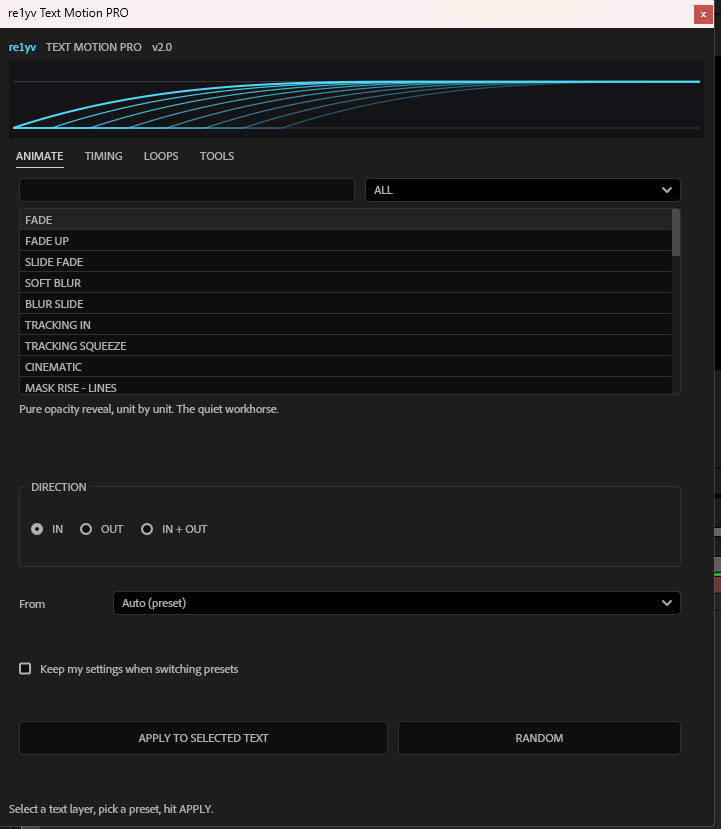
Text animation for After Effects 2025 in one click. It has 35 presets, 11 loops, and live timing controls, and it works as a dockable panel inside After Effects.
This demo is 100% free. I made it to say thank you and to help you make cooler text faster. 💙
Quick install (about 30 seconds)
- Close After Effects.
- Unzip the download.
- Copy re1yv_Text_Motion_PRO.jsx into: Documents > Adobe > After Effects 2025 > Scripts > ScriptUI Panels
- Open After Effects, then go to Window > re1yv_Text_Motion_PRO, at the bottom
How to use it
- Select a text layer (or a few at once).
- Pick a preset from the list.
- Choose IN, OUT, or IN + OUT.
- Click APPLY. That's it! 🎬
little tips
- Hit RANDOM when you're out of ideas. It's surprisingly good.
- After applying, open the layer's Effects panel and tweak the "re1yv" sliders. You don't need to re-apply anything.
- Select several layers and use Layer stagger to make them animate one after another.
- Stack a LOOP (like Float or Shimmer) on top of an IN animation for extra polish.
- Try the MASK RISE presets for that clean pro reveal.
Something not working?
Make sure the file ends in .jsx and that you restarted After Effects. Still stuck? Send me a message with a screenshot and I'll help. 🛠️
Thank you so much for downloading! 💖
If you make something with it, I'd love to see it. Tag me and share it around. It really means a lot.
Made with love by re1yv ✌️