



Clock Vault for Windows – Disguised Encrypted File Vault for Secure & Private File Storage
Clock Vault for Windows
Disguised Encrypted File Vault for Privacy & Secure File Storage
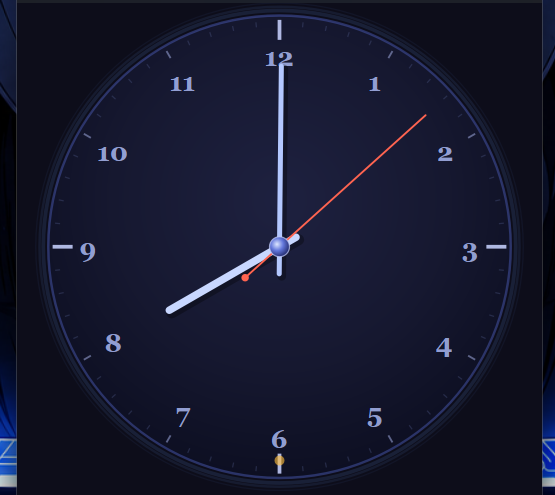
Protect your sensitive files with Clock Vault, a unique Windows application that disguises itself as a fully functional analog clock while securely hiding your files inside an encrypted vault.
At first glance, it looks like an ordinary desktop clock complete with alarm, timer, and stopwatch features. Behind the clock, however, is a powerful encrypted vault accessible only through your secret clock gesture and master password.
No installation required. No internet connection required.
✅ What’s Inside the ZIP Folder:
- Clock.exe – The main Windows application (portable, no installation required)
- README.txt – Quick start guide with setup and usage instructions
- LICENSE.txt – License and usage information
✅ Key Features:
Keep your private files hidden and protected using advanced encryption and a unique disguised interface.
Features include:
- Disguised as a fully functional analog clock
- Secret clock gesture unlock mechanism
- Working Alarm, Timer, and Stopwatch
- AES-encrypted secure file vault
- Restore files and folders back to your computer whenever needed
- Change your secret clock unlock time at any time
- Change your master password with automatic re-encryption of stored files
- Automatic vault locking after periods of inactivity
- Resizable and minimizable application window
- Emergency password recovery system tied to your device
- All files remain encrypted and stored locally on your computer
✅ Easy to Use
- Extract the ZIP file.
- Double-click Clock.exe.
- The application opens as a normal analog clock.
- Drag the clock hands to your secret unlock time.
- Double-click the center dot when it glows green.
- Enter your master password to access your encrypted vault.
✅ First-Time Setup
- Open the application.
- Perform the clock unlock gesture (Default time 3:00).
- Create your master password when prompted.
- Your encrypted vault is now ready to use.
Choose a strong password and remember it carefully.
✅ Perfect For
Privacy-conscious users, Students, Professionals, Remote Workers, Journalists, Content Creators, Small Business Owners, Freelancers, and anyone who wants to securely hide and encrypt personal or confidential files.
🎁 Instant Digital Download
Purchase once and use the application anytime on your Windows PC.
No subscriptions, no recurring fees, and no installation required.
Simply download, extract, and start protecting your files in minutes.
⚠️ Important Note:
This is a digital product only. No physical item will be shipped.
The application is provided as a downloadable ZIP file containing the executable and documentation files.
All encrypted vault data is stored locally on your computer. Backing up the application's vault folder is strongly recommended to avoid accidental data loss.Due to the nature of digital downloads, all sales are final and non-refundable.