

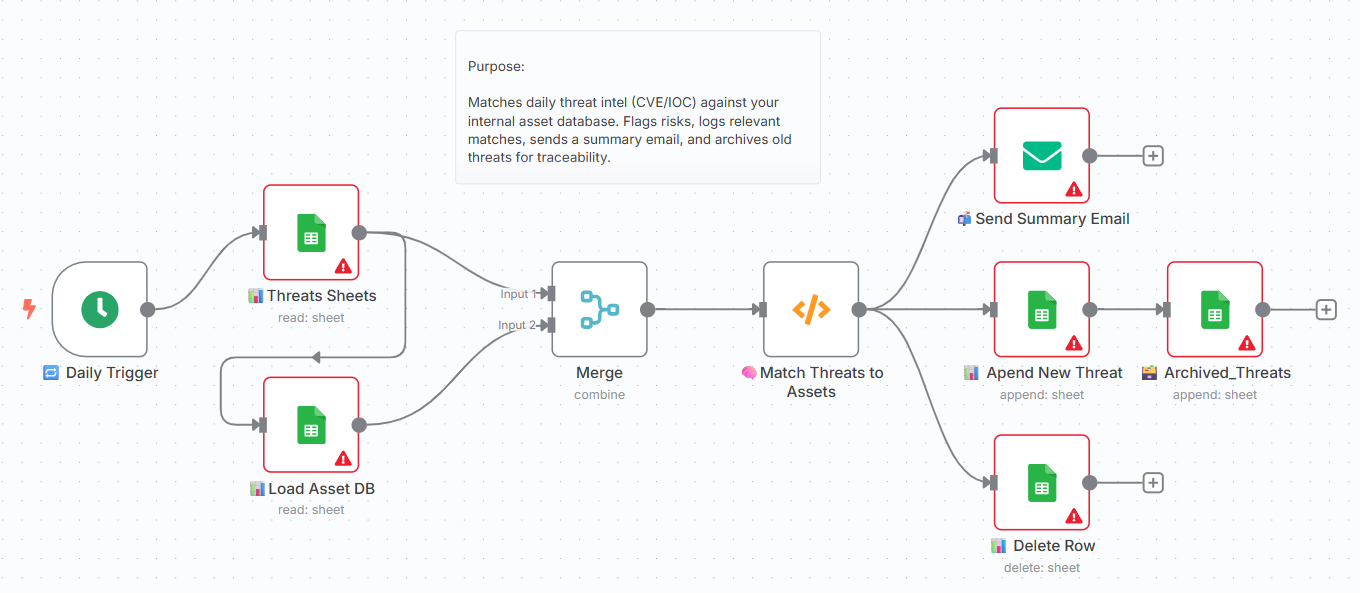
CYBERPULSE AI BlueOps: Asset Enrichment Engine
On Sale
A$45.00
A$45.00
👤 Who it’s for
Blue teamers, SOC operators, cyber analysts, and SME defenders who want to automatically enrich daily CVE/IOC threats by matching them to their internal asset database.
Ideal for compliance-driven teams (NIST CSF, Essential Eight) seeking automated enrichment and alert routing.
⚙️ How it works / What it does
- Loads current threat data from Sheet or Module 1 output
- Loads internal asset database from Google Sheets
- Merges based on matching IP fields
- Calculates impact score (threat score × asset value)
- Applies basic playbook logic to classify action
- Sends summary emails for matched threats
- Logs to archived and live threat monitoring sheets
- Built with modular, no-code logic and alerting support
🛠️ How to set up
- Google Sheets:
- Authenticate your Google account
- (OAuth2) and set your Asset DB and Threats log sheet IDs.
- Email:
- Add sender/recipient addresses and SMTP credentials.
- Customize Matching Logic:
- Adjust enrichment rule in the “🧠 Match Threats to Assets” node.
- Triggers:
- Add a Cron node or Webhook to schedule the enrichment job.
- Review sticky notes:
- All steps are explained clearly within the workflow nodes.
📋 Requirements
- Google Sheets with asset inventory + threat log
- Google account with Sheets API access
- SMTP service (Gmail, Mailgun, SendGrid, etc.)
- Optional: OpenAI for dynamic playbook scoring (if extending logic)
🧩 How to customize the workflow
- Replace Google Sheets with Supabase, Airtable, or Postgres
- Extend enrichment rule to include hostname or UUID matching
- Fine-tune scoring logic by severity, CVSS, or business unit
- Route alerts via Slack, Discord, or n8n Webhook endpoints
- Add conditional routing for alert suppression or review queues
📦 No sensitive data included. All credentials and sheet IDs are placeholders.
🔐 This module is part of the CYBERPULSEBlueOps Pro Pack.
For full access to advanced Blue Team automations, visit cyberpulsesolutions.com/blueops