



20 Pinterest Pin Templates for Offer-Led Blog Posts
Pins that send her to the post with your offer on it, not just traffic that leaves.
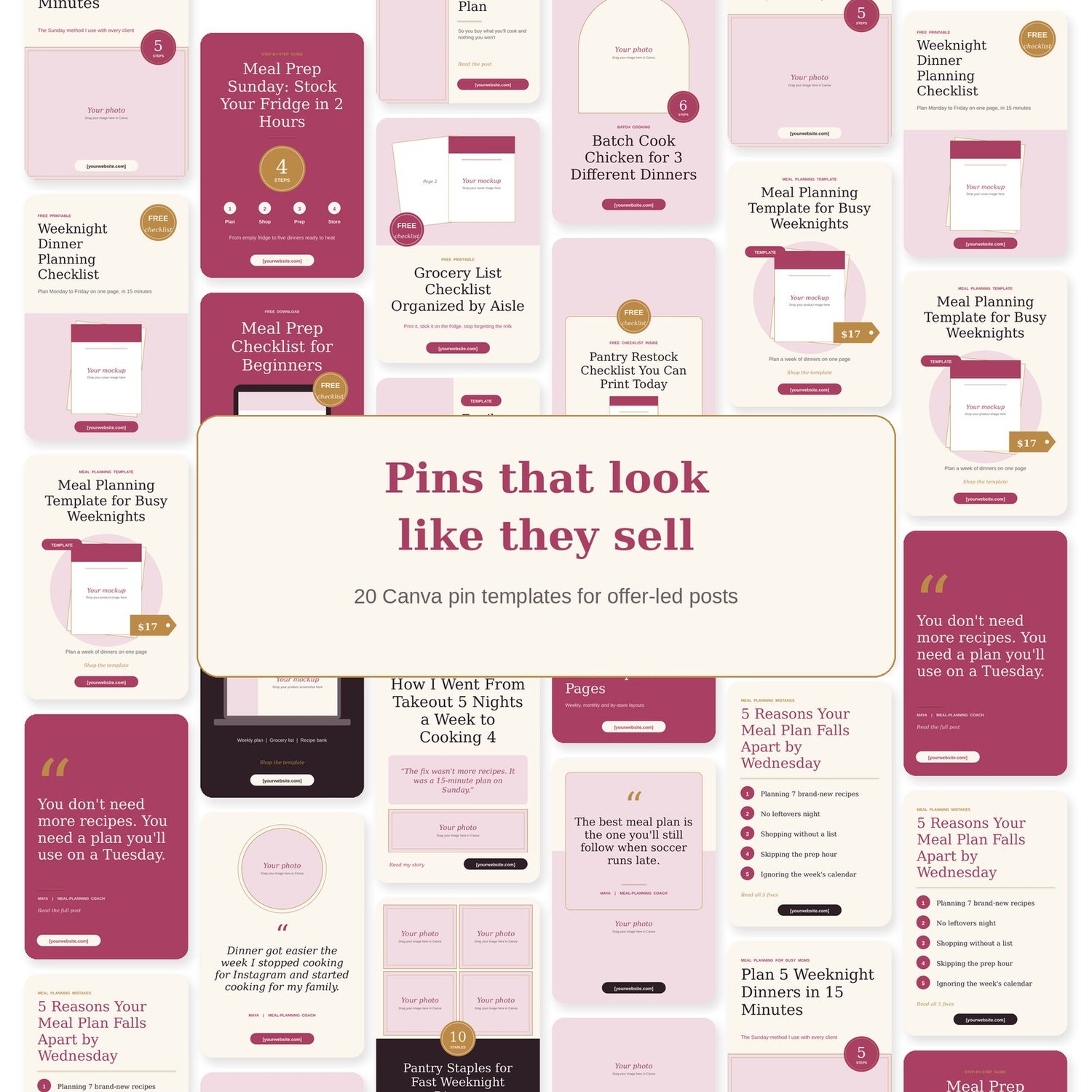
Most pin templates are built for clicks. Pretty, sure. But the click lands on a post with nothing to buy, and she's gone. These 20 pins are built for posts that sell: how-to posts that lead to a freebie, list posts that lead to a product, freebie pins with a mockup of what she gets, product pins with the price right on them. Pick 3 per post, swap the words, link them to the post. That's the system.
What's inside
- 20 Pinterest pin templates at 1000 x 1500 (2:3), editable in free Canva
- 4 how-to pins with a step count badge
- 4 list and mistakes pins with numbers front and center
- 4 freebie pins with a "Free checklist" badge and a mockup frame for your freebie cover
- 4 product pins with a price tag, a "Template" badge and a mockup frame
- 4 story and quote pins with a big quote and your author line
- Layouts that don't all look the same: text top and photo bottom, full-bleed color, split, arch frame, collage, photo with card
- Every element is editable text and shapes. Photo spots are framed and labelled "Your photo"
- Sample titles for a meal-planning coach, so you can see what a keyword-first title looks like
- Pin Playbook (2-page PDF): which layout for which post, title formulas, the 3 pins per post rule, board names, where to link, and a posting pace you can keep
- Start Here guide with the Canva link and Brand Kit steps
Who it's for
- Bloggers who have a freebie or a product and want Pinterest to send people to it
- Coaches who blog and want pins that look like the price they charge
- Busy moms who have one evening a week for Pinterest, not one hour a day
- Anyone whose pins get impressions and no sales
Not for you if you want 200 pins in 15 styles. This is 20 pins, 5 jobs, one way to do it.
How to use it
- Open the template link in Canva and click "Use template." Apply your Brand Kit so every pin is in your colors and fonts.
- Pick 3 layouts for one blog post. Swap in keyword-first titles, drop in your photos and mockups, change [yourwebsite.com] to your site.
- Download as PNG, upload to Pinterest with a keyword description, and link every pin to the exact post, not your homepage.
FAQ
Do I need Canva Pro?
No. Everything opens and edits on free Canva. Brand Kit styles are a Pro feature, but on free Canva you can swap a color on every pin at once with "Change all."
Will these work if I'm not in food or meal planning?
Yes. The sample text is for a meal-planning coach so you can see a real example. The layouts work for any niche: business, home, faith, fitness, money, parenting.
Can I use them for my clients?
No. The licence is for your own blog and business. If you make pins for clients, they need their own copy.
How many pins should I post?
1 to 3 fresh pins a day is plenty. The Playbook shows you how to batch a week of them in one sitting.