


2027 Money Reset Bundle, 5 Budget Spreadsheets and Printables for Google Sheets & Excel, Toolkit, Paycheck, Debt, Bills, Sinking Funds
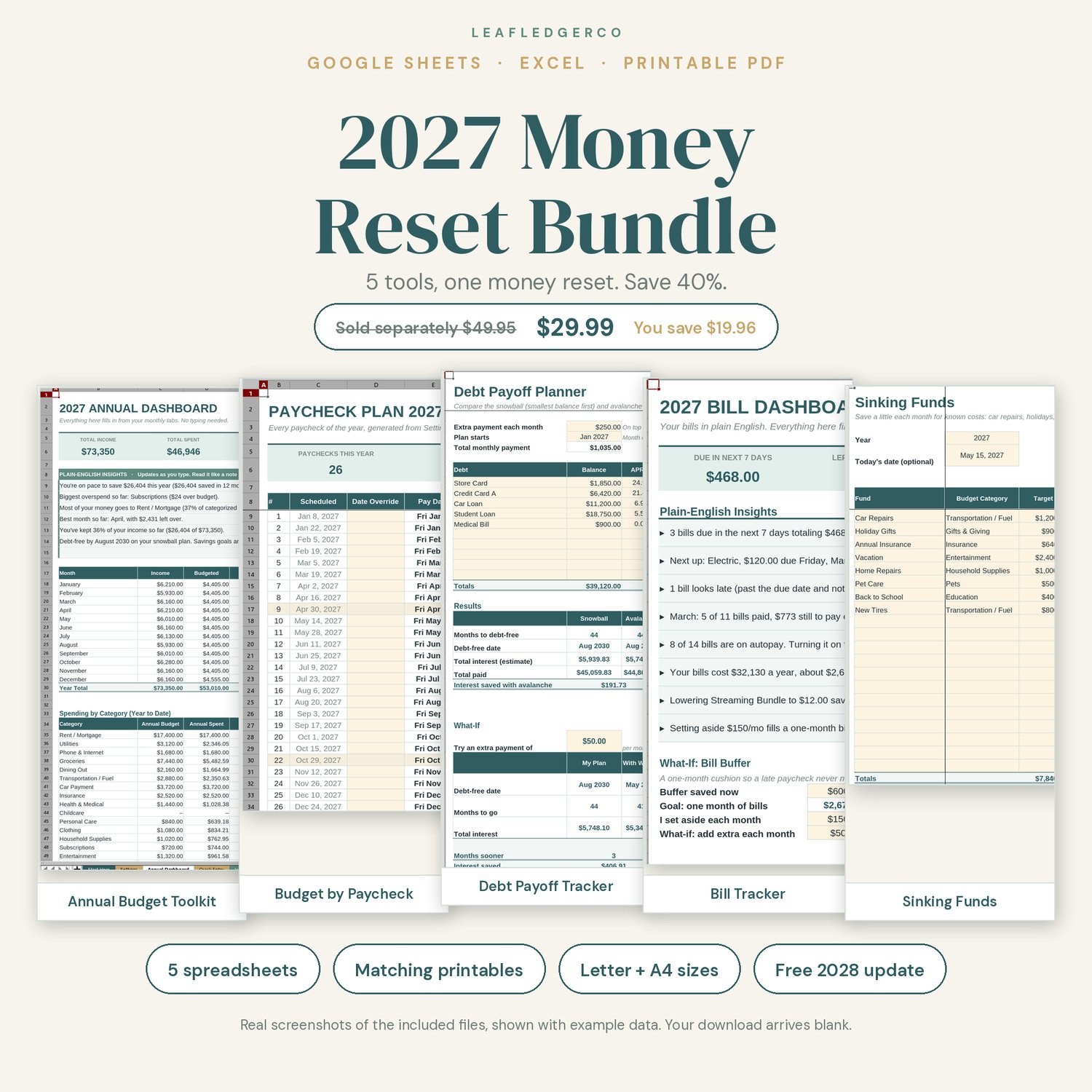
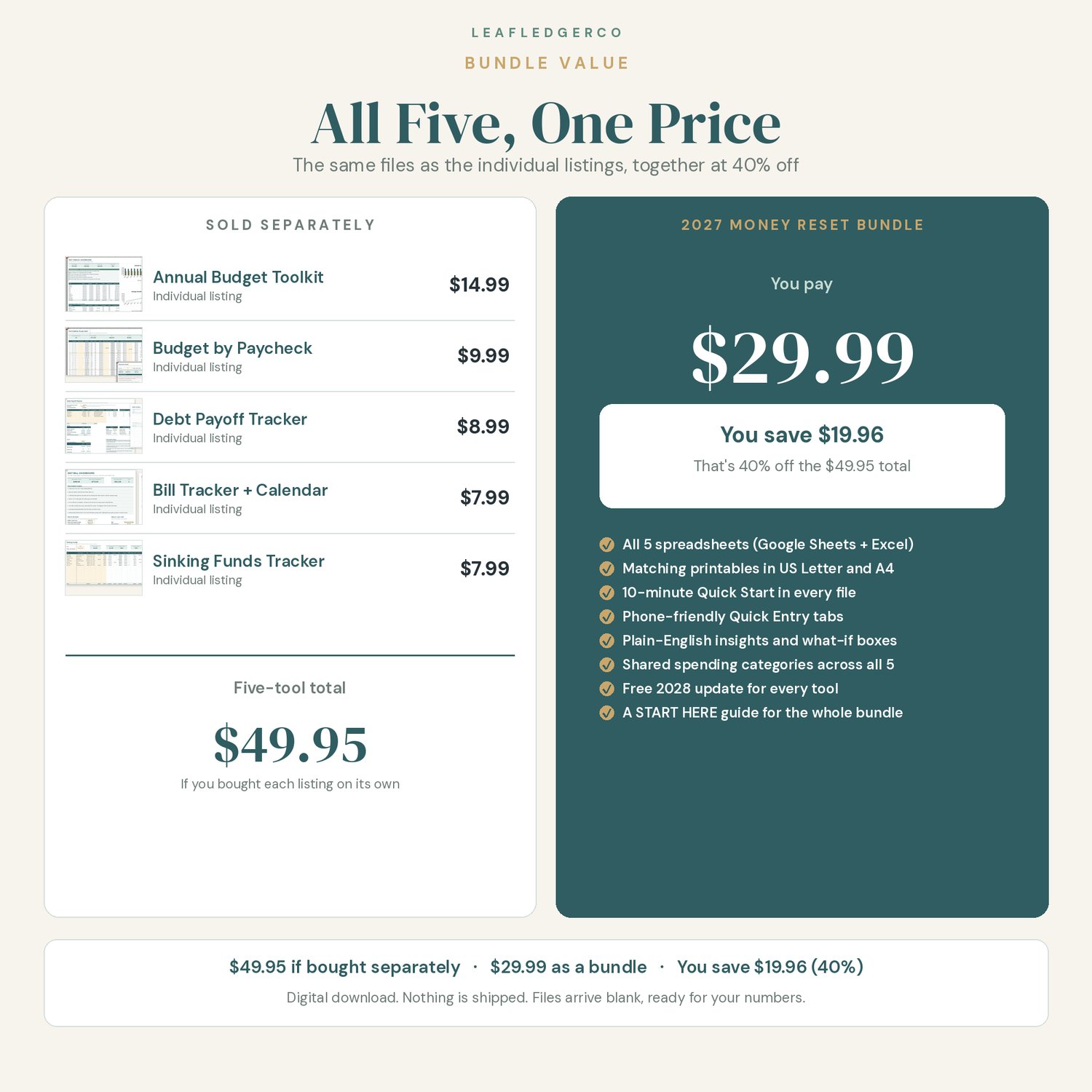
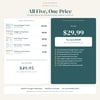
Reset your money for 2027 with five LeafLedgerCo tools that work as one system. You get the Annual Budget Toolkit, Budget by Paycheck, the Debt Payoff Tracker, the Bill Tracker, and the Sinking Funds Tracker — the same files as the individual listings — together for $29.99. Bought separately they are $49.95, so you save $19.96 (40%).
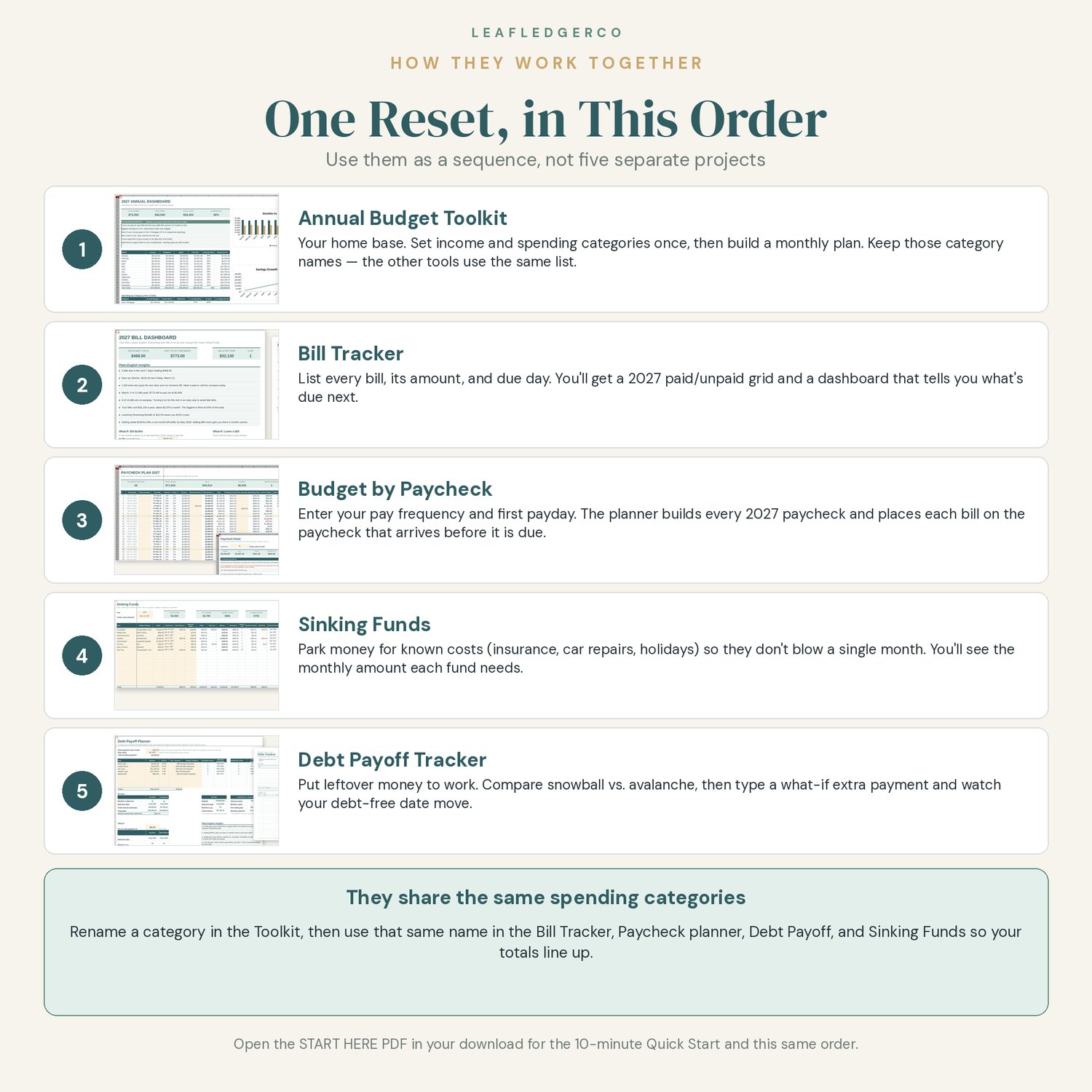
A START HERE guide is included so you know the order to use them and can get the whole bundle talking in about 10 minutes.
★ WHY THIS BUNDLE STANDS OUT
• Five tools, one reset: they share the same spending category names, so totals line up when you use them side by side.
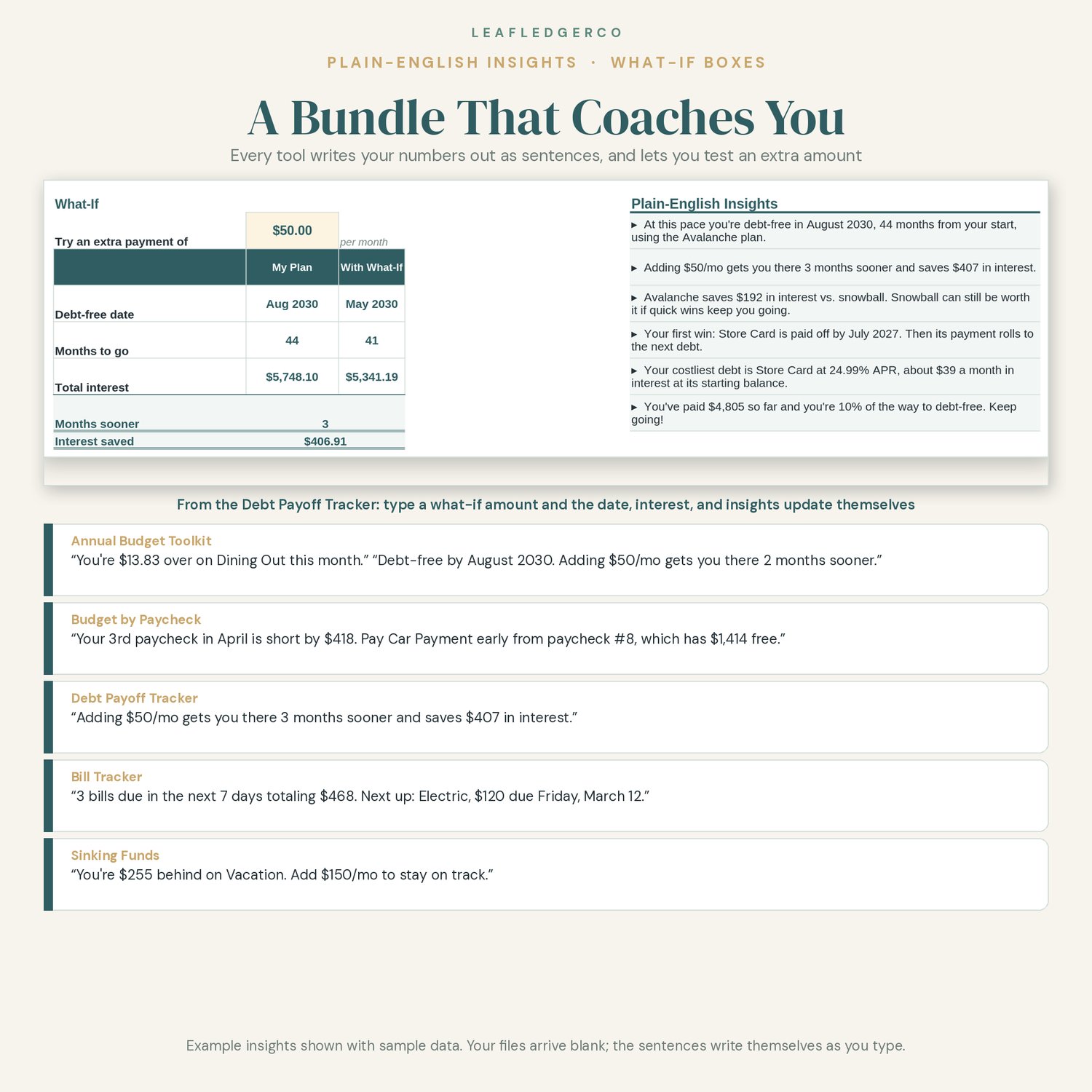
• Plain-English Insights in every spreadsheet, written by formulas as you type. For example: "You're $13.83 over on Dining Out this month." "Your 3rd paycheck in April is short by $418. Pay Car Payment early from paycheck #8." "Adding $50/mo gets you there 3 months sooner and saves $407 in interest."
• What-if boxes: type an extra debt payment, an extra savings amount, or an extra sinking-fund contribution and watch the dates move.
• A 10-minute Quick Start for the whole bundle, plus a Start Here tab in each file.
• Quick Entry tabs sized for logging on your phone in the Google Sheets app.
• Matching printable PDFs in US Letter and A4 for every tool.
• Free 2028 update for every tool in the bundle.
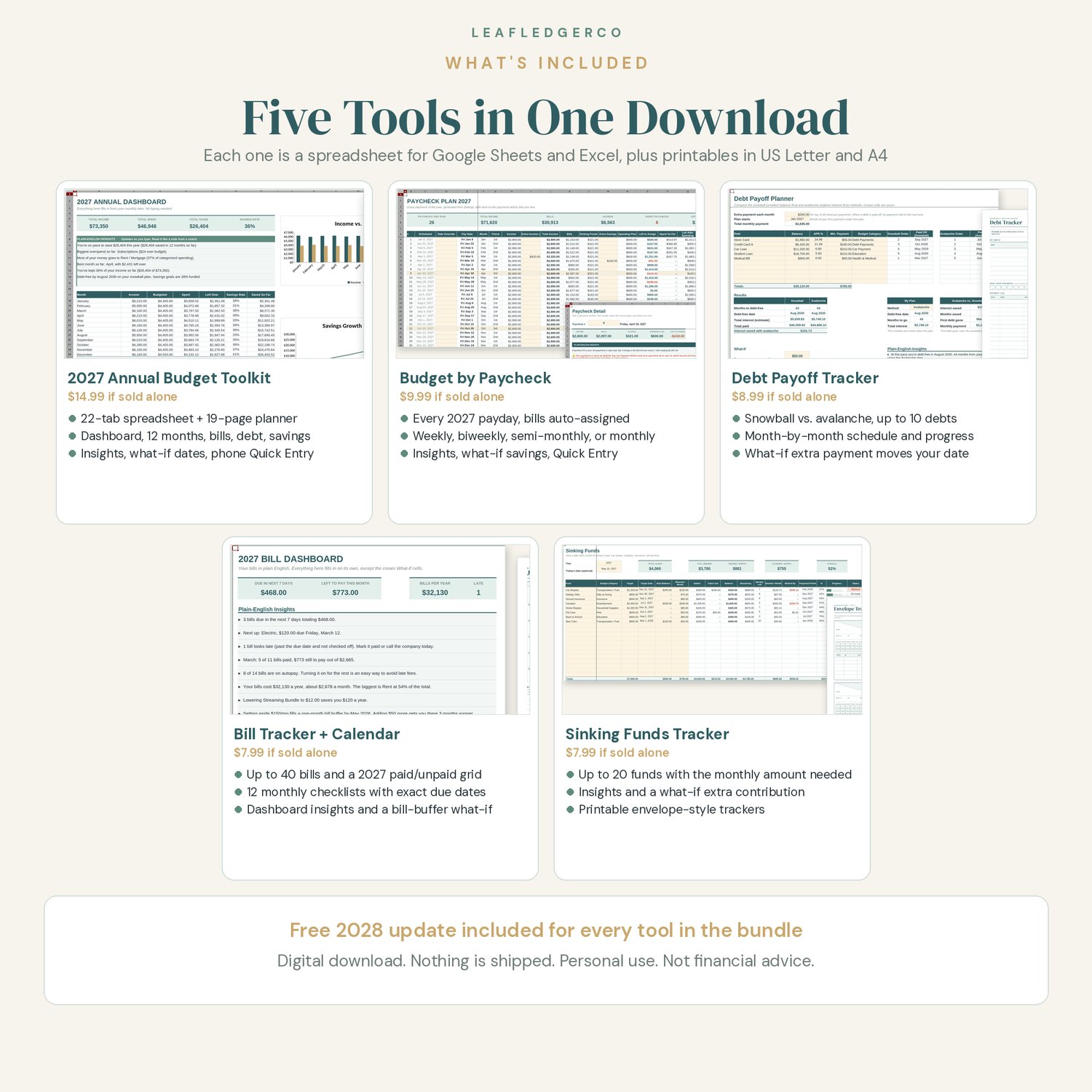
★ WHAT'S INCLUDED
START HERE GUIDE (open this first)
• A 4-page PDF that welcomes you, lists your five download files, gives the order to use the tools, walks through a 10-minute Quick Start for the whole bundle, and shows how to copy each sheet into Google Sheets or open it in Excel.
1. 2027 ANNUAL BUDGET TOOLKIT ($14.99 value)
Spreadsheet (22 tabs, one .xlsx file for Google Sheets and Microsoft Excel)
• Start Here, Settings, Annual Dashboard with insights and charts, Quick Entry, 12 monthly budget tabs, Bill Tracker, Sinking Funds, Debt Payoff with what-if dates, Savings Goals with what-if dates, and a 52-Week Savings Challenge
Printable PDF planner (19 pages, US Letter and A4)
• Cover, 2027 Year at a Glance, Annual Goals, 12 monthly budget pages, bill checklist, debt tracker, sinking funds tracker, and a 52-week savings challenge
2. BUDGET BY PAYCHECK ($9.99 value)
Spreadsheet for Google Sheets and Excel
• Automatic 2027 pay dates (weekly, biweekly, semi-monthly, or monthly), bills assigned to the paycheck that arrives before each due date, Plain-English Insights, a what-if savings calculator, Quick Entry, and an annual summary
Printable PDF (5 pages, US Letter and A4)
• Cover, paycheck budget worksheet, bill list, 2027 paycheck calendar, and paycheck register
3. DEBT PAYOFF TRACKER ($8.99 value)
Spreadsheet for Google Sheets and Excel
• Up to 10 debts, snowball vs. avalanche side by side, a month-by-month payoff schedule, Payment Log, Debt-Free Progress charts, a what-if extra payment, insights, and Quick Entry
Printable PDF (US Letter and A4)
• A matching debt tracker
4. BILL TRACKER + PAYMENT CALENDAR ($7.99 value)
Spreadsheet for Google Sheets and Excel
• Up to 40 bills, a 2027 paid/unpaid Year at a Glance, 12 monthly checklists with exact due dates, dashboard insights, bill-buffer and lower-a-bill what-if boxes, and Quick Entry
Printable PDF (16 pages, US Letter and A4)
• A 2027 bill calendar and monthly checklists
5. SINKING FUNDS TRACKER ($7.99 value)
Spreadsheet for Google Sheets and Excel
• Up to 20 funds with the monthly amount needed, insights, a what-if extra contribution, a contribution log, a 2027 monthly tracker, and Quick Entry
Printable PDF (6 pages, US Letter and A4)
• A plan page, 8 envelope-style trackers, 2 big-goal envelopes, and a monthly contributions grid
★ HOW TO USE THE FILES
1. Download all five files from the link in your purchase receipt email (a computer is easiest).
2. Open 00-START-HERE-2027-Money-Reset-Bundle.pdf first.
3. Unzip the other four files. On a Mac, double-click each zip. On Windows, right-click and choose Extract All.
HOW TO COPY EACH SHEET INTO GOOGLE SHEETS
1. In Google Drive, click New > File upload and choose one .xlsx file.
2. Open it and choose File > Save as Google Sheets. Work in that new copy, not the original upload.
3. Repeat for all five spreadsheets: 2027-Budget-Toolkit.xlsx, Budget-by-Paycheck-2027.xlsx, Debt-Payoff-Tracker.xlsx, 2027-Bill-Tracker.xlsx, and Sinking-Funds-Tracker.xlsx.
4. On your phone, open those copies in the free Google Sheets app and use each file's Quick Entry tab.
5. Optional: to use clickable checkboxes, select a ✓ column and choose Insert > Checkbox. The totals count either style.
HOW TO OPEN EACH SHEET IN MICROSOFT EXCEL
1. Double-click each .xlsx file to open it in Excel (desktop, web, or mobile).
2. If you see a Protected View bar, click Enable Editing.
3. Choose File > Save As and keep a personal copy so the original stays blank.
4. Follow the 10-minute Quick Start on that file's Start Here tab, or use the order in the bundle's START HERE guide.
★ PRINTING
Print the PDFs at home or at a print shop. Choose "Actual size" or "Fit" in your print settings. Print every page or only the ones you need. The pages use thin lines and little color to save ink.
★ FREE 2028 UPDATE
Buy once and get the 2028 edition of every tool in this bundle free. When the 2028 files are ready, LeafLedgerCo will add them to this product's download files, and you can get them from your original purchase download link. I'll also email buyers when the update is ready. If you have any trouble, contact LeafLedgerCo with your order number.
★ PLEASE NOTE
• This is a DIGITAL DOWNLOAD. Nothing will be shipped to you.
• The listing photos show example data so you can see how the tools work. Your files arrive blank, ready for your numbers.
• These are the same files as the five individual listings in this shop. The Christmas Gift & Holiday Budget Tracker is a separate seasonal listing and is not part of this bundle.
• Amounts are shown in US dollars. You can change the currency format in your spreadsheet app.
• You need a free Google account or Microsoft Excel to use the spreadsheets, and a PDF reader to print.
• Insights, payoff dates, and finish dates are estimates based on what you enter. Debt math assumes a fixed APR, monthly interest, and no new charges. These are organizing tools, not financial advice.
• For personal use only. Please do not share or resell the files.
• Colors may look slightly different on screen than on paper.
★ ABOUT HOW THIS WAS MADE
This product was designed with AI assistance under my direction. I planned the bundle, set its features and look, and reviewed and tested the spreadsheet formulas and printable pages before listing.
Questions? Use the contact form on this store, or reply to your receipt email. I'm happy to help you get set up.