



Contractor Bid & Follow-Up Kit — Excel Quote & Bid Tracker (Pilot)
Know every morning which quotes need a call, which bids are due, and which jobs have no next step — in one Excel sheet.
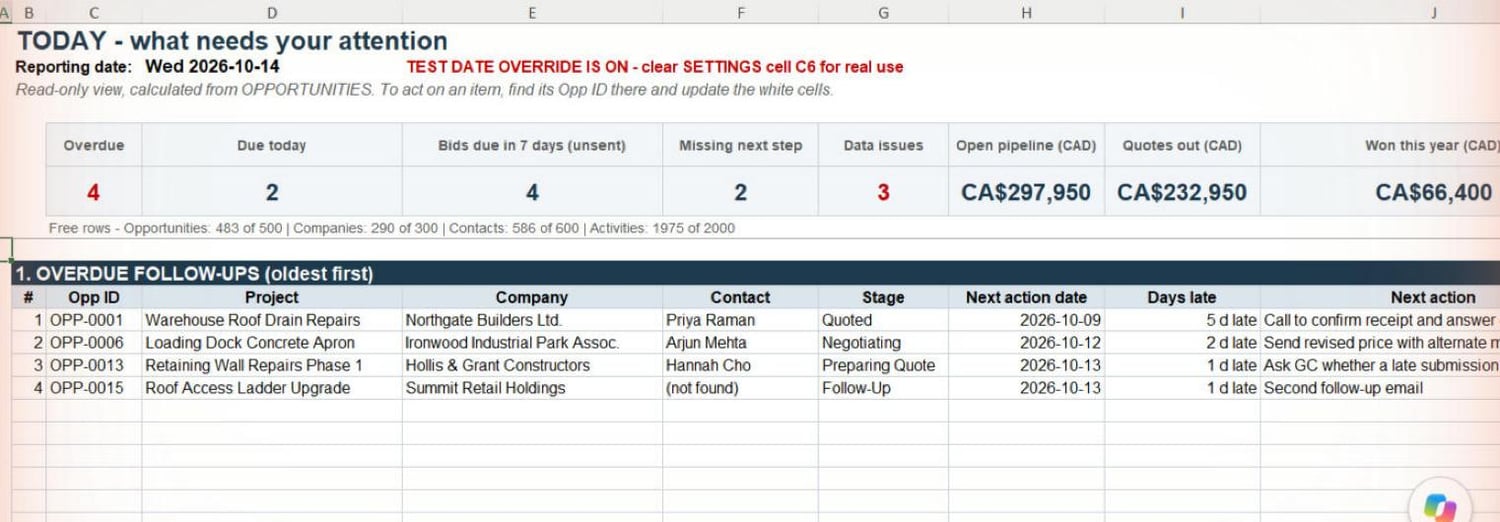
About the screenshots: they show the DEMO workbook, filled with fictional sample companies, contacts and amounts (not real customers or results). The DEMO uses a fixed test reporting date of 2026-10-14, which is why the TODAY sheet shows "TEST DATE OVERRIDE IS ON". As the banner says, clearing SETTINGS cell C6 switches the DEMO back to the real date.
What it does
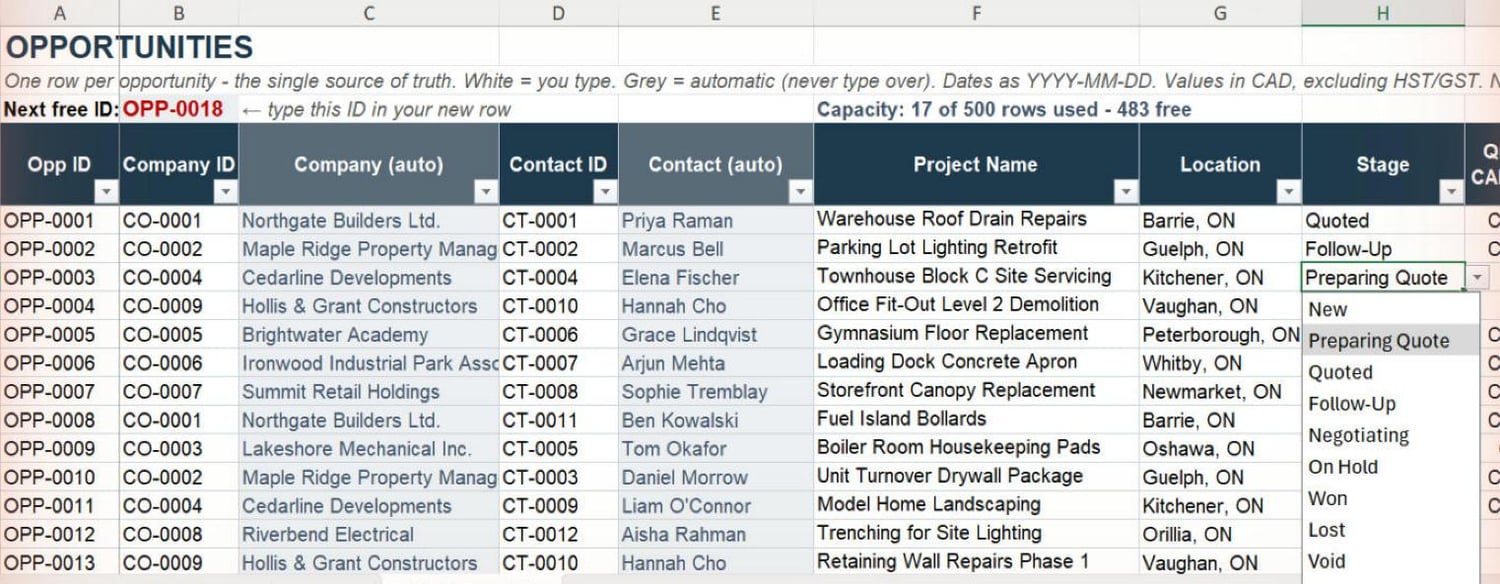
The Contractor Bid & Follow-Up Kit is an Excel workbook for contractors who quote jobs and then have to chase them. You keep one row per job. The TODAY sheet reads those rows and shows:
- Overdue follow-ups, oldest first, with how many days late
- Follow-ups due today
- Bids due in the next 7 days that you haven't sent yet (missed deadlines first)
- Open jobs with no next step or no next-step date
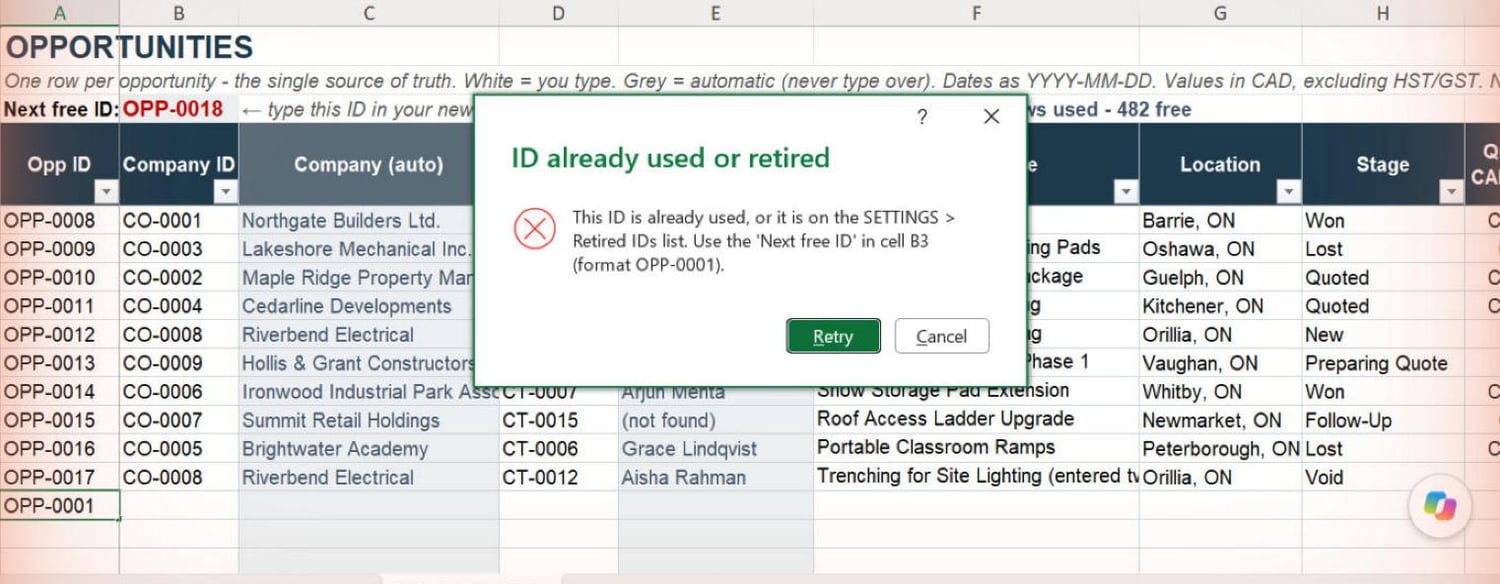
- Data checks: duplicate or retired IDs, missing links, stage and date problems
- Pipeline totals in CAD: open pipeline, quotes out awaiting a decision, and won this year
There is nothing to install and no subscription. It is a regular Excel file that you keep.
What's in the download
- BLANK workbook: your own copy, which starts empty.
- DEMO workbook: the same workbook filled with fictional sample jobs, so you can see how it works before entering your own.
- Quick Start & AI Playbook (PDF): about 15 minutes of setup, a 5-minute daily routine, how to add or retire records safely, and optional copy-and-paste prompts. The prompts help you use an AI chat tool to draft follow-ups from your own data, which you review before sending.
Who it's for
- Trades and general contractors, mostly working alone or in a small office, who send quotes and lose track of follow-ups
- People already comfortable typing into Excel
- Anyone who wants one simple record of bids and follow-ups, not a full CRM
Probably not for you if several people need to edit the same file at once, or you want automatic email, calendar or phone integration.
Where it has been tested
- Tested in: Microsoft 365 Excel for Windows (desktop app). The seller's acceptance tests ran on version 16.0.20326.20232, and an automated regression check also passed.
- Not yet verified: Excel for Mac, older stand-alone Excel versions (2016/2019/2021), Excel for the web, phone and tablet apps, and Google Sheets. If you use one of these, please ask before buying.
- No macros, add-ins, external links or internet connection needed.
Built-in safeguards
- Each sheet shows the next free ID. Excel blocks a duplicate or retired ID when you type one.
- Stage, Company and Contact are picked from dropdown lists. A value that isn't on the list is refused.
- The dashboard, settings and guide sheets are protected against accidental edits (no password).
Limitations — please read before buying
- Single user. It isn't built for several people editing at once. Separate copies don't merge.
- No automatic sync with email, calendar or contacts. You type updates yourself, and nothing sends messages for you.
- The AI prompts are optional and manual. You copy rows into an AI tool of your choice, then review and type any changes yourself.
- Grey formula cells on the record sheets aren't locked, so sorting keeps working. If one is overwritten, the guide explains how to repair it.
- Capacity: 500 opportunities, 300 companies, 600 contacts and 2,000 activities. More rows can be added (steps in the guide).
- Amounts are in CAD, excluding tax. Dates are typed as YYYY-MM-DD.
- This is a pilot. The workbook works as described, but it is new, and your feedback during the first two weeks shapes what happens next. No future features are promised.
Pilot terms
- C$49 one-time, offered to the first 5 buyers only.
- You keep your copy of the files.
- Includes setup help by email (see the support terms) and a two-week feedback period with a five-question form at the end. The feedback period is not a refund period.
- Refunds: see the Digital Product Refund Policy below. Not included: custom changes, integrations, ongoing or unlimited support, or a subscription.
Support (pilot buyers only)
- Channel: email to support@bearbuiltdigital.com. Replies within 2 business days (Mon–Fri, Eastern time).
- Included: help getting started (opening the files, SETTINGS, entering your first jobs), up to about 30 minutes per buyer in total during the 14-day pilot. This can be one short screen-share call if both sides agree.
- Fixes: if the workbook doesn't work as the product page describes in Microsoft 365 Excel for Windows, I'll try to reproduce the problem. If it's a defect, I'll fix it if I reasonably can and send you a corrected file. No timeline is guaranteed.
- Not included: custom columns or layouts, changes for your specific business, data entry, Excel training, integrations, support beyond the pilot period, or support for Excel versions or platforms that haven't been tested.
Digital Product Refund Policy
Because our products are delivered as downloadable digital files, purchases are generally final once the files have been delivered. We do not offer change-of-mind refunds or free trials through our refund policy.
If you cannot access your purchased files, encounter a product defect, or find that the product materially differs from its description, contact support@bearbuiltdigital.com. We will work to resolve the issue or provide an appropriate refund.
Nothing in this policy limits your rights under applicable consumer protection laws.
What the pilot does not promise
- No future features, updates, subscription or managed service.
- No particular business result (sales, time saved, deals won).
- Your data stays in your own file. The seller never sees it unless you choose to send a copy for troubleshooting. Don't send files containing client details you aren't permitted to share.
FAQ
Do I need Microsoft 365? It has been tested in Microsoft 365 Excel for Windows. Other Excel versions and Mac aren't verified yet, so please ask first.
Does it work in Google Sheets? Not verified. Please treat it as Excel-only for now.
Will it send emails or reminders? No. It shows you what's due when you open it. You make the calls and send the messages yourself.
Can my office manager and I both use it? It's a single-user file. Two people editing separate copies won't merge their changes.
What if I delete a job by mistake? Use Undo straight away. The guide also shows how to retire a job (Stage = Void) instead of deleting it, so its history and ID are kept.
Is my data uploaded anywhere? No. The workbook stays on your computer or wherever you save it. Nothing in it connects to the internet.
What does the AI playbook do? It gives you ready-made prompts to paste into an AI chat tool to draft a follow-up or plan your day from rows you copy in. It tells the AI to use only your facts and to mark its suggestions. It's optional, and you check everything before using it.
What if it doesn't work for me? If you cannot access your files, find a product defect, or find that the product materially differs from its description, email support@bearbuiltdigital.com and we will work to resolve the issue or provide an appropriate refund. Otherwise, purchases are generally final once the files have been delivered. See the Digital Product Refund Policy above.
Will there be updates? The pilot price covers the current version (v1.1.2). No future features or updates are promised.