




TeraZip-Setup.msi is inside the 7z
TeraZip — Extreme Folder Compression for Image-Heavy Archives
Turn massive folders into dramatically smaller archives — fast.
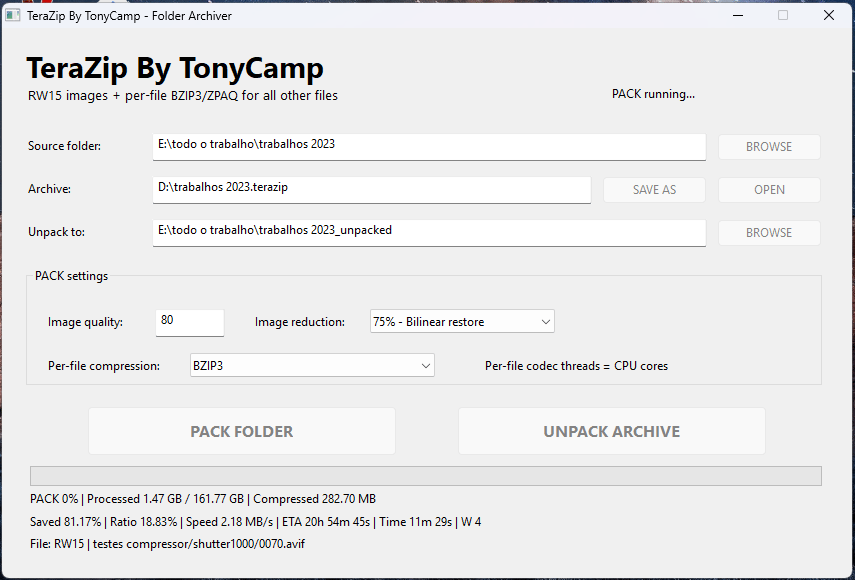
TeraZip is a Windows folder archiver designed for collections containing large amounts of images, graphics and mixed files. Instead of treating every file as generic binary data,TeraZip
uses a specialized image compression pipeline and then applies powerful final compression using ZPAQ or BZIP3.
In one of our real-world tests, an approximately 24 GB folder was reduced to around 9 GB in about one hour. Performance and final size depend on the files, selected quality, CPU and compression mode.
Unlike extremely slow general-purpose compressors such as CMIX or NNCP, TeraZip is designed to obtain very strong compression on image-heavy folders while remaining practical enough for everyday use.
Key Features
- Compress complete folders and all subfolders into one .lossyzippro archive
- Specialized compression for PNG, JPG, WebP, AVIF, JXL, BMP, TGA and other image formats
- Non-image files are preserved as original binary data
- Restore images back to their original file format
- ZPAQ compression modes: -m1s, -m2s, -m3s, -m4s, -m5s
- BZIP3 compression support
- Multi-core CPU processing
- Automatic worker count based on available CPU cores
- GB-based progress display
- Estimated remaining time
- Elapsed time display
- Automatic temporary-file cleanup
- Preserves folder and subfolder structure
- Simple graphical Windows interface
- Designed for very large folders and datasets
Why TeraZip?
Traditional compressors must preserve every byte exactly, which limits how much already-compressed images can shrink.
TeraZip
takes a different approach.
Images can be intelligently reduced and recompressed before the final archive compression stage, while normal documents, executables, data files and other non-image files remain stored without this lossy image transformation.
This makes WinLossyZip Pro particularly suitable for:
photo collections, image datasets, website backups, graphics folders, AI datasets, game graphics, large media archives and storage reduction.
Example
Original folder: ~24 GB
TeraZip archive: ~9 GB
Processing time: ~1 hour in our tested configuration
That represents a reduction of approximately 62.5% in that particular test.
For large image-heavy collections, this approach can deliver a much more useful compression ratio versus processing-time balance than ultra-slow compressors such as CMIX or NNCP.
Important: TeraZip uses lossy processing for supported images. It is therefore not a direct like-for-like replacement for fully lossless compressors. Compression ratio, speed and reconstructed image quality vary depending on source material, quality settings, CPU and selected compression profile.
BENCHMARKS : 1025GB regular Folder TeraZip zpaq -m5s -q80 209GB in 3 days 4 workers
BENCHMARKS : 1025GB regular Folder 7z -ultra LMZ2 621GB in 1 days 4 workers