


Invoice & Payment Tracker — Lite (Free) | Finance Made Simple™
Open it, log an invoice, and know instantly who's paid, who hasn't, and who's overdue.
No setup, no account, no watermark — just a spreadsheet that does the one thing a spreadsheet should: tell you what's actually going on with your money, without you doing the maths.
What changes once you're using this
No more scrolling back through old messages trying to remember if someone paid. No more guessing what's overdue. Open the Dashboard, see four numbers, know exactly where you stand.
What's inside
- Invoice Register — log up to 25 invoices: client, dates, amount, status, notes
- Automatic overdue flagging — you never have to check manually
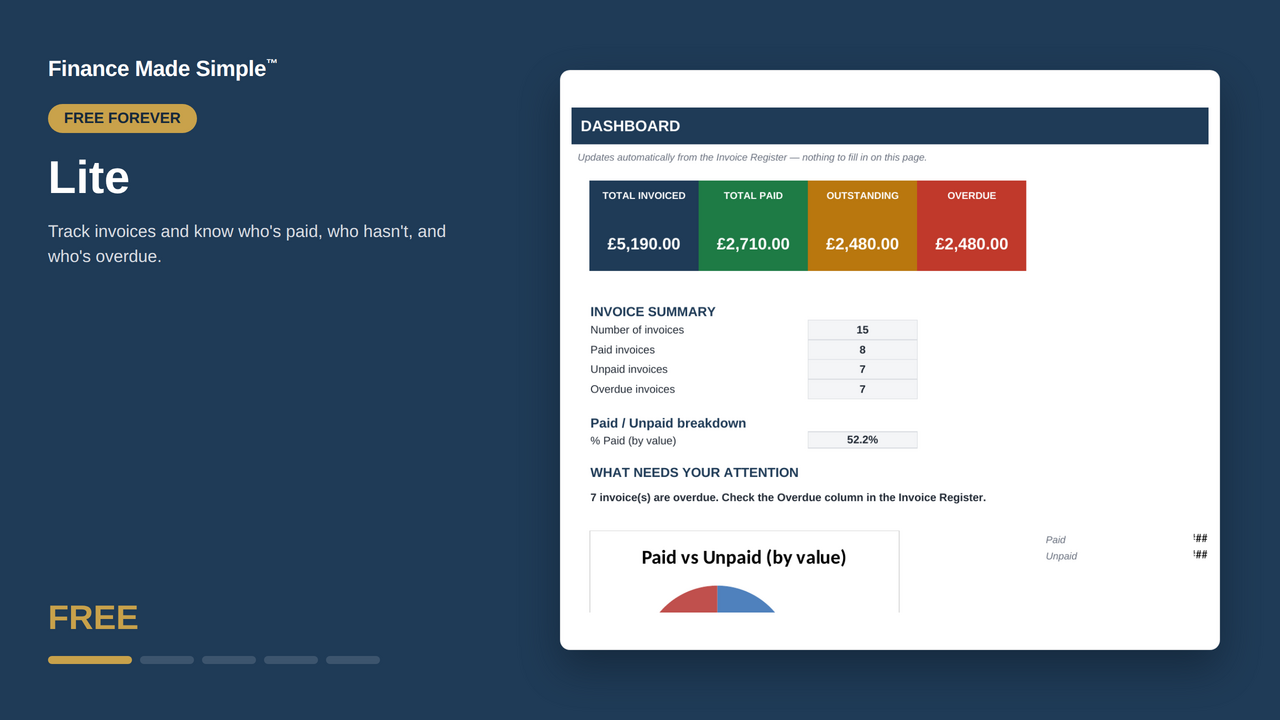
- Live Dashboard — Total Invoiced, Total Paid, Outstanding, Overdue, % Paid
- A one-line "what needs attention" prompt, so you're never staring at numbers wondering what to do next
- Full UK formatting, no fuss
Who this is for
Freelancers just getting started, or anyone who wants to test whether tracking invoices in a spreadsheet actually fits how they work — before committing to anything bigger.
How it works
Download the Blank version, log your first invoice, check the Dashboard. That's it. Mark invoices Paid as they're paid; overdue ones flag themselves.
What you get in the download
- Demo workbook (15 sample invoices, so you can see it working before you touch anything)
- Blank workbook (clean, ready for your own data)
- A one-page Quick Start PDF
What this doesn't do
No client list (Client is a text field here, not linked to anything), no partial payments, no monthly summaries, no reminder templates. Capacity is fixed at 25 invoices. If you outgrow that, Standard (£5.99) is built for exactly this moment — unlimited invoices, a real client list, and reminder templates ready to send.
The honest print
This is a spreadsheet template for personal record-keeping. It's not accounting, legal, or tax software, and Finance Made Simple™ isn't a firm of accountants.
Part of the Finance Made Simple™ family — Lite → Standard → Pro → Complete → Tax Prep. Start wherever your business actually is right now.