
Kid's Kitchen Mixer File
Custom 3D-Printed Kids’ Stand Mixer Toy | Personalized Pretend-Play Kitchen Accessory
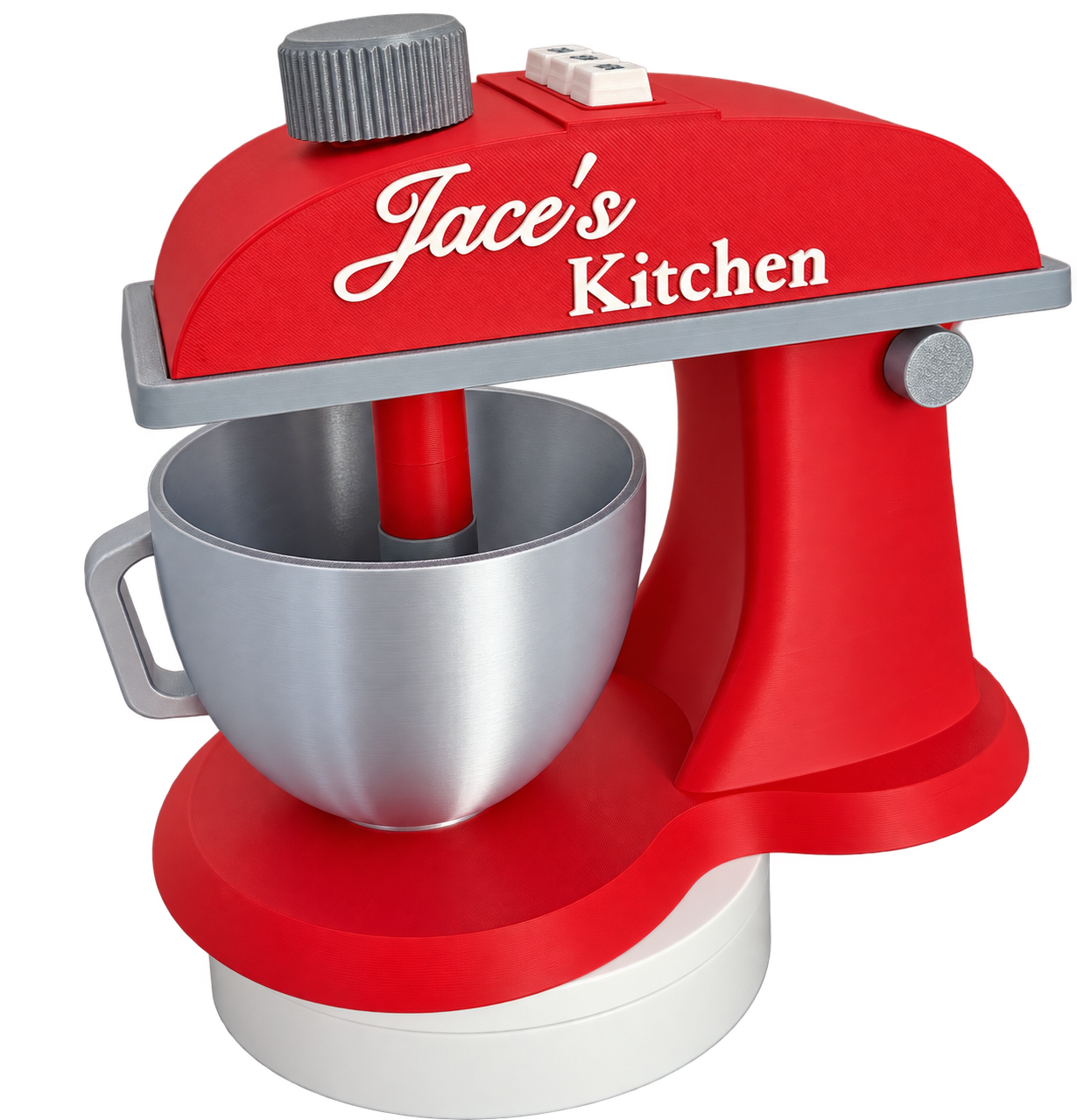
Let your little chef’s imagination run wild with this adorable, fully interactive 3D-printed stand mixer toy! Designed for imaginative pretend play, this miniature kitchen mixer brings the fun of baking to any play kitchen. Featuring a vibrant red design, silver accents, a mixing bowl, and interactive moving parts, this unique toy is perfect for little ones who love pretending to bake cupcakes, mix up imaginary cake batter, and create their own kitchen masterpieces. Best of all, the side of the mixer can be customized with any name or phrase, making it a special, personalized addition to your little chef’s play kitchen!
Interactive Features
- Moveable Mixer Head: Lift and lower the mixer head for an engaging, realistic pretend-baking experience.
- Three Clickable Buttons: Press the buttons on top labeled ON, OFF, and MIX for interactive pretend-play fun.
- Manually Rotating Whisk: Turn the knob on top of the mixer to manually rotate the whisking blade and pretend to mix up delicious creations.
- Personalized Nameplate: Customize the side of the mixer with any name or phrase to make it uniquely yours.
- 3D-Printed Design: Created using 3D-printing technology with fun details and a distinctive miniature stand mixer appearance.
Made for Imaginative Play
Whether your little one is pretending to bake cookies, whip up a birthday cake, or run their very own bakery, this toy encourages creativity, storytelling, and imaginative role-play.
It’s a fun addition to a play kitchen and a thoughtful personalized gift for little chefs who love helping in the kitchen!
Perfect For
- Kids’ play kitchens
- Pretend baking and cooking
- Imaginative role-play
- Personalized birthday gifts
- Holiday and special-occasion gifts
- Little chefs and aspiring bakers
Assembly Instructions
This product requires assembly. Please follow the steps below carefully. Above this description is an attached video button link for assembly (click the button to watch a full assembly of this model)
Step 1: Prepare the Head Insert
- Remove all support material from the head insert.
- The head insert is designed to fit snugly into the mixer head dome.
Step 2: Attach the Mixer Head Dome
- Insert the head insert into the mixer head dome.
- Apply super glue to the top portion of the insert to secure the dome to the insert.
- Align the holes on both pieces and snap them into place.
Step 3: Attach the Customized Nameplate
- Once the dome and insert are secured, glue the customized nameplate onto the side of the dome.
- Important: Attach the nameplate to the side of the dome that was printed face-down on the build plate. This ensures the nameplate is properly aligned and centered. Attaching it to the opposite side will cause it to appear off-center.
Step 4: Secure the Mixer Head to the Neck Base
- Insert the skinny peg through the corresponding holes in the back of the neck base and the head insert.
- Attach and glue the round circle pegs onto the skinny peg to hold the mixer head dome and insert securely in place.
Step 5: Install the Clickable Buttons
- Insert the clickers into the designated openings in the base body clicker model.
- Insert the corresponding key caps labeled ON, OFF, and MIX into their correct positions.
Step 6: Attach the Button Assembly
- Apply super glue to the recessed cutout area on the mixer dome.
- Insert the assembled base body clicker into the cutout and secure it in place.
Step 7: Install the Whisking Blade
- Apply glue to the whisking blade pole where it fits into the round circular opening.
- Insert the whisking blade into the opening.
- Insert the assembled whisking blade and pole into the hole in the mixer head dome and insert.
Step 8: Secure the Top Knob
- Screw the top knob onto the whisking blade pole to hold the assembly in place.
- Once assembly is complete and all adhesive has fully cured, check that the whisk rotates manually as intended.
Important Information
Ages 3+
- This is a pretend-play toy, not a real kitchen appliance.
- The buttons are for interactive play and do not power an electric motor.
- The whisk rotates manually using the top knob.
- This toy is not intended for mixing real food or liquids.
- Adult assembly is required. Use super glue according to the manufacturer's instructions and allow it to cure completely before use.
- Keep glue and unassembled small parts away from children.
- Inspect the toy regularly for loose components, cracks, or damage, and discontinue use if damage occurs. A personalized little mixer for big imaginations! Let your little chef create their own pretend bakery and enjoy hours of creative kitchen fun.