
Everyday Budget Planner
TAKE CONTROL OF YOUR MONEY—ONE PLAN AT A TIME
The Everyday Budget Planner
A simple, organized budgeting workbook to help you track your monthly income and expenses, understand where your money is going, and make a plan that works for your life.
Stop guessing where your paycheck went.
Start giving your money a clear purpose.
[GET THE EVERYDAY BUDGET PLANNER — $11]
Instant digital download
Does your money seem to disappear every month?
You work hard for your income, but between bills, groceries, subscriptions, transportation, debt payments, savings, and everyday spending, it can be hard to see the full picture.
Maybe you have tried to budget before, but it felt overwhelming. Maybe you write numbers down but do not know what they mean. Or maybe you simply want one place to organize your plan before the month gets away from you.
The Everyday Budget Planner helps you turn scattered numbers into a clear monthly money plan.
No complicated system to learn. No need to build formulas from scratch.
Just enter your numbers, review your totals, and use the insights to make informed choices.
[GET ORGANIZED WITH THE EVERYDAY BUDGET PLANNER — $11]
WHAT THE EVERYDAY BUDGET PLANNER HELPS YOU DO
- Organize your monthly income in one place
- Plan and track monthly expenses by category
- See total income, total expenses, money left, and the percentage of income used
- Review your spending totals by category
- Compare your plan with the 50/30/20 budgeting guideline
- Set and monitor a savings goal
- Organize debt details, including balances, APRs, minimum payments, and extra payments
- See an annual summary based on your current monthly budget plan
- Follow the built-in Start Here instructions to begin confidently
INSIDE THE PLANNER
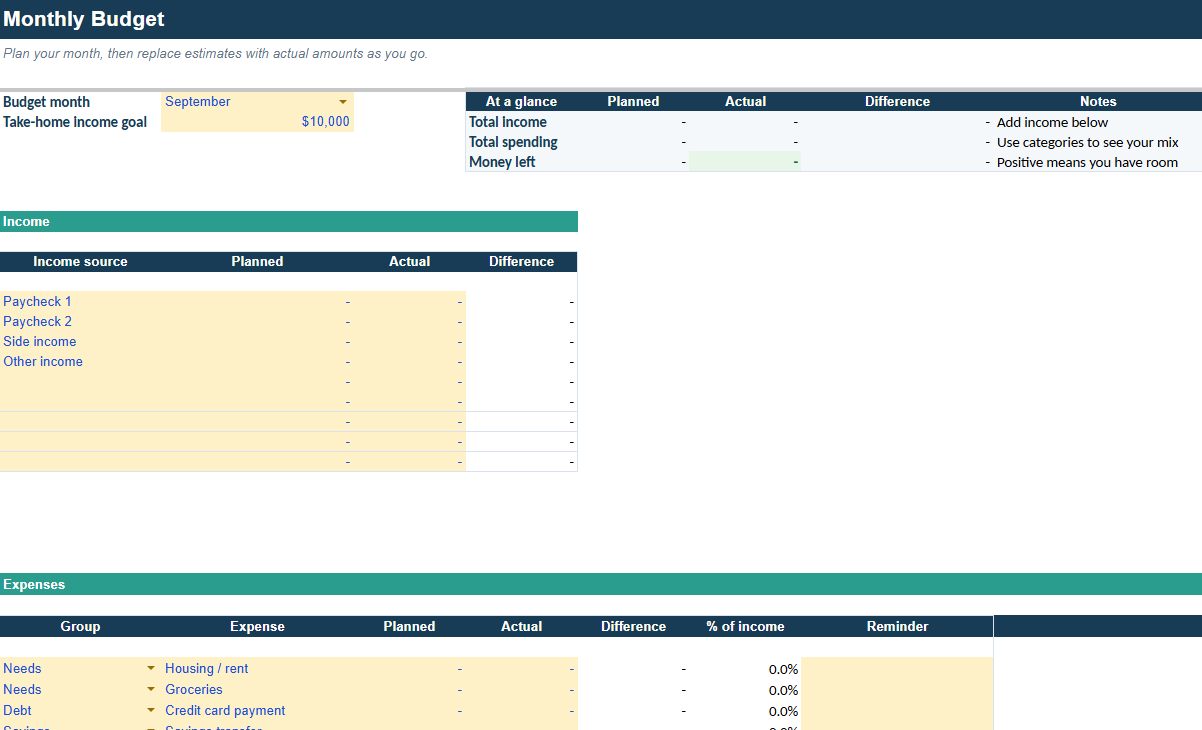
Monthly Income Tracker
Enter each source of monthly income and let the workbook total it for you.
Whether your income comes from one paycheck, multiple jobs, side work, or another source, this section gives you a clear starting point for your monthly plan.
Monthly Expense Planner
Add your planned expenses and organize them using built-in category dropdowns.
Seeing expenses grouped by category makes it easier to identify what your money is being assigned to—from housing and groceries to transportation, subscriptions, and more.
Your expense totals update automatically as you enter your plan.
Monthly Budget Snapshot
Get a quick view of the numbers that matter most:
- Total monthly income
- Total monthly expenses
- Money left after planned expenses
- Percentage of income used
- Category spending totals
Instead of searching through a long list of expenses, you can see the overall direction of your monthly budget in one place.
50/30/20 Target Comparison
Use the 50/30/20 guideline as a reference point for your plan.
The planner compares your budget with suggested targets for:
- Needs
- Wants
- Savings and debt-related goals
This is not a rulebook—it is a practical way to reflect on how your current plan is allocated and decide whether any changes would help you reach your goals.
Savings Goal Calculator
Turn a savings goal into a more actionable plan.
Enter your target amount, what you have already saved, and your planned monthly contribution to better understand the path toward your goal.
Whether you are saving for an emergency fund, a vacation, a major purchase, or simply more financial breathing room, this section keeps the goal visible.
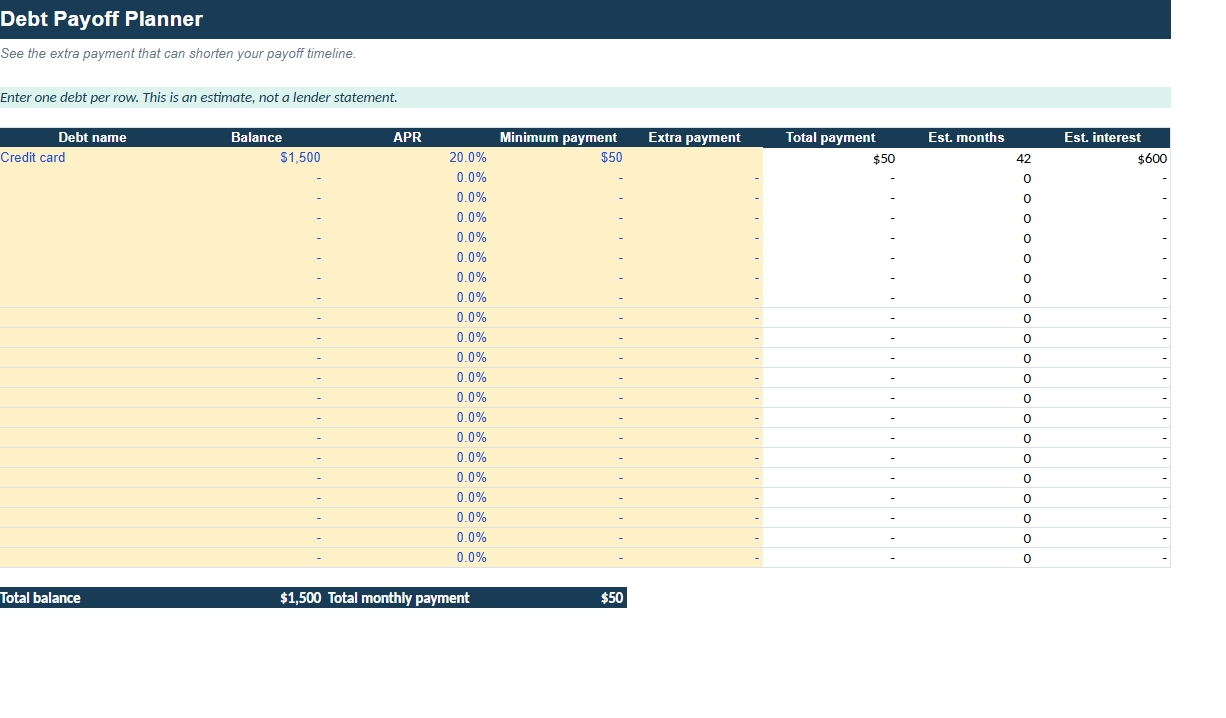
Debt Payoff Organizer
Keep your debt details organized in one place.
Track:
- Debt name or account
- Current balance
- APR
- Minimum payment
- Extra payment amount
Use it as a clear record of your repayment plan and a way to see the details before deciding where you want to focus your extra money.
Annual Budget Summary
See the bigger picture beyond a single month.
The annual summary projects your current monthly budget plan across the year, helping you understand what your planned income, expenses, and remaining money could look like over 12 months.
Please note: this summary is based on the monthly plan you enter. It is a planning tool, not a record of actual bank activity or a forecast of future income and expenses.
Start Here Instructions
You do not have to figure it out alone.
The included Start Here tab walks you through how to begin using the workbook so you can start entering your plan with more confidence.
WHAT’S INCLUDED
With your purchase, you will receive:
- The Everyday Budget Planner workbook
- Monthly income tracker
- Monthly expense planner with category dropdowns
- Automatic monthly totals
- Monthly budget snapshot
- 50/30/20 target comparison
- Savings goal calculator
- Debt payoff organizer
- Annual budget summary
- Start Here instruction tab
[GET THE EVERYDAY BUDGET PLANNER TODAY — $11]
WHO THIS PLANNER IS FOR
The Everyday Budget Planner is for you if you want to:
- Feel more aware of where your money is going
- Start budgeting without creating a workbook from scratch
- Make a plan before spending your income
- See your monthly income and expenses more clearly
- Build savings into your plan
- Keep debt details organized
- Use the 50/30/20 guideline as a helpful reference
- Take a more intentional approach to your everyday finances
You do not need to be “good with money” to get started. You only need a willingness to look at your numbers and take one step at a time.
HOW IT WORKS
- Purchase the planner.
- Download the digital file from your purchase confirmation page or email.
- Open the workbook in compatible spreadsheet software.
- Start with the Start Here tab.
- Enter your monthly income and planned expenses.
- Review your snapshot, category totals, targets, savings goal, debt organizer, and annual summary.
- Update your plan as your income, expenses, or goals change.
There is no physical product shipped to you.
PLEASE READ BEFORE PURCHASING
This is a digital spreadsheet product. You will receive a downloadable file; no printed planner or physical item is included.
Because this is a planning workbook, your results depend on the numbers you enter and the choices you make. Review all entries carefully and update the workbook whenever your financial situation changes.
Compatibility
This planner is provided as a Google Sheets template and is designed to be used in Google Sheets.
To use it, you will need:
- A free Google account
- Access to Google Sheets on a computer, tablet, or mobile device
- An internet connection to open and save your copy
After purchase, you will receive access to the template and instructions for making your own copy. You will be able to edit and save that copy privately in your Google Drive.
For the best experience, we recommend using the planner on a computer or tablet. Some formatting, dropdowns, and workbook features may be easier to view and use on a larger screen.
Please make sure you can access Google Sheets before purchasing.
FREQUENTLY ASKED QUESTIONS
Is this a physical planner?
No. This is a digital download. Nothing will be mailed to you.
Do I need budgeting experience?
No. The workbook is designed to be approachable, and the Start Here tab explains how to begin.
Does the planner connect to my bank account?
No. This planner does not connect to bank accounts or automatically import transactions. You enter and update your own information.
Is this a debt payoff calculator?
There is a debt payoff organizer that lets you record balances, APRs, minimum payments, and extra payments. It is designed to help you keep those details together as part of your overall budget plan.
Does the annual summary show my actual yearly spending?
The annual summary is based on the current monthly plan you enter. It is intended for planning purposes and does not automatically track bank transactions or actual spending across the year.
Can I use this every month?
Yes. Update your income, expenses, savings goal, and debt information as needed to keep your plan current.
Can I share the file with someone else?
No. Your purchase is for your personal use only. Please do not share, distribute, resell, copy for others, or upload the file.
Will I receive updates?
This purchase includes the version available at the time of purchase. Future updates are not guaranteed.
DIGITAL PRODUCT REFUND POLICY
Due to the immediate access provided with digital downloads, all sales are generally final once the file has been accessed or downloaded.
PERSONAL-USE LICENSE & COPYRIGHT
Your purchase grants one individual a limited, non-transferable license for personal use.
You may:
- Download and use the planner for your own personal budgeting
- Make personal edits to your own copy for your own use
You may not:
- Share, distribute, email, upload, publish, or give the file to another person
- Resell, sublicense, rent, lease, or redistribute the file in any form
- Copy, recreate, or modify the planner for sale or commercial use
- Claim the design, workbook, formulas, or content as your own
- Use any part of the product to create or sell a competing template or product
All rights not expressly granted are reserved by RealTalkwithRon .
FINANCIAL DISCLAIMER
The Everyday Budget Planner is an educational and organizational tool only. It is not financial, legal, tax, accounting, investment, credit, or debt-management advice.
The information and calculations in this workbook are based on the details entered by the user and may not reflect every aspect of an individual financial situation. You are responsible for reviewing your information and making your own financial decisions.
For advice tailored to your circumstances, consult a qualified financial, tax, legal, credit, or other professional as appropriate.
YOUR MONEY DESERVES A PLAN
You do not need a perfect budget to begin.
You need a clear place to start.
Use the Everyday Budget Planner to see your numbers, organize your priorities, and make intentional decisions with your money—one month at a time.
[GET THE EVERYDAY BUDGET PLANNER — $11]
Instant digital download