
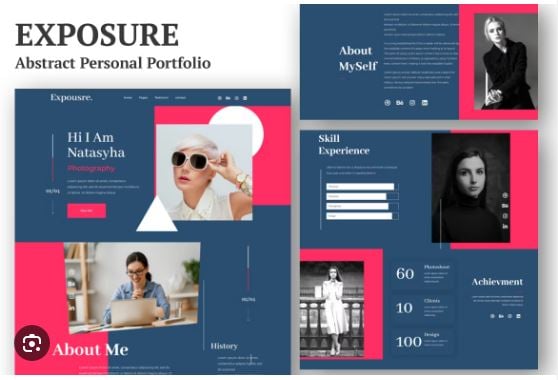
Exposure - Personal Portfolio Elementor Template Kit
Exposure is an all-in-one Elementor Template Kit designed for creating stunning personal portfolio websites . It features an abstract and professional design that helps you create a unique and distinctive online presence, suitable for photographers, designers, artists, freelancers, and creative professionals looking to highlight their projects in a visually appealing way .
The kit includes 3 different homepage/landing page designs and a range of pre-built page templates that are easy to edit and customize using Elementor's drag-and-drop interface, enabling users to create a professional portfolio website quickly and efficiently without coding knowledge .
Who Is Exposure For?
Photographers and videographers
Designers and artists
Freelancers and creative professionals
Anyone looking to create a distinctive personal portfolio website
Key Features:
Abstract & Professional Design — Unique and professional aesthetic that makes your portfolio stand out
Elementor Integration — Fully compatible with Elementor's drag-and-drop visual builder; no coding required
3 Home/Landing Page Designs — Multiple homepage variations to choose from
11+ Pre-Built Templates — Includes Home/Landing Page (3 designs), About Us, Services, Gallery, Blog, Testimonials, FAQ, Contact Us, 404 Page, Header, and Footer
Responsive & Adaptive — Design adapts seamlessly across computers, tablets, and smartphones
Blog Integration — Built-in blog page layouts for sharing updates and insights
SEO Optimized — Built with SEO best practices to help improve search visibility
What's Included in the Kit:
Component Included
Home/Landing Pages 3 designs
About Us Yes
Services Yes
Gallery Yes
Blog Yes
Testimonials Yes
FAQ Yes
Contact Us Yes
404 Page Yes
Header Yes
Footer Yes
Required Plugins:
Elementor (Free)
Elementor Pro (required)
Note: This kit has been tested for compatibility with Elementor 3.0.x .
Easy Setup in 3 Steps:
Install and activate the Elementor plugin on your WordPress site.
Install the Envato Elements plugin from Plugins > Add New in WordPress .
Go to Elements > Installed Kits, click the Upload Template Kit button, and upload the Exposure kit zip file. Click Install Requirements to activate required plugins, then import the Global Kit Styles first, followed by individual templates one at a time .
Important Note: For best results, do not import more than one template at a time .
Why Choose Exposure Over Other Portfolio Kits:
Feature Exposure Generic Portfolio Kits
Abstract, distinctive design Yes Varies
3 homepage variations Yes Usually 1-2
11+ pre-built templates Yes Usually 8-10
Elementor Pro compatible Yes Sometimes
Fully responsive Yes Yes
Blog integration Yes Varies
Requirements:
WordPress 5.0 or higher
Elementor (Free) 3.0.x or higher
Elementor Pro
PHP 7.0 or higher (7.4+ recommended)
Demo Images Notice:
This Template Kit uses demo images from Envato Elements. You will need to license these images to use them on your website, or you can substitute them with your own .
Support & Updates:
Lifetime updates for compatibility
6 months of support included
Call to Action:
Your work deserves a portfolio as unique and professional as your talent. Build a stunning, responsive online presence that captivates clients and showcases your creativity.
Download Exposure today and create a standout personal portfolio with zero coding required.