

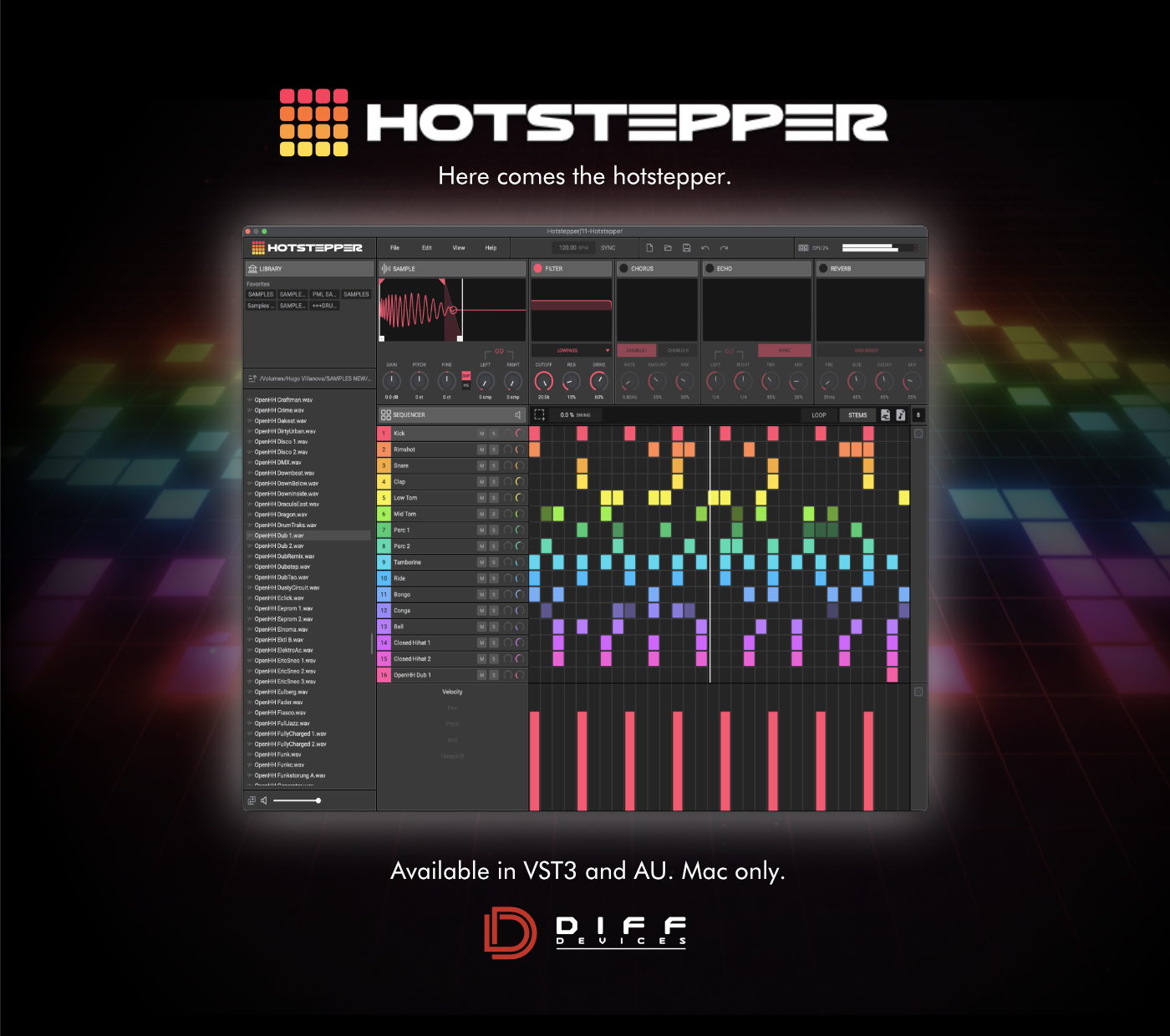
DIFF Devices - HOTSTEPPER (AU/VST3)
DIFF Devices — HOTSTEPPER
HOTSTEPPER is a sample-based rhythmic sequencer built for fast groove creation, sample manipulation, and direct idea export inside your DAW. Designed for producers who want immediacy without losing control, HOTSTEPPER combines step sequencing, per-slot sample shaping, integrated effects, and drag-and-drop workflow into a single focused instrument.
At its core, HOTSTEPPER is designed to keep the creative process moving. Load samples, shape them, sequence patterns, apply FX, and export results without leaving the plugin. Whether you are building drum patterns, chopped rhythmic loops, percussion layers, or experimental one-shot sequences, HOTSTEPPER is built to stay fast, visual, and musical.
Unlike traditional drum sequencers that separate playback, shaping, and export into multiple tools, HOTSTEPPER keeps everything in one environment:
• sample loading
• trimming and fades
• per-slot sequencing
• per-slot effects
• groove and timing control
• MIDI drag export
• audio drag export
• project save/load
The result is a workflow that feels immediate for sketching, but deep enough for detailed rhythmic design.
WHAT HOTSTEPPER IS
HOTSTEPPER is a sample sequencer instrument plugin for macOS.
It allows you to:
• load your own samples into multiple slots
• build rhythmic sequences in an internal step grid
• shape each sample with trim, fade, gain, pitch, pan, and timing controls
• process each slot with integrated FX
• drag the resulting MIDI or rendered audio directly into your DAW
• save complete HOTSTEPPER projects, including embedded samples
HOTSTEPPER is built for producers who want:
• fast beat creation
• hands-on sample shaping
• clean visual workflow
• creative sequencing without menu-heavy friction
CORE FEATURES
• 16 Sample Slots
HOTSTEPPER gives you 16 independent sample slots for building patterns, kits, and layered rhythmic ideas.
Each slot can hold its own sample and sequence data, making it easy to create:
• drum kits
• percussion layers
• chopped loops
• one-shot melodic phrases
• experimental textures
• Step Sequencer Workflow
Each loaded slot can be programmed directly in the internal sequencer grid.
This allows fast creation of:
• drum grooves
• syncopated percussion
• evolving rhythmic patterns
• stuttered or sparse arrangements
• layered polyrhythmic ideas
The sequencer is designed to stay immediate and visual, so pattern building feels fast instead of technical.
• Per-Slot Sample Editing
Each slot includes detailed sample shaping controls, including:
• sample start
• sample end
• fade in
• fade out
• fade curve control
• gain
• pitch
• fine pitch
• pan
• delay / timing offset
This makes it possible to turn simple samples into fully shaped rhythmic material without leaving the plugin.
• Per-Slot FX Section
Each sample slot includes its own internal FX chain with:
• Filter
• Echo
• Reverb
• Chorus
These FX are integrated directly into the workflow, allowing fast sound design without loading extra plugins.
• Groove and Timing Control
HOTSTEPPER includes sequencing controls for adding movement and feel to patterns, including:
• swing
• timing offsets
• step-level modulation lanes
• pattern shaping tools
This gives grooves more life while keeping the workflow compact.
• Drag MIDI Export
HOTSTEPPER can export the generated pattern as MIDI drag-and-drop, allowing you to:
• drag sequences directly into your DAW timeline
• edit notes further in the host
• use the groove with other instruments
• Drag Audio Export
HOTSTEPPER can also render and export the sequenced result as audio drag-and-drop.
This is useful for:
• printing loops quickly
• resampling ideas
• committing sound design
• building arrangements faster
• Project Save / Load
HOTSTEPPER includes its own project save system.
Project files store:
• sequence data
• loaded samples
• per-slot settings
• trim and fade settings
• FX parameters
• general project state
Samples are saved inside the project file, so sessions are portable and self-contained.
• Zoom and UI Scaling
HOTSTEPPER supports adjustable zoom settings for different screen sizes and workflows.
It also supports:
• recalling the last zoom per instance
• setting a default zoom for new instances
WORKFLOW PHILOSOPHY
HOTSTEPPER is designed around three main ideas:
• Speed
The interface is made for quick decisions:
• load sample
• shape sample
• sequence pattern
• export result
• Control
Even though the workflow is fast, each slot gives enough detail for precise shaping and rhythmic correction.
• Contained Creativity
HOTSTEPPER avoids splitting the process across multiple windows or devices. The goal is to keep rhythmic creation, editing, and export in a single place.
TYPICAL USE CASES
HOTSTEPPER is ideal for:
• drum programming
• percussion sequencing
• sample chopping
• rhythmic sound design
• loop generation
• resampling workflows
• fast sketching inside a production session
It works especially well for:
• electronic music
• house
• techno
• hip-hop
• experimental beats
• cinematic percussion design
INSTALLATION GUIDE
Inside the installer package you will find the HOTSTEPPER plugin formats for macOS.
Included Plugin Formats:
• AU
• VST3
Installation Steps:
1. Open the HOTSTEPPER installer package.
2. Follow the installer steps.
3. The installer will place the plugins into:
/Library/Audio/Plug-Ins/Components/
/Library/Audio/Plug-Ins/VST3/
4. Open your DAW.
5. Run a plugin rescan if needed.
6. Load HOTSTEPPER as an instrument plugin.
You’re ready to go.
MACOS SECURITY NOTICE
HOTSTEPPER is currently distributed independently and is not signed or notarized through Apple Developer ID.
Because of this, macOS may prevent the installer or DMG from opening on first launch.
If macOS blocks the file:
1. Locate the HOTSTEPPER .dmg or installer package in Finder.
2. Right-click the file.
3. Choose Open.
4. Confirm by clicking Open again in the security prompt.
If macOS still blocks it:
1. Open System Settings
2. Go to Privacy & Security
3. Scroll to the security section near the bottom
4. Look for a message saying HOTSTEPPER was blocked
5. Click Open Anyway
After that, macOS should allow the installer to open.
Important Note:
This warning appears because the software is not Apple Developer signed/notarized, not because it contains malware. HOTSTEPPER installs only the plugin files needed for use in your DAW.
LICENSE ACTIVATION
On first launch, HOTSTEPPER will ask for:
• your email address
• your license key
After successful activation, HOTSTEPPER stores the unlock locally on your Mac so it does not need to be activated every time.
PRIVACY
HOTSTEPPER is designed to keep your data as private as possible.
What HOTSTEPPER stores locally:
After activation, HOTSTEPPER stores a small local unlock file on your Mac so the plugin can remember your license on future launches.
What information is used for activation:
HOTSTEPPER requires:
• your email address
• your license key
These are used only to verify your license and unlock the software.
What HOTSTEPPER does not do:
HOTSTEPPER does not:
• collect project content
• upload your samples
• scan unrelated files on your computer
• track your usage for analytics
• send personal session data to third parties
Internet access:
Internet access is only required for license verification during activation.
Once successfully unlocked, HOTSTEPPER stores the unlock locally so repeated activation is not normally required.
SYSTEM REQUIREMENTS
• macOS only
• AU and VST3
• Compatible with supported macOS DAWs that load AU or VST3 plugins
• Apple Silicon only
SUMMARY
HOTSTEPPER is a focused sample sequencer designed for modern beat creation and fast musical workflow. It combines:
• sample loading
• sequencing
• shaping
• FX
• drag export
• project saving
into one clean production tool.
It is built to help you move quickly, stay creative, and turn raw samples into finished rhythmic ideas without breaking flow.