
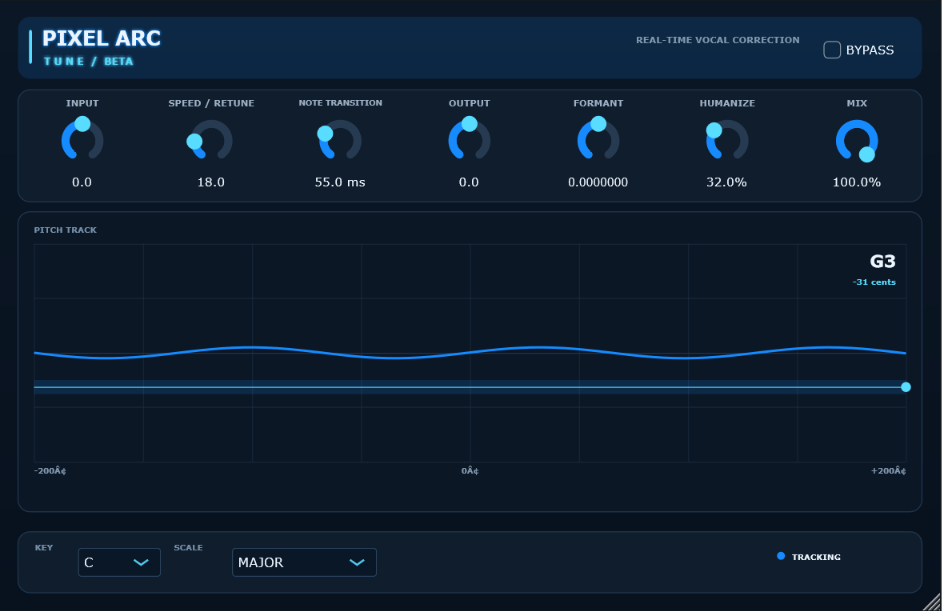
PIXEL ARC TUNE BETA
PIXEL ARC Tune BETA
ARC Tune BETA · Windows x64 · VST3 · Version 0.1.0 BETA
PIXEL ARC Tune BETA is an experimental, real-time, monophonic vocal pitch-correction plug-in. This build is being shared for evaluation; pitch quality and phase behavior still need testing across voices, registers, and DAW setups.
Install
1. Close FL Studio before replacing a plug-in file that is already loaded.
2. Extract `PIXEL ARC Tune BETA.vst3` from the release ZIP.
3. Copy the complete `.vst3` bundle to `%COMMONPROGRAMFILES%\VST3\PIXEL BEATZ\` (normally `C:\Program Files\Common Files\VST3\PIXEL BEATZ\`).
4. Start FL Studio and open **Options → Manage plugins → Find installed plugins**.
5. Add the plug-in to a vocal mixer insert. Confirm the product name reads **PIXEL ARC Tune BETA**.
The plug-in is 64-bit Windows VST3. No installer or code-signing certificate is included. A host may display a Windows security prompt for unsigned software; only continue if you trust the source of this package.
## Distribution and licensing
This project is built with JUCE, which is dual-licensed under AGPLv3 or a commercial JUCE licence. The plug-in's own distribution licence has not been selected in this beta package. Before publishing it, confirm that your JUCE licence covers the distribution model you intend to use, or prepare the source and notices required for the AGPLv3 route. The VST3 bundle is unsigned, and some distribution platforms may require code signing or additional metadata.
Controls
- **Key / Scale:** Select the song key and Major, Minor, or Chromatic scale.
- **Speed / Retune:** Set how quickly the pitch correction follows a target.
- **Note Transition:** Set the glide time when changing target notes.
- **Humanize:** Reduce the strength of correction to preserve more natural movement.
- **Formant:** Alters the shifter grain window; this beta control is not a formant-preserving processor.
- **Mix:** Blend the corrected and uncorrected signals.
- **Input / Output:** Adjust plug-in gain; **Bypass** disables correction.
The interface uses a dark navy and electric-blue palette, with a gently pulsing blue glow on the product mark.
## Beta limitations
- Intended for one lead vocal or other monophonic source. Chords, harmonies, backing vocals, and loud accompaniment can confuse pitch detection.
- The detector is tuned for fundamentals in roughly the 70–700 Hz range. Very low or high voices may track unreliably.
- Fast note changes, breathy or noisy recordings, and vibrato near scale boundaries may produce audible artifacts. Tune speed and note transition settings to taste.
- This build has been compiled as a Windows x64 VST3, but its sound has not been independently validated across all hosts, interfaces, sample rates, or vocal types. Please audition it before relying on it in a final mix.
- This is an original implementation and does not reproduce Waves Tune or any other vendor's proprietary DSP.
## Source build
Requires Visual Studio 2022 with **Desktop development with C++**, CMake 3.22+, and JUCE 7+.
```powershell
cmake -S . -B build -G "Visual Studio 17 2022" -A x64 -DJUCE_DIR="C:/path/to/JUCE"
cmake --build build --config Release --target PIXEL_ARC_Tune_VST3
```
The processor uses YIN-style monophonic pitch detection, a single-head granular shifter with a short wrap crossfade, target-note hysteresis, and a staged release toward unity pitch. Its nominal reported latency is 29.5 ms. The source is included for transparency and development; this beta is supplied without a warranty.