

If you look after a Splunk Cloud stack, your week probably has a familiar shape. Someone asks why a new log source is not showing up. A forwarder that worked yesterday has stopped sending. A sourcetype is breaking events in the wrong place, timestamps are landing an hour off, and a team wants an index of its own with a different retention period. None of that is exotic. It is the daily work of running Splunk Cloud, and it is almost exactly what the SPLK-1005 exam asks about.
SPLK-1005 is the exam behind the Splunk Cloud Certified Admin credential. Splunk's own Splunk Cloud Certified Admin certification page describes it as covering data inputs and management, forwarder configuration, user accounts, and basic monitoring and problem isolation for Splunk Cloud. It is a professional-level exam with 60 multiple choice questions, a 75-minute appointment and a price of $130 USD per attempt.
This article reads the exam from the point of view of someone already doing the job. It walks through what the blueprint actually weights, how that lines up with tasks you probably handle every week, what the candidate rules say about booking, retakes and renewal, and one change that matters right now: from October 20, 2026, Splunk exam registration moves to Cisco's certification system.
What Is the Splunk Cloud Certified Admin (SPLK-1005) Exam?
The Splunk Cloud Certified Admin exam checks whether you can manage and configure a Splunk Cloud environment. In Splunk's description that means getting data in, configuring forwarders, managing indexes and users, handling apps, and isolating problems before you open a case with Splunk Cloud Support. It is not a search exam. Writing SPL is the territory of the Core User and Power User tracks. This exam is about the plumbing that makes searches possible.
Splunk names three groups the certification is meant for. The first is career builders who want a recognised Splunk credential on their record. The second is platform administrators who want to show competence on the Splunk Cloud platform specifically. The third is people migrating to Splunk Cloud, including experienced on-premises Splunk Enterprise administrators who now need to work within the boundaries of the cloud service.
That last group is worth thinking about if you came from Splunk Enterprise. A lot of your knowledge carries over directly: configuration files, inputs, parsing, transforms. What changes is who controls what. In Splunk Cloud, parts of the stack are run by Splunk, so the exam expects you to know which tasks are yours and which ones go through Splunk Cloud Support. Two of the blueprint objectives ask you to list the primary differences between Splunk Cloud and Splunk Enterprise, and the differences between Self-Service Cloud and Managed Cloud.
Where it sits in the Splunk certification path
SPLK-1005 has a prerequisite: Splunk Core Certified Power User. You need that certification before the Cloud Admin credential is awarded, so plan for it if you do not hold it yet. In Splunk's candidate handbook the Cloud Admin track appears as a next-level option above Power User and above Core Certified Advanced Power User. Passing it therefore also matters for renewing those lower certifications, which is covered in the overview section below.
The handbook's recertification table lists no next-level option above Cloud Admin itself. In other words, there is no higher Splunk exam that renews the Cloud Admin credential for you. To keep it active you retake and pass the Cloud Admin exam within the final year of its cycle.
What the exam is not
It is not an architecture exam. Indexer clustering, search head clustering and sizing a distributed deployment belong to the Splunk Enterprise Certified Architect track. It is also not a security operations exam. Enterprise Security and SOAR have their own tracks. If your daily work is mostly building correlation searches or dashboards, this exam will feel unfamiliar in places, because it spends most of its weight on how data arrives and how it is shaped on the way in.
SPLK-1005 Exam Overview and Details
Here is what Splunk publishes about the exam itself, followed by the rules from the candidate handbook that affect how you book and sit it.
- Exam name: Splunk Cloud Certified Admin
- Exam code: SPLK-1005
- Level: Professional
- Prerequisite: Splunk Core Certified Power User
- Length: 75 minutes, which includes 3 minutes to review the exam agreement
- Format: 60 multiple choice questions
- Price: $130 USD per exam attempt
- Passing score: 700 / 1000, as listed on CertFun's syllabus page. Splunk's track page and test blueprint do not print a cut score, and the result screen shows pass or fail.
- Delivery: Pearson VUE, at a test center or at home or in the office with an online proctor
Subtract the three agreement minutes and you have 72 minutes for 60 questions, which works out to 72 seconds a question. That is our own arithmetic, not a Splunk figure, but it is a useful pacing number. You can flag questions for review and return to them, and you get a final chance to review all answers before you submit. Once submitted, scores are final.
Registration moves to Cisco on October 20, 2026
Splunk is now part of Cisco, and the two certification systems are being merged. According to Splunk's FAQ on the upcoming certification changes, candidates register for Splunk certification exams through Cisco beginning October 20, 2026. A few practical points from that FAQ are worth knowing before you book:
- You will no longer need a Splunk ID to register for an exam.
- Splunk certification accounts have been migrated to Cisco's tracking system. You log in with the email address tied to your certifications and may be asked to create a Cisco.com account.
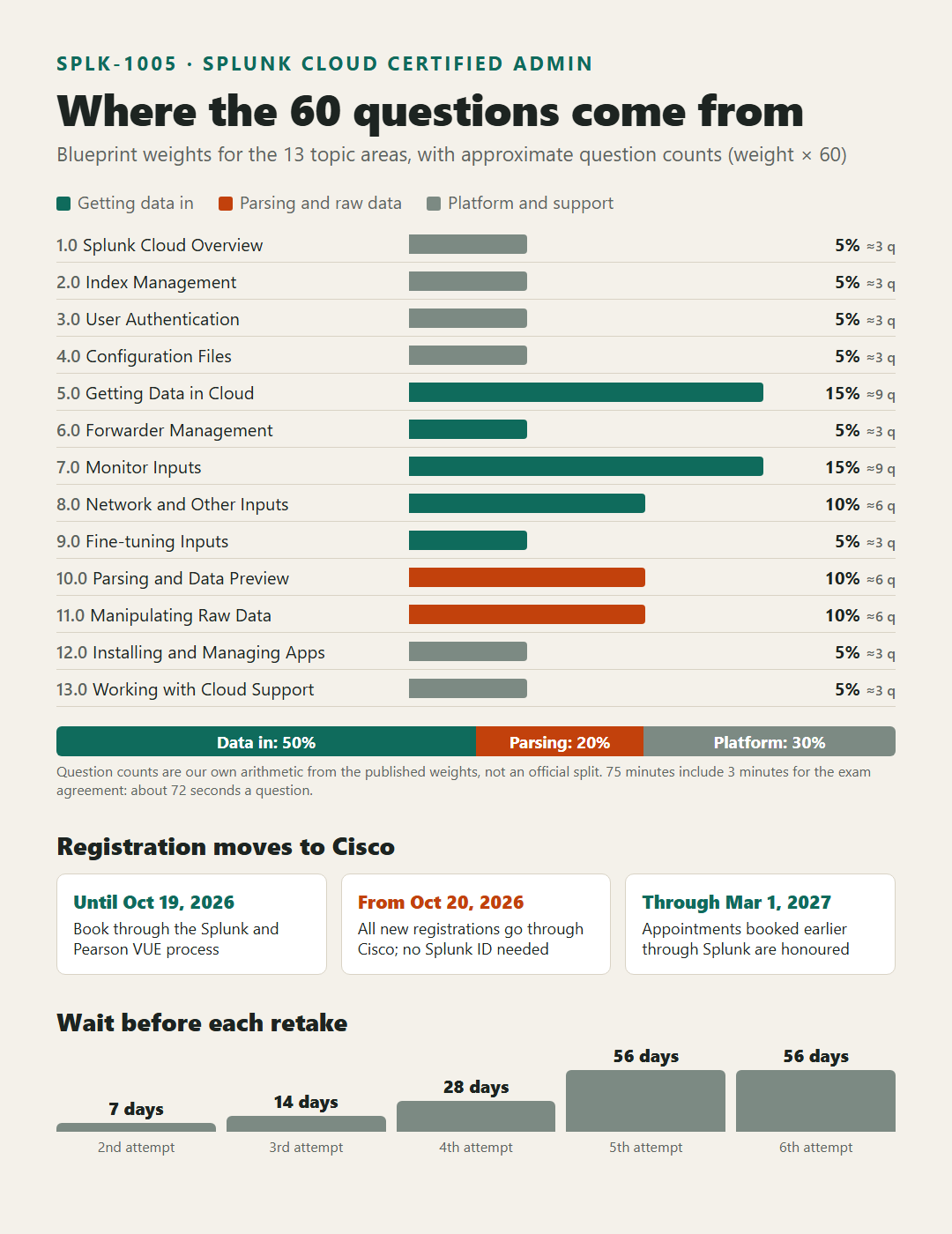
- Appointments already booked through Splunk are honoured through March 1, 2027. All new registrations after October 20, 2026 go through Cisco.
- Existing, active exam vouchers still work on Splunk exams delivered through Cisco.
- Badges still come from Credly, now on Cisco's Credly page, and certifications can be viewed in Certmetrics or Credly. They will no longer show in STEP.
- Support moves to the Learn with Cisco Help Center, and the old Splunk certification email address will no longer be monitored.
For an administrator, the useful habit here is the same one you would use for any migration: check that your history came across before you need it. If your earlier Splunk exams, including the Power User prerequisite, do not appear after you log in, the FAQ says to open a case with the Learn with Cisco Help Center so the accounts can be merged. Doing that before you book SPLK-1005 avoids a surprise when the prerequisite is checked.
Candidate rules from the handbook
Splunk's Certification Candidate Handbook (version 05.05.26 at the time of writing) sets the rules for every Splunk exam. Some of its registration steps describe the Pearson VUE process that applies until the Cisco cutover, so read it alongside the FAQ above. The rules that matter most for SPLK-1005 are these:
- Candidates must be at least 18. Candidates aged 13 to 17 need a signed parental acknowledgement form.
- You need a valid photo ID and a second form of identification showing your legal name, and the registration name must match the photo ID.
- Scheduled exams carry a 48-hour cancellation and rescheduling window. Miss it, or miss the appointment, and the fee is forfeited.
- Exams are closed book. Reference material of any kind is not allowed, and a perceived violation means automatic failure.
- Results appear immediately. Candidates who do not pass can see section feedback in their exam account. There is no question-by-question breakdown.
Retakes and renewal
If you do not pass on the first attempt, you wait 7 days before the second, counted from the day after the exam. After a second failed attempt the wait is 14 days. The fourth attempt comes after 28 days, and the fifth and sixth after 56 days each. Retakes beyond the sixth are considered case by case, and Splunk can refuse them. You cannot retake an exam you have already passed unless it is part of an approved recertification.
All Splunk certifications run on a three-year cycle, starting from the date you earned your highest-level certification. There is a 90-day grace period after the cycle ends, and after that the certification goes inactive. Splunk sends reminder emails at 180, 90 and 30 days during the final year, and Credly sends one at 60 days. Because Cloud Admin has no higher exam above it in the handbook's table, renewing it means passing SPLK-1005 again during the final year of your cycle. Passing it also renews the lower Core certifications listed beneath it in the handbook's downstream table, so check the footnotes there for the exact conditions.
Key Topics and Syllabus for SPLK-1005
Splunk's SPLK-1005 test blueprint lists thirteen topic areas with a weight for each. Splunk notes that the topics are general guidelines, that related topics may also appear, and that the guidelines can change without notice. Here are the thirteen areas with their weights:
- 1.0 Splunk Cloud Overview: 5%
- 2.0 Index Management: 5%
- 3.0 User Authentication and Authorization: 5%
- 4.0 Splunk Configuration Files: 5%
- 5.0 Getting Data in Cloud: 15%
- 6.0 Forwarder Management: 5%
- 7.0 Monitor Inputs: 15%
- 8.0 Network and Other Inputs: 10%
- 9.0 Fine-tuning Inputs: 5%
- 10.0 Parsing Phase and Data Preview: 10%
- 11.0 Manipulating Raw Data: 10%
- 12.0 Installing and Managing Apps: 5%
- 13.0 Working with Splunk Cloud Support: 5%
Add up areas 5 through 9 and you get 50%. Half the exam is about getting data into Splunk Cloud: forwarders, monitor inputs, network and scripted inputs, the HTTP Event Collector, and the input-phase settings. Add parsing and raw data manipulation and the share reaches 70%. If you only remember one thing about the blueprint, remember that ratio. On 60 questions a 15% area is worth roughly nine questions and a 5% area roughly three, again by our own arithmetic rather than a published split.
Getting data in and forwarder management (20%)
Area 5 asks you to list the Splunk forwarder types, describe what forwarders do, configure a forwarder to send to Splunk Cloud, test the connection, and describe optional forwarder settings. Area 6 covers the Deployment Server, the use of forwarder management, configuring forwarders as deployment clients, and managing forwarders with deployment apps.
In practice this is the part of the job where you install a universal forwarder on a new host, give it the credentials package for your Splunk Cloud stack, confirm that it connects, and then push its inputs through a deployment app instead of editing files on every host. If you already manage a fleet with a Deployment Server, most of this is familiar. If your organisation hands that work to another team, spend time on it, because it carries a fifth of the exam.
Monitor inputs, network inputs and fine-tuning (30%)
Area 7 covers how Splunk takes data in, creating file and directory monitor inputs, and the optional settings for them. Area 8 covers TCP and UDP network inputs, a basic scripted input, optional network input settings, the Windows input types, and the HTTP Event Collector. Area 9 asks about the default processing in the input phase and input-phase options such as sourcetype fine-tuning and character set encoding.
The questions here tend to reward people who have actually written an inputs.conf stanza and watched what happened. Think about which settings belong on the forwarder and which belong elsewhere, how a whitelist or blacklist changes what a monitor input picks up, and when HEC is the right choice over a forwarder, for example for an application that can send events over HTTP but cannot host an agent.
Parsing, Data Preview and raw data (20%)
Area 10 asks you to describe default parsing, optimise and configure event line breaking, explain how timestamps and time zones are extracted or assigned, and use Data Preview to check event creation. Area 11 covers how transformations are defined and invoked, using props.conf and transforms.conf to modify raw data, and using SEDCMD.
This is where the "events broken in the wrong place" and "timestamps an hour off" tickets come from. If you have fixed those in production you have already done the work the exam asks about. If you have not, Data Preview is the safest place to practise, because you can see how a sample file would be broken into events before anything reaches an index.
The 5% areas that are easy to skip
Six areas carry 5% each beyond forwarder management: the cloud overview, index management, user authentication and authorization, configuration files, apps, and working with Splunk Cloud Support. Together they are 30% of the exam, so skipping them is a poor trade. Index management covers defining and creating indexes in the cloud, deleting data from an index, and monitoring indexing. User management covers roles and integration with LDAP, Active Directory or SAML. The configuration file area covers files and directories, precedence, and the split between index-time and search-time processing. The apps area covers installing apps, private apps and how apps are managed. The support area covers isolating problems before contacting Splunk Cloud Support and the process for working with it.
For a structured study outline that follows the same thirteen areas, the SPLK-1005 syllabus on CertFun lays out each objective with its weight, along with the exam's key details in one place.
SPLK-1005 Preparation Guide
A sensible plan starts from the blueprint weights and from an honest look at your own work. The aim is to spend the most time on the areas that carry the most weight and that you touch least often.
Step 1: Map the blueprint to your last three months of tickets
Go through the thirteen areas and mark each one as "do this weekly", "have done it once or twice" or "never touched". Most working administrators find that monitor inputs and forwarders are in the first column, while scripted inputs, SEDCMD, SAML integration or the Self-Service versus Managed Cloud differences sit in the last. The last column is your study list, sorted by weight.
Step 2: Pick the right course for where you start
The blueprint suggests two courses from the Cloud Certified Admin learning path. Splunk Cloud Administration is aimed at net-new Splunk administrators. Transitioning to Splunk Cloud is aimed at experienced Splunk Enterprise administrators moving to Splunk Cloud. The blueprint calls this a suggested and non-exhaustive list, and it also points candidates to the Splunk How-To YouTube channel, Splunk Docs and their own Splunk experience.
If you came from Splunk Enterprise, the transition course is the more efficient choice, because it spends its time on what is different in the cloud rather than on the configuration knowledge you already have.
Step 3: Practise in a stack you are allowed to break
Reading about line breaking is much less effective than watching a bad LINE_BREAKER split a multiline event into ten pieces. Use a non-production stack or a trial if you can. Work through a small set of exercises that match the heavy areas:
- Install a universal forwarder, connect it to Splunk Cloud and confirm the connection.
- Make it a deployment client and push a monitor input through a deployment app.
- Create a TCP or UDP input, a basic scripted input and an HTTP Event Collector token, and send a test event to each.
- Load a sample file with multiline events and fix the line breaking and timestamp extraction in Data Preview.
- Mask a field such as an account number with SEDCMD, then do a similar change with props.conf and transforms.conf.
- Create an index, assign a role that can search only that index, and test it with a user account.
Step 4: Rehearse the timing
Seventy-two seconds a question sounds generous until a configuration question makes you trace precedence through four directories in your head. Work through timed practice sets, flag anything that takes more than about a minute and a half, and come back to it. The exam's own review screen lets you do exactly that, so practise the habit before exam day.
Step 5: Sort out the logistics early
With the Cisco cutover on October 20, 2026, logistics deserve more attention than usual. Log in to the new system, confirm that your Power User certification shows, and only then book. If you choose online proctoring, the handbook requires you to pass a system test on the same computer and in the same location you will use for the exam, and administrative rights are needed to install the software. Pearson VUE's online proctored testing page for Splunk exams hosts that system test. If your computer fails it after the 48-hour window has passed, the handbook warns that a refund is unlikely, so run the check well ahead of time.
One more rule from Splunk's FAQ: testing accommodations must be requested at least 30 days before the first attempt, and they are not available for online-proctored appointments. If you need one, plan for a test center.
Benefits and Career Scope of the Splunk Cloud Certified Admin Credential
For someone already running Splunk Cloud, the main benefit is recognition of work you already do. Splunk Cloud administration is often learned on the job, one ticket at a time, and there is little else that shows an employer or a client that you know the full input-to-index path rather than the parts you happened to meet.
What it signals to an employer
The credential tells a hiring manager three specific things. You can get data from servers, network devices and applications into Splunk Cloud without needing step-by-step help. You can shape that data correctly on the way in, so searches built on it can be trusted. And you know where the line sits between your job and Splunk Cloud Support's, which saves time on every escalation. Splunk's handbook also mentions a Splunk Earner Directory that organisations can use to find certified candidates, and passing candidates receive a digital badge through Credly that can be shown on a profile or checked by a recruiter.
Splunk's own claim about pay
The candidate handbook states that Splunk Certified candidates earn an average of 16% more than their uncertified peers. That is Splunk's figure for its certifications in general, not a salary survey for this exam, and it is reported here only in the form Splunk gives it. Treat it as one input among many when you weigh the cost of studying.
Where it leads
Cloud Admin has no next-level exam above it in Splunk's renewal table, but it is not a dead end for learning. Splunk's track page points to the Splunk Enterprise Security Certified Admin certification and to developer and SOC administrator learning paths as related options. For an administrator, a natural next step is often the security side of the same platform, because the data you onboard is what those teams rely on.
Why the timing works now
The move to Cisco's certification system does not change the exam content, but it does change how your record is held. Earning or renewing the credential after your account has moved means your history, badge and renewal dates all live in one place from the start. For anyone who was planning the exam within the next year, that is a small but real reason not to wait.
Practice Test and Preparation Resources for SPLK-1005
Good resources for this exam fall into three groups: Splunk's own documents, hands-on practice, and question practice that matches the format.
Splunk's own documents
Start with the blueprint and the certification track page, then keep the candidate handbook and the Cisco changes FAQ nearby for the rules. Splunk's Training and Certification FAQ answers the common questions about registration, vouchers, badges, accommodations and retakes, and mentions a voucher store option of five exams for $500. Check the details there before you buy, because the registration steps are changing with the Cisco cutover.
Splunk Docs is the reference the blueprint itself points to. For this exam the most useful parts are the sections on forwarding, inputs, props.conf and transforms.conf, index management and Splunk Cloud administration. Read them with a test stack open so you can try each setting as you meet it.
Hands-on practice
Nothing replaces running the tasks yourself. The exercise list in the preparation section above covers the heavy areas of the blueprint. If you work through it twice, the second time without notes, you will have practised most of the tasks that make up the inputs, parsing and raw data areas.
Practice questions
Once you know the material, practise answering questions in the exam's format so the 72-second pace feels normal. CertFun's set of SPLK-1005 sample questions is a free way to check how ready you are before you book, and it shows which blueprint areas still need work.
A short video overview
The video below gives a quick overview of the SPLK-1005 exam and how to approach your preparation, which is a useful starting point if you want a short summary before reading the blueprint in detail.
Conclusion
SPLK-1005 is a close match for the work of a Splunk Cloud administrator. Half of its weight sits on getting data in, another fifth on parsing and reshaping that data, and the rest on the indexes, users, apps and support processes around it. If you onboard data sources and fix ingestion problems as part of your job, you have already practised most of the exam. The remaining study is about filling gaps in the areas you touch less often and getting used to a pace of about 72 seconds a question.
The one thing that is different this month is the registration process. From October 20, 2026, you book Splunk exams through Cisco, existing appointments are honoured through March 1, 2027, and your exam history should already be in Cisco's system. Check that it is, confirm that your Power User prerequisite appears, and then pick a date. Go by Splunk's own pages for anything that changes, and plan your study around the blueprint weights rather than around the topics you already enjoy.
FAQs
How many questions are on SPLK-1005, and how long is the exam?
The exam has 60 multiple choice questions in a 75-minute appointment. Those 75 minutes include 3 minutes to review and accept the Splunk Certification Agreement, which leaves 72 minutes for the questions themselves.
Do I need another Splunk certification before Splunk Cloud Certified Admin?
Yes. The prerequisite is Splunk Core Certified Power User. If you earned it under the old Splunk system, log in to the new Cisco-based system after October 20, 2026 and confirm that it appears in your history before you book.
What happens if I already booked SPLK-1005 before October 20, 2026?
According to Splunk's changes FAQ, appointments booked through Splunk are honoured through March 1, 2027, so an existing booking is not cancelled. Any new registration made after October 20, 2026 goes through Cisco. Existing active vouchers can still be used.
How long do I have to wait to retake the exam if I fail?
You wait 7 days after a first failed attempt and 14 days after a second. The fourth attempt comes after 28 days, and the fifth and sixth after 56 days each. Retakes beyond the sixth are decided case by case.
How long does the Splunk Cloud Certified Admin certification stay valid?
Splunk certifications run on a three-year cycle from the date of your highest-level certification, with a 90-day grace period afterwards. Because no higher Splunk exam renews Cloud Admin, you keep it active by passing SPLK-1005 again within the final year of your cycle.