
A job search gets difficult to manage long before it becomes impossible. One application becomes five. Five becomes twenty. Recruiter conversations happen across email, phone calls, and job boards. Follow-up dates disappear into scattered notes, and strong opportunities can go quiet simply because the next action was never recorded.
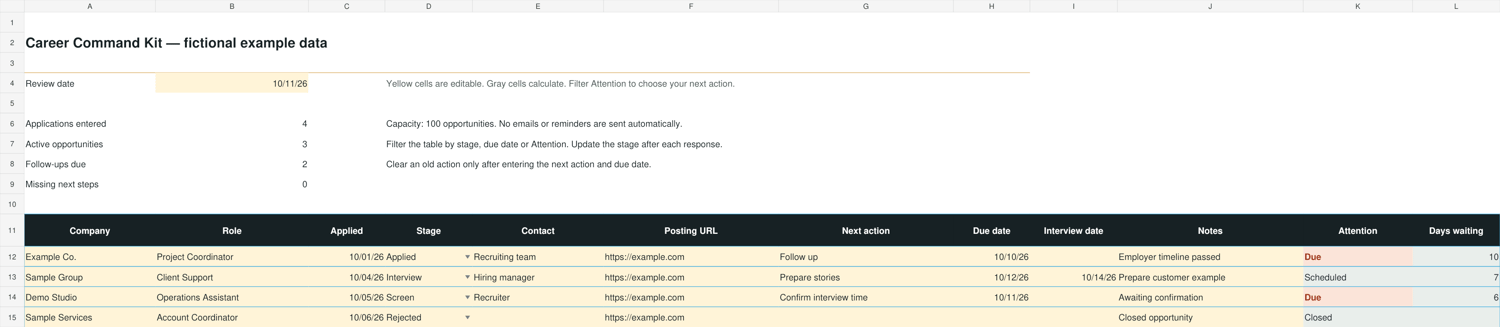
A job application tracker in Excel solves that problem by turning your search into a clear operating system. The goal is not to create more administration. The goal is to know what deserves your attention today.
WHAT TO TRACK FOR EVERY JOB APPLICATION
A useful tracker should capture only the information that helps you make a decision or take action:
• Company and job title
• Application date
• Current stage
• Primary contact and contact information
• Next action
• Follow-up date
• Salary range
• Source of the opportunity
• Notes from interviews or recruiter conversations
The most important fields are Next Action and Follow-Up Date. A list of applications tells you where you applied. A real job-search system tells you what to do next.
USE CLEAR STAGES
Keep your stages consistent so you can filter the workbook quickly. A practical sequence is:
Researching
Applied
Recruiter Screen
Interviewing
Offer
Closed
Avoid vague labels such as “waiting” or “maybe.” Your stage should tell you where the opportunity sits. Your next action should tell you what you control.
ASSIGN A NEXT ACTION TO EVERY ACTIVE OPPORTUNITY
Every active opportunity needs one specific next action. Examples include:
• Follow up with recruiter on Tuesday
• Prepare leadership story for interview
• Send thank-you email
• Research the hiring manager
• Review compensation details
If the Next Action field is blank, the opportunity can become invisible. A strong tracker should flag missing next steps and overdue follow-ups automatically.
REVIEW THE TRACKER ON A CONSISTENT CADENCE
Open your tracker for ten minutes at the start or end of each job-search session. Filter for active opportunities, review anything due today, and assign a new next action whenever you complete one.
A simple daily routine:
1. Complete overdue follow-ups.
2. Update stages after new conversations.
3. Add new opportunities.
4. Prepare for upcoming interviews.
5. Confirm that every active role has a next action and date.
PREPARE INTERVIEW EVIDENCE IN THE SAME SYSTEM
Tracking applications is only half the job. Interview preparation becomes easier when you keep your strongest examples in the same workbook.
Prepare stories that demonstrate:
• Leadership
• Problem solving
• Results
• Conflict resolution
• Adaptability
• Customer or client impact
For each story, record the situation, the action you personally took, and the measurable result. This keeps your answers focused and prevents you from rebuilding examples before every interview.
COMPARE OFFERS BEYOND BASE SALARY
When more than one opportunity reaches the offer stage, compare the complete package. Base salary matters, but it is not the entire decision.
Consider:
• Expected bonus
• Sign-on bonus
• Commute or relocation cost
• Schedule and flexibility
• Growth opportunity
• Role scope
• Benefits that materially affect your decision
A side-by-side offer comparison makes tradeoffs visible before emotion takes over.
A READY-TO-USE JOB SEARCH WORKBOOK
Career Command Kit combines an Excel job application tracker, follow-up flags, interview story preparation, and a three-offer comparison in one branded workbook. It includes space for 100 opportunities and a focused first-seven-days action plan.
See the Career Command Kit here:
https://payhip.com/b/VZHJz
The workbook is a one-time $9 digital download with no subscription. Use it to create a disciplined job-search pipeline, protect your follow-ups, and make better decisions as opportunities move forward.