Your Cart
Loading

AULA S18 Ghost Shark Wired Gaming Mouse UNBOXING & REVIEW

UNBOXING & REVIEW

AULA S18 Ghost Shark

Wired Gaming Mouse

6400 DPI • 7 Programmable Buttons • RGB Backlit • Fire Rate Key

UNBOXING & REVIEW AULA S18 Ghost Shark Wired Gaming Mouse 6400 DPI  •  7 Programmable Buttons  •  RGB Backlit  •  Fire Rate Key    Introduction If you've been hunting for a gaming mouse that delivers real performance without the premium price tag, the AULA S18 Ghost Shark deserves your full attention. This wired gaming mouse packs a serious feature set — 6400 DPI optical precision, 7 fully programmable buttons including a dedicated fire-rate key, and vivid multi-zone RGB lighting — all in an ergonomic right-hand form factor built for long gaming sessions. In this blog post we unbox the S18 Ghost Shark, walk through every feature you need to know, share our hands-on impressions, and point you directly to the official drivers so you can unlock the full macro and DPI customisation experience the moment it lands on your desk.  Quick Specs at a Glance  Specification	Detail Connection	Wired USB 2.0 — braided cable, 1.8 m DPI Range	800 / 1600 / 3200 / 6400 — 4-step on-the-fly switch Polling Rate	1000 Hz (1 ms response) Buttons	7 fully programmable Special Keys	Fire-rate button, DPI switch, 2× side buttons RGB Lighting	Multi-zone, 7 colours, 3 lighting modes Sensor	High-precision optical Charging Interface	Type-C (cable) Compatibility	Windows PC, notebook, desktop Use Case	Gaming, esports, office   Unboxing the AULA S18 Ghost Shark What's in the box •	AULA S18 Ghost Shark wired gaming mouse •	Braided USB Type-C to USB-A cable (1.8 m) •	Quick-start guide / driver download card  The packaging is clean and gaming-forward — matte black with the Ghost Shark branding front and centre. The mouse itself is nestled securely in a foam insert, and the braided cable is pre-coiled and held with a velcro strap, which is a small but welcome touch.  First impressions out of the box The S18 immediately feels substantial in hand. The matte black finish is fingerprint-resistant, and the sculpted right-hand contour fits naturally without forcing your grip. Plug it in and the RGB lights spring to life — a smooth blue breathing effect runs across the scroll wheel, the AULA logo panel, and the side accent strips simultaneously. The braided cable has just the right amount of stiffness — flexible enough not to drag, rigid enough to stay out of the way. Zero wireless lag concerns here; it is simply wired, instant, and reliable.   Feature Deep Dive 1 — DPI switch button Sitting just below the scroll wheel in the centre channel is the DPI switch. One press cycles through 800, 1600, 3200, and 6400 DPI. There is no software required to switch — it is entirely on-the-fly, which is ideal mid-game when you need to drop sensitivity for a long-range snipe and snap back up for close-quarters combat.  2 — Fire-rate button This is arguably the S18's most distinctive feature. The fire-rate button — located just above the DPI switch in the same centre channel — holds down a rapid auto-click for as long as you hold it. In compatible games, this translates to a sustained stream of clicks without finger fatigue. It is fully programmable via the driver software and can be reassigned to any macro.  Pro tip — fire-rate button in LOL The Ghost Shark was designed with games like League of Legends in mind. The fire-rate key can be mapped to ability spam or rapid item activation, giving you a measurable edge in high-tempo teamfights.  3 — Side buttons (×2) Two tactile side buttons sit on the left flank, perfectly positioned for the thumb. By default they map to browser forward/backward navigation, but via the driver they can be assigned to any macro, keybind, or DPI profile. The click feel is crisp with minimal pre-travel — satisfying and unambiguous.  4 — RGB multi-zone lighting The S18 has three independent RGB zones: the scroll wheel, the AULA logo panel on the body, and the side accent strips. All three support 7 colours and 3 lighting modes — steady, breathing, and cycling. The default breathing blue is visually striking in a dark room, and the colour can be changed via the driver software without needing to restart.  5 — Ergonomic right-hand body The contoured form factor is built specifically for right-handed palm and claw grippers. The thumb rest and pinky ledge keep your hand anchored during fast movements, and the anti-slip texture on both flanks means the mouse stays put even during intense sessions. At roughly 162 g with the cable, it sits in the medium-weight category — enough mass to feel planted without tiring your wrist.   Where to Get the Drivers The AULA S18 reaches its full potential with the official driver software installed. Without it, the mouse works plug-and-play at its default settings. With it, you unlock full macro programming, custom DPI profiles, per-zone RGB colour control, and polling rate selection.  Official Driver Download Download link (Google Drive): https://drive.google.com/file/d/1E9KFwltFRh4o-pv6x4jsAymcXtpiZaxM/view?usp=drive_link  Alternatively, visit the official AULA downloads page: https://www.aulastar.com/keyboard/  How to install the driver — step by step 1.	Download the driver ZIP file from the Google Drive link above. 2.	Extract the ZIP to a folder on your desktop. 3.	If any folder names contain Chinese characters, rename the folder to something simple (e.g. "AULA-S18") before running the installer. 4.	Right-click the Setup.exe and select Run as administrator. 5.	Follow the on-screen prompts. Restart your PC if prompted. 6.	Plug in the S18 and open the AULA software from your taskbar or Start menu. 7.	Configure your DPI, macros, RGB colours, and polling rate. Save your profile.  Windows 8 / 10 / 11 driver note If the installer shows an error about InstallShield or iKernal.exe, make sure you have renamed any Chinese-character folder names before running. Run Setup.exe as administrator. This resolves the issue on all modern Windows versions.   Verdict — Is the AULA S18 Worth It? The short answer is yes — emphatically. The AULA S18 Ghost Shark occupies a sweet spot that is increasingly rare: it gives you pro-adjacent features (dedicated fire-rate key, 6400 DPI optical sensor, 1000 Hz polling rate, full macro programming) at a price point that does not require a second thought. It is not trying to compete with a Razer DeathAdder or a Logitech G Pro on sensor precision at the absolute ceiling. But for the overwhelming majority of gamers — whether you are grinding ranked in LOL, building in Minecraft, fragging in CS, or just upgrading from a basic office mouse — the S18 punches well above its weight.  Summary — who is this mouse for? ✔  Budget-conscious PC and laptop gamers wanting real gaming features ✔  LOL / MOBA players who will benefit from the fire-rate and macro keys ✔  Right-hand palm and claw grip players ✔  Anyone upgrading from a basic office mouse to a proper gaming peripheral ✗  Ultra-competitive FPS players who need a flagship-tier optical sensor ✗  Left-handed users (the ergonomic body is right-hand only)   Where to Buy The AULA S18 Ghost Shark is available in Kenya through SangYug, one of the country's most trusted tech and gaming accessories retailers.  Get yours now SangYug Kenya — Official Stockist Product page: https://www.sangyug.com/product/aula-wired-gaming-mouse-s18/  AULA Official Website: https://www.aulastar.com/gaming-mouse/65.html   The Ghost Shark is in the water. Your move. AULA S18 Ghost Shark


Introduction

If you've been hunting for a gaming mouse that delivers real performance without the premium price tag, the AULA S18 Ghost Shark deserves your full attention. This wired gaming mouse packs a serious feature set — 6400 DPI optical precision, 7 fully programmable buttons including a dedicated fire-rate key, and vivid multi-zone RGB lighting — all in an ergonomic right-hand form factor built for long gaming sessions.

In this blog post we unbox the S18 Ghost Shark, walk through every feature you need to know, share our hands-on impressions, and point you directly to the official drivers so you can unlock the full macro and DPI customization experience the moment it lands on your desk.


Quick Specs at a Glance


Specification

Detail

Connection

Wired USB 2.0 — braided cable, 1.8 m

DPI Range

800 / 1600 / 3200 / 6400 — 4-step on-the-fly switch

Polling Rate

1000 Hz (1 ms response)

Buttons

7 fully programmable

Special Keys

Fire-rate button, DPI switch, 2× side buttons

RGB Lighting

Multi-zone, 7 colours, 3 lighting modes

Sensor

High-precision optical

Charging Interface

Type-C (cable)

Compatibility

Windows PC, notebook, desktop

Use Case

Gaming, esports, office


Unboxing the AULA S18 Ghost Shark


What's in the box

•      AULA S18 Ghost Shark wired gaming mouse

•      Braided USB Type-C to USB-A cable (1.8 m)

•      Quick-start guide / driver download card


The packaging is clean and gaming-forward — matte black with the Ghost Shark branding front and centre. The mouse itself is nestled securely in a foam insert, and the braided cable is pre-coiled and held with a velcro strap, which is a small but welcome touch.


First impressions out of the box

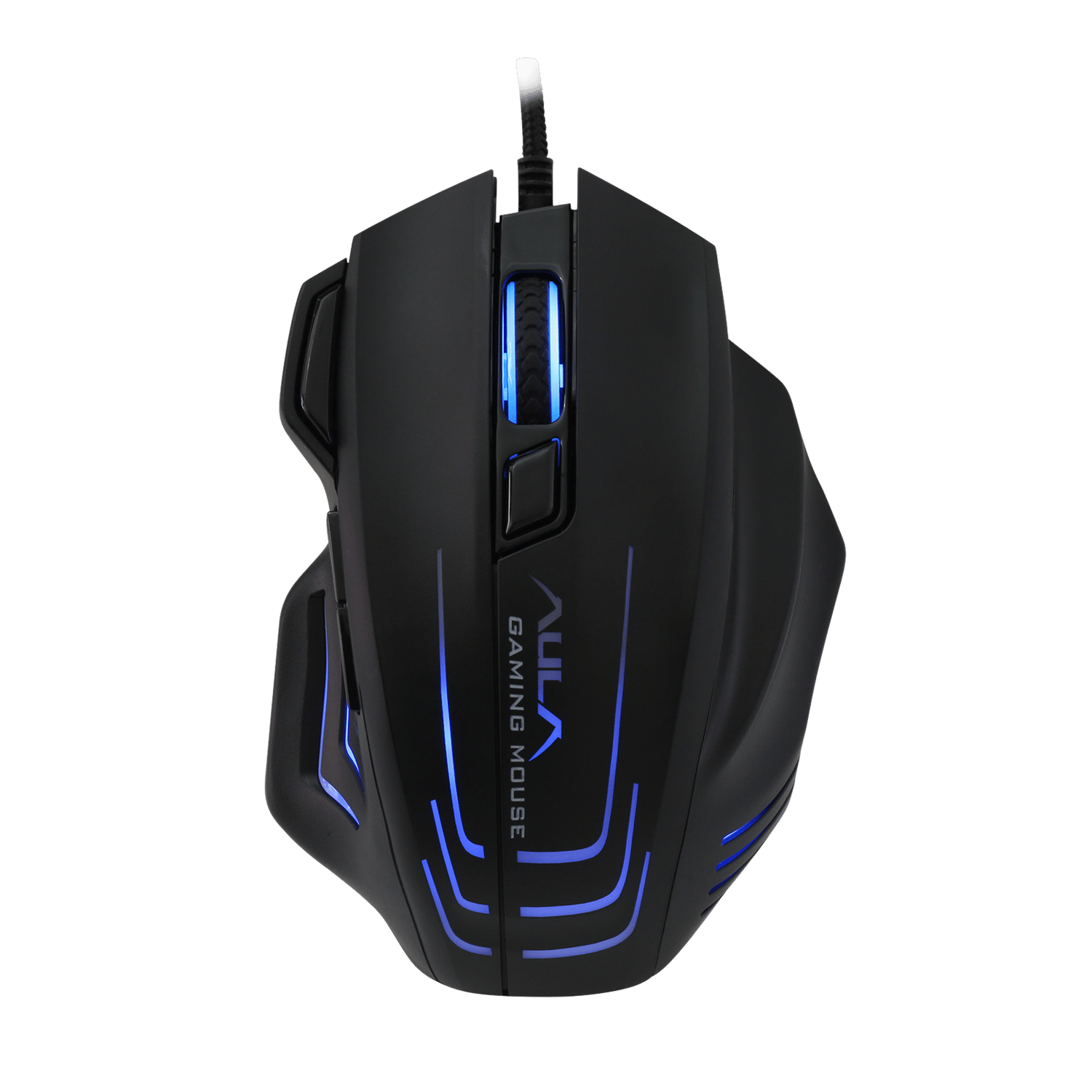
The S18 immediately feels substantial in hand. The matte black finish is fingerprint-resistant, and the sculpted right-hand contour fits naturally without forcing your grip. Plug it in and the RGB lights spring to life — a smooth blue breathing effect runs across the scroll wheel, the AULA logo panel, and the side accent strips simultaneously.

The braided cable has just the right amount of stiffness — flexible enough not to drag, rigid enough to stay out of the way. Zero wireless lag concerns here; it is simply wired, instant, and reliable.


Feature Deep Dive

1 — DPI switch button

Sitting just below the scroll wheel in the centre channel is the DPI switch. One press cycles through 800, 1600, 3200, and 6400 DPI. There is no software required to switch — it is entirely on-the-fly, which is ideal mid-game when you need to drop sensitivity for a long-range snipe and snap back up for close-quarters combat.


2 — Fire-rate button

This is arguably the S18's most distinctive feature. The fire-rate button — located just above the DPI switch in the same centre channel — holds down a rapid auto-click for as long as you hold it. In compatible games, this translates to a sustained stream of clicks without finger fatigue. It is fully programmable via the driver software and can be reassigned to any macro.


Pro tip — fire-rate button in LOL

The Ghost Shark was designed with games like League of Legends in mind.

The fire-rate key can be mapped to ability spam or rapid item activation,

giving you a measurable edge in high-tempo teamfights.


3 — Side buttons (×2)

Two tactile side buttons sit on the left flank, perfectly positioned for the thumb. By default they map to browser forward/backward navigation, but via the driver they can be assigned to any macro, keybind, or DPI profile. The click feel is crisp with minimal pre-travel — satisfying and unambiguous.


4 — RGB multi-zone lighting

The S18 has three independent RGB zones: the scroll wheel, the AULA logo panel on the body, and the side accent strips. All three support 7 colours and 3 lighting modes — steady, breathing, and cycling. The default breathing blue is visually striking in a dark room, and the colour can be changed via the driver software without needing to restart.


5 — Ergonomic right-hand body

The contoured form factor is built specifically for right-handed palm and claw grippers. The thumb rest and pinky ledge keep your hand anchored during fast movements, and the anti-slip texture on both flanks means the mouse stays put even during intense sessions. At roughly 162 g with the cable, it sits in the medium-weight category — enough mass to feel planted without tiring your wrist.


Where to Get the Drivers

The AULA S18 reaches its full potential with the official driver software installed. Without it, the mouse works plug-and-play at its default settings. With it, you unlock full macro programming, custom DPI profiles, per-zone RGB colour control, and polling rate selection.


Official Driver Download

Download link (Google Drive):

https://drive.google.com/file/d/1E9KFwltFRh4o-pv6x4jsAymcXtpiZaxM/view?usp=drive_link


Alternatively, visit the official AULA downloads page:

https://www.aulastar.com/keyboard/


How to install the driver — step by step

1.   Download the driver ZIP file from the Google Drive link above.

2.   Extract the ZIP to a folder on your desktop.

3.   If any folder names contain Chinese characters, rename the folder to something simple (e.g. "AULA-S18") before running the installer.

4.   Right-click the Setup.exe and select Run as administrator.

5.   Follow the on-screen prompts. Restart your PC if prompted.

6.   Plug in the S18 and open the AULA software from your taskbar or Start menu.

7.   Configure your DPI, macros, RGB colours, and polling rate. Save your profile.


Windows 8 / 10 / 11 driver note

If the installer shows an error about InstallShield or iKernal.exe,

make sure you have renamed any Chinese-character folder names before running.

Run Setup.exe as administrator. This resolves the issue on all modern Windows versions.


Verdict — Is the AULA S18 Worth It?

The short answer is yes — emphatically. The AULA S18 Ghost Shark occupies a sweet spot that is increasingly rare: it gives you pro-adjacent features (dedicated fire-rate key, 6400 DPI optical sensor, 1000 Hz polling rate, full macro programming) at a price point that does not require a second thought.

It is not trying to compete with a Razer DeathAdder or a Logitech G Pro on sensor precision at the absolute ceiling. But for the overwhelming majority of gamers — whether you are grinding ranked in LOL, building in Minecraft, fragging in CS, or just upgrading from a basic office mouse — the S18 punches well above its weight.


Summary — who is this mouse for?

✔ Budget-conscious PC and laptop gamers wanting real gaming features

✔ LOL / MOBA players who will benefit from the fire-rate and macro keys

✔ Right-hand palm and claw grip players

✔ Anyone upgrading from a basic office mouse to a proper gaming peripheral

✗ Ultra-competitive FPS players who need a flagship-tier optical sensor

✗ Left-handed users (the ergonomic body is right-hand only)


Where to Buy

The AULA S18 Ghost Shark is available in Kenya through ESGaming, one of the country's most trusted tech and gaming accessories retailers.


Get yours now


Product page:


AULA Official Website:

https://www.aulastar.com/gaming-mouse/65.html


The Ghost Shark is in the water. Your move.