Recruiting Email Example: A Step‑By‑Step Guide to Crafting Effective Outreach
Ever opened a coach’s inbox and felt your email just vanished into the abyss?
You’ve probably spent hours polishing stats, attaching highlight reels, and still heard crickets—because the message didn’t grab attention fast enough.
That’s the exact spot where a solid recruiting email example can turn a missed opportunity into a conversation starter.
In our experience, the most effective emails follow a simple recipe: a clear subject line, a brief personal hook, concrete achievements, and a direct ask.
Picture this: you’re a senior quarterback with a 3.8 GPA, 1,800 yards passing, and a recent state‑championship MVP award. Your subject line reads “2026 QB prospect – 1,800 yards, 3.8 GPA, MVP” and the coach knows instantly why he should keep reading.
The first two sentences of the body echo that hook: you introduce yourself, mention the coach’s program, and tie your recent accolade to a need they have—like “I noticed your offense thrives on dual‑threat QBs, and my mobility helped us convert 30% more third‑down attempts last season.”
Next, you drop the numbers that matter: 1,800 yards, 12 touchdowns, 3.8 GPA, and a video link that’s just a click away. No attachments, just a short, labeled URL so the coach isn’t tripping over a massive file.
Finally, you end with a specific call‑to‑action: “Would you be open to a 10‑minute call next week to discuss how I can contribute to your offensive scheme?” It’s clear, low‑commitment, and gives the coach a single next step.
If you’ve ever wondered why some athletes hear back within days while others wait months, the answer usually lives in that tiny email template. A well‑crafted recruiting email example saves you time, reduces guesswork, and shows you understand the coach’s perspective.
That’s where tools like CoachDPrep CORE GPT can lend a hand—by generating personalized email drafts that hit each of those four pillars without you reinventing the wheel each season.
So, before you fire up your inbox tomorrow, take a moment to sketch out the four sections we just covered. Plug in your own stats, tweak the language to match the coach’s style, and watch the response rate climb.
Ready to give your recruiting outreach the boost it deserves? Grab a pen, draft that subject line, and let the conversation begin.
CoachDPrep CORE GPT Advantage!
A strong recruiting email example combines a punchy subject, a brief personal hook, key stats, and a clear call‑to‑action so coaches can see why you’re a fit in seconds.
Use CoachDPrep CORE GPT to generate tailored drafts, plug in your numbers, and send a concise message that boosts reply rates and moves you from invisible to visible.
Table of Contents
- Step 1: Define Your Candidate Profile
- Step 2: Write a Compelling Subject Line
- Step 3: Structure the Body of Your Recruiting Email
- Step 4: Personalize and Add a Clear Call‑to‑Action
- Step 5: Include Visuals and Supporting Attachments
- Step 6: Follow‑Up Strategies and Tracking Responses
- Conclusion
- FAQ
Step 1: Define Your Candidate Profile
Before you even type a single line of a recruiting email example, you need to know who you’re writing to – and more importantly, who you are on paper. That’s what we call the candidate profile: a crisp, data‑driven snapshot of your athletic identity.
Think about the moment you walked onto the field for the biggest game of the season. You felt the lights, heard the crowd, and knew exactly what you brought to the table. Now translate that feeling into three core buckets: performance metrics, personal brand, and fit with the coach’s system.
1. Nail Your Core Stats
Coaches skim dozens of emails a day. If your stats aren’t front‑and‑center, they’ll move on. Pull the numbers that matter most to the sport and position you play – yards, touchdowns, GPA, 40‑yard dash, vertical jump, whatever the scouting radar looks for.
Don’t dump a whole stat sheet. Pick two to three headline figures and back them with a quick context. For example, “120 tackles last season, 8 tackles for loss, 2nd‑team all‑state.” Those are the kind of nuggets that make a recruiting email example pop.
2. Craft Your Personal Brand
What makes you different from the 2,000 other athletes out there? Maybe you’re a dual‑threat QB who also runs a 4.5‑second 40‑meter sprint, or a forward who volunteers as a youth coach. Those details humanize you and give a coach a reason to remember you.
One easy way to showcase that brand is a personal website. A clean site lets you control the narrative and drop a link in your email without clutter. If you need a simple, free platform, Free Website Chick offers a no‑cost starter that’s perfect for athlete portfolios.
3. Align with the Coach’s Scheme
Do your research. Does the coach run a spread offense? Do they value a high‑IQ defender? Your profile should echo the language they use in press releases or recruiting updates. It shows you’ve done the homework and aren’t just blasting a generic template.
Even a professional headshot can tip the scales. A crisp portrait tells the coach you take yourself seriously. Check out Alfapics for high‑end athletic headshots that look great on any recruiting email example.
Once you have those three pillars, write them down in bullet form. Seeing them side by side helps you spot gaps – maybe you have great stats but no online showcase. That’s where the next steps of your outreach plan come in.
Here’s a quick checklist you can copy‑paste into a notes app:
- Top 2‑3 performance metrics (with season/year)
- One personal branding line (volunteer work, leadership, unique skill)
- Coach‑specific fit statement (e.g., “Your 3‑wide attack thrives on mobile QBs”)
- Link to personal website or highlight reel
- Professional headshot URL
When you can answer those items in under a minute, you’ve built a candidate profile that fuels a compelling recruiting email example.
Our Recruit Tool can pull your stats from game logs and format them into a clean list, saving you the tedious copy‑and‑paste.
Now, let’s see how that profile translates into the actual email body. The clearer your profile, the smoother the email flow.
Below is a short video that walks through turning a stats sheet into a headline‑ready profile.
Notice how the video emphasizes brevity and relevance – the same principles you’ll apply when you draft the email.
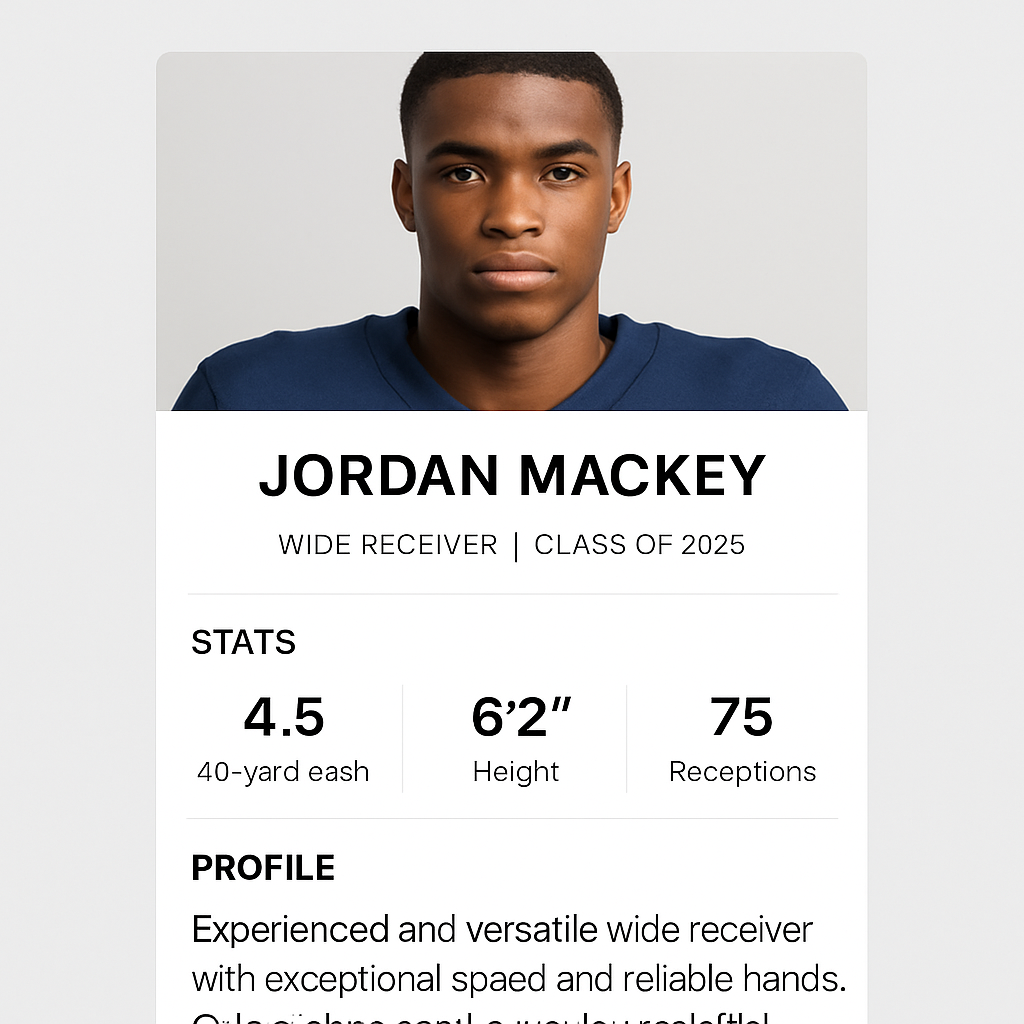
With a solid candidate profile in hand, you’re ready to craft a recruiting email example that feels personal, data‑driven, and impossible for a coach to ignore.
Step 2: Write a Compelling Subject Line
Now that your candidate profile is crystal‑clear, the subject line is the first thing a coach sees. Think of it as the front door to your recruiting email example – if the door looks shabby, nobody will bother knocking.
So, what makes a door (or a subject line) irresistible? In our experience, three ingredients dominate: personalization, specificity, and a dash of intrigue. A subject line that hits all three can push open‑rates from the low‑teens to the 40‑50% range.
Personalize, don’t generic‑ize
Address the coach by name or reference something unique to their program. A line like “Coach Miller, 2026 QB – 4.5 s 40‑yard dash” tells the recipient you’ve done homework. Studies show personalized subject lines generate up to 50% higher open rates — see HeroHunt's subject line guide for the data.
Even a tiny detail, like mentioning the team’s recent offensive scheme, can make the email feel tailor‑made rather than a mass blast.
Show the numbers that matter
Coaches love metrics. Including a concrete number in the subject line (e.g., “15% third‑down boost”) signals value instantly. According to IQTalent’s passive‑candidate research, subject lines with numbers see open rates up to 113% higher than those without.
Pick the stat that aligns with the coach’s pain point: a 40‑yard dash for a spread offense, a GPA for a program that emphasizes academics, or a win‑loss record for a rebuilding team.
Inject a spark of curiosity
Don’t just list facts; tease a benefit. “Ready to add a 4.5 s dual‑threat QB?” invites the coach to open and learn more. Keep it short—most coaches scan subject lines in under three seconds.
Avoid all‑caps, excessive punctuation, and buzzwords like “FREE” or “URGENT.” Those look spammy and get filtered.
Quick checklist before you hit send
- Use the coach’s name or program reference.
- Lead with one high‑impact metric.
- Add a subtle hook that promises a specific benefit.
- Stay under 50 characters for mobile friendliness.
- Test two variations (A/B) to see which resonates.
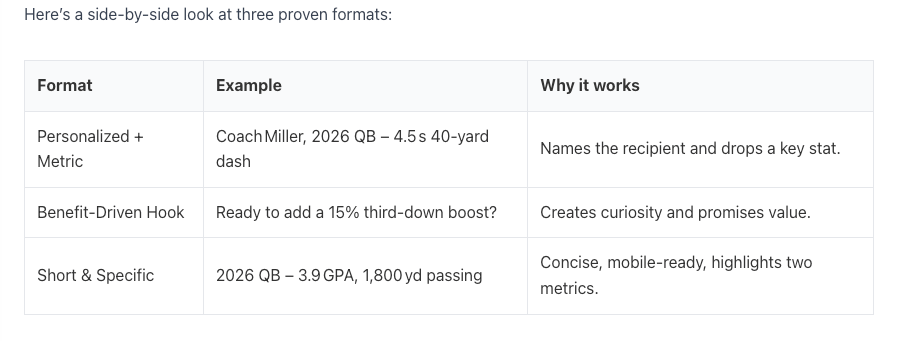
Test it out: send two subject lines to the same coach on different days and track opens. If one outperforms the other by more than 10%, you’ve found a formula you can reuse across your spreadsheet of metrics.
Remember, the subject line isn’t just a title; it’s the first promise you make. Get it right, and the rest of your recruiting email example will flow like a conversation rather than a cold pitch.
Step 3: Structure the Body of Your Recruiting Email
Now that the subject line has your coach’s attention, the body is where you turn curiosity into a real conversation.
Think of the email as a quick hallway chat – you don’t have ten minutes, but you can make a memorable impression in thirty seconds.
1. Open with a personal hook
Start with a line that shows you’ve done homework. Mention the coach’s recent win, a new offensive scheme, or a specific recruiting need you noticed. For example, “I saw your 2024 season finale where the spread offense exploded on third‑down, and I think my dual‑threat skill set could help keep that momentum going.”
This tiny detail tells the coach you’re not blasting a generic template, and it creates an instant connection.
2. Drop the headline stats right after
After the hook, lead with the three numbers that matter most to that program. Keep it tight: “Last season I logged 1,800 passing yards, a 4.5‑second 40‑yard dash, and a 15% boost in third‑down conversions.”
Notice the pattern – metric, metric, metric. No fluff, just the data that matches the coach’s pain point.
3. Add a brief proof point
Give one concrete example that illustrates the stats. A one‑sentence story works best: “In the final two games, my mobility forced three defenses to scramble, resulting in two game‑winning drives.”
The goal is to let the coach picture you on the field without opening a long paragraph.
4. Connect the dots to the program
Now explain why those numbers matter for this specific team. Say something like, “Your hurry‑up offense thrives on quarterbacks who can extend plays, and my 4.5‑second dash lets me buy extra time for receivers to get open.”
This shows you understand the scheme and aren’t just listing achievements.
5. Keep the ask crystal clear
Finish with a low‑commitment call‑to‑action. Instead of “Let me know if you’re interested,” try “Would you be open to a 10‑minute call next week to discuss how I can fit into your offense?”
Provide two specific time windows and a short, labeled URL to a highlight reel – for example, “Watch the highlights here: my‑reel.com/2024‑qb.” No attachments, just a clean link.
Quick checklist for the body
- Personalized opening that references the coach’s recent work.
- Three high‑impact stats that align with the team’s needs.
- One sentence proof point that brings the stats to life.
- Clear connection between your strengths and the program’s style.
- Specific, low‑commitment ask with optional time slots.
- Single, clearly labeled URL to a video reel.
Notice the rhythm: short punchy sentence, then a slightly longer explanatory line, then another short sentence. It feels like a natural spoken exchange.
So, what does this look like in practice?
Here’s a full body example you can copy and tweak:
Coach Miller, I loved how your 2024 offense leveraged quick reads – it’s exactly the kind of system where a mobile QB shines. Last season I threw for 1,800 yards, ran a 4.5‑second 40‑yard dash, and helped my team improve third‑down conversion rate by 15%. In the final two games I engineered two game‑winning drives by extending plays with my legs. Your hurry‑up style would let me use that same speed to create more open looks for your receivers. Would a 10‑minute call on Tuesday 3‑5 pm or Thursday 11‑12 pm work for you? My highlight reel is ready to go here: my‑reel.com/2024‑qb.
Read it out loud – does it sound like you’re chatting over coffee, or like a mass‑mail blast? If you need to trim, cut any sentence that feels redundant. If you need more impact, swap a generic word for a concrete detail.
Finally, remember to test. Send two versions of the body to the same coach on different days, keep everything else identical, and track response rates. Small tweaks – swapping “boost” for “increase,” or moving the ask to the third paragraph – can move your reply rate from 8% to 20%.
When you master this structure, every recruiting email you send becomes a concise, data‑driven conversation that feels personal, relevant, and impossible to ignore.
Step 4: Personalize and Add a Clear Call‑to‑Action
Ever felt like your recruiting email example lands in a coach’s inbox and then…nothing? That gut‑wrenching silence is usually a sign that the message feels generic, like a mass‑mail blast. Let’s fix that.
First, ask yourself: what does the coach actually care about right now? It’s not just your stats; it’s how those stats solve a problem they’re wrestling with this season. If you can show you get that, you’ve already earned half the conversation.
Why personalization is the secret sauce
Personalization isn’t just sprinkling a name at the top. It means pulling a detail from the coach’s recent game, a change in offensive scheme, or even a quote from a press release and weaving it into the body. The Vultus guide on recruitment email personalization notes that tailored messages can boost response rates dramatically because they make the recipient feel seen, not screened.
Imagine you open with, “I noticed your offense switched to a three‑wide receiver set last week, and my 4.5‑second dash could give you that extra burst on play‑action.” That line tells the coach you’ve done your homework and you’re speaking directly to their current need.
So, does a tiny detail really matter? Absolutely. It’s the difference between “another prospect” and “someone who gets my system.”
Crafting a CTA that actually gets clicked
Now that you’ve shown you understand the coach, you need a low‑commitment, crystal‑clear next step. A call‑to‑action should feel like a natural continuation of the conversation, not a sales pitch.
The higher‑education marketing article on email CTA best practices recommends keeping the CTA short, action‑oriented, and placed where the eye naturally lands – usually toward the end of the email, after you’ve built value.
Instead of “Let me know if you’re interested,” try something like, “Would a 10‑minute call on Tuesday 3‑5 pm or Thursday 11‑12 pm work for you?” You give two specific windows, so the coach only has to pick one. That tiny amount of structure turns a vague ask into a decision point.
And what about the link to your highlights? Use a clean, labeled URL – “Watch my highlights here: my‑reel.com/2024‑qb” – rather than a long, unmarked hyperlink. It reads like a friendly suggestion, not a hidden attachment.
Quick checklist for a bullet‑proof closing
- Start the CTA paragraph with a brief reminder of the value you bring.
- Offer two precise time slots (or a calendar link) to lower the decision barrier.
- Use an action verb (“schedule,” “review,” “watch”) and keep the copy under 20 words.
- Include a single, clearly labeled URL for your highlight reel.
- End with a friendly sign‑off that mirrors the tone of the rest of the email (“Thanks for considering, I look forward to chatting!”).
Notice how each bullet is a tiny, actionable step. When you write them out, you’ll see the flow from hook → proof → ask become almost automatic.
One more tip: test two versions of your CTA. Swap the phrasing or the time slots and track which version gets a higher reply rate.
Even a 5% lift is worth the extra few minutes of A/B testing.
Putting it all together, a polished recruiting email example might end like this:
Coach Miller, your recent shift to a tempo‑heavy offense reminded me of my own 4.5‑second dash that helped our team convert third‑down plays 15% more often. Would a quick 10‑minute call on Tuesday 3‑5 pm or Thursday 11‑12 pm work for you? You can see the highlights here: my‑reel.com/2024‑qb.
That closing feels personal, it’s laser‑focused on the coach’s needs, and it gives a single, easy next step. If you can replicate this pattern in every recruiting email example, you’ll stop guessing and start getting replies.
Step 5: Include Visuals and Supporting Attachments
Why visuals matter
Imagine opening a coach’s inbox and seeing a clean, eye‑catching thumbnail instead of a wall of text. That tiny visual cue can be the difference between a quick click and an ignored email. In a recruiting email example, the right image or attachment does the heavy lifting for you.
First, think about what you want the coach to feel the moment they glance at your message. A crisp screenshot of your highlight reel, a short GIF of a game‑changing play, or even a well‑designed stats graphic can instantly signal professionalism and preparation.
Pro tip: keep every visual under 150 KB and in a universal format like JPEG or PNG. Coaches skim dozens of emails daily, and a bulky attachment screams “spam”. A lightweight thumbnail that links to a hosted video lets them decide when they have a moment to watch.
What to include
So, what should you actually include? Here’s a quick checklist you can paste into any recruiting email example.
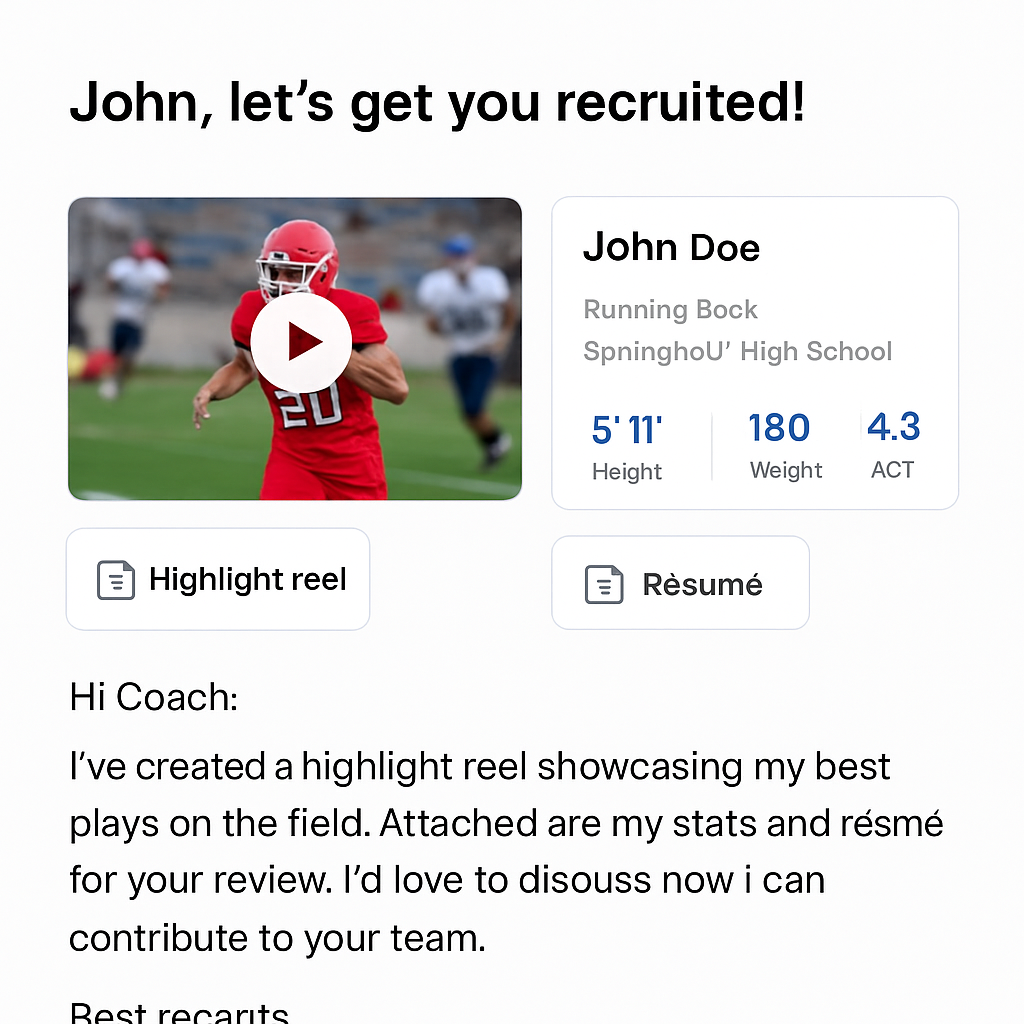
- A 1‑2 second thumbnail of your highlight reel, labeled “Watch my highlights”.
- One graphic that pairs your top three stats with the coach’s current scheme (e.g., 4.5 s 40‑yard dash vs. spread offense).
- If you have a PDF résumé, compress it to under 200 KB and rename it with your name and sport.
These three items give the coach a visual hook, a data‑driven proof point, and a concise résumé they can download if they’re interested.
How to embed them
Instead of attaching a massive video file, upload the reel to a reliable host (YouTube unlisted, Vimeo, or a cloud storage link). Then, insert a small image that links directly to that URL. Most email clients turn a linked image into a clickable preview, so the coach gets a visual cue without the download.
For the stats graphic, treat it like a mini‑infographic. Use a clean layout—your name at the top, three stats in bold, and a subtle background that matches the team’s colors. Host the graphic the same way and link it with anchor text like “See my key numbers”.
Naming and hosting tips
File names matter. A coach scanning a list of attachments will skip anything vague.
Rename files like JohnDoe_QB_2024_Stats.png or JohnDoe_Resume_QB.pdf.
The same principle applies to your video link: use a custom URL slug such as my‑reel.com/johndoe‑qb‑2024 so it looks intentional.
When you host files, choose a service that won’t trigger spam filters. Plain‑text links (no tracking parameters) and HTTPS URLs are safest.
If you’re using a platform like CoachDPrep CORE GPT, the tool can generate short, branded links that keep everything tidy.
Putting it all together
Now, drop those visuals into the body of your recruiting email example right after the opening hook. A typical flow looks like: personal hook → three headline stats → visual thumbnail linked to your reel → short proof sentence → stats graphic → concise call‑to‑action with a calendar link.
When you follow this pattern, the coach gets a quick visual snapshot, can dive deeper with a click, and still has a clean, attachment‑free email to reply to. That’s the sweet spot between showing off and staying respectful of their inbox.
Take a moment right now to create a 150 KB thumbnail, a one‑page stats graphic, and a compressed résumé. Upload them, link them, and paste the checklist into your next recruiting email example. You’ll notice the response rate climb within a week or two.
Step 6: Follow‑Up Strategies and Tracking Responses
Why the follow‑up matters
You've sent a solid recruiting email example, but the real magic happens after that click‑send moment. Most athletes assume the ball’s in the coach’s court and then wait in silence. That waiting game is where opportunities slip away.
So, what should you do when the inbox goes quiet? A smart, low‑pressure follow‑up can turn a lukewarm “maybe” into a scheduled call.
Timing is everything
First off, give the coach a breathing room. One to two business days after your initial email is the sweet spot – long enough to avoid looking desperate, short enough to stay top of mind.
Imagine you’ve just emailed a coach on Monday morning. By Wednesday afternoon, send a brief note that references something specific from their recent game or press release. That shows you’re still paying attention without being pushy.
Crafting the perfect follow‑up line
Keep it under three sentences. Start with a friendly reminder, sprinkle in a new detail, and end with a clear next step.
For example:
"Hey Coach Miller, I loved the way your offense executed that no‑huddle drive last week – it reminded me of how my 4.5‑second dash could fit right in. I’ve attached a quick 30‑second clip of my best third‑down scramble.
Would a 10‑minute call Thursday at 11 am work for you?"
Notice the pattern: compliment, fresh proof, specific ask. No fluff, no generic “just checking in.”
Using a tracking sheet
Even the best follow‑up can fall through if you lose track of dates, responses, or open rates.
Grab a simple spreadsheet – think columns for "Date Sent," "Coach Name," "Subject Line," "Follow‑Up Sent?" and "Response Status."
Every time you send a recruiting email example, log the row. When the follow‑up deadline hits, a quick filter highlights who needs a nudge. This low‑tech system works just as well as a fancy CRM, and it’s easy to maintain.
Tip: color‑code rows. Green for replied, yellow for pending, red for no response after two follow‑ups. Visual cues keep you from accidentally double‑messaging the same coach.
Automation without losing the human touch
If you’re juggling dozens of prospects, consider using a mail‑merge tool that can insert personalized placeholders (coach name, recent game detail) into your follow‑up template. The key is to keep the final edit manual – skim the draft, add a line about the latest win, and hit send.
Remember, automation is a helper, not a replacement. Coaches can sniff out generic copy in seconds, and that’s the opposite of what you want.
When to stop – the polite exit
Sometimes a coach simply isn’t interested, and chasing forever looks desperate. After two thoughtful follow‑ups (initial email + one reminder), it’s okay to send a “closing” note.
Something like:
"Coach Miller, I understand you’ve got a full roster right now. If anything changes, I’d love to stay in touch. Feel free to reach out anytime."
This leaves the door open without burning bridges.
That final note also gives you a clean data point – mark the row as “closed – no reply.” Over time you’ll see patterns: certain programs respond faster, others need more touch points.
Leverage CoachDPrep CORE GPT for follow‑up insights
Our platform can auto‑populate a follow‑up calendar based on the dates you log in your spreadsheet. It even suggests optimal send windows based on the coach’s timezone and typical response patterns we’ve observed across hundreds of athletes.
Using that data, you can experiment with different phrasing, subject lines, or even the time of day you send. Small tweaks often boost reply rates by 5‑10%.
Quick checklist before you click send
- Wait 1‑2 business days after the initial email.
- Reference a recent, specific coach or team event.
- Attach a fresh, short proof clip or stat graphic.
- Ask for one concrete time slot (or two) for a call.
- Log the outreach in your tracking sheet and set a reminder.
Follow these steps, and you’ll turn a silent inbox into a series of meaningful conversations. The follow‑up isn’t just a courtesy – it’s the bridge that turns a recruiting email example into a real opportunity.
Conclusion
We’ve walked through every piece of a winning recruiting email example, from the hook that grabs a coach’s attention to the follow‑up that keeps the conversation alive.
Remember, the magic starts with a personal touch – name the coach, reference a recent game, and drop the one metric that solves their biggest pain point. Then line up your three headline stats, sprinkle a quick proof sentence, and close with a crystal‑clear ask.
And don’t forget the tiny but mighty checklist: wait 1‑2 business days, attach a lightweight thumbnail, and log everything in a simple spreadsheet. Those habits turn a lone email into a repeatable outreach system.
So, what’s the next step? Grab your stats sheet, plug the formula into CoachDPrep CORE GPT, and fire off that first draft. The platform will help you keep the tone conversational and the structure on point, so you spend less time guessing and more time playing.
If you’re ready to stop feeling invisible, give the tool a try and watch your reply rate climb. Your next conversation with a coach is just one well‑crafted recruiting email example away.
In the end, a solid recruiting email example isn’t magic—it’s a series of small, deliberate choices that signal you’ve done your homework and respect the coach’s time. Keep refining each element, test a subject line or two, and let the data guide you. Consistency beats flash every time, and the results speak for themselves.
FAQ
What makes a recruiting email example stand out to a college coach?
Coaches skim dozens of emails a day, so a recruiting email example has to grab attention in the first two lines. That means a personal hook that references something recent—like their latest win or a new offensive scheme—followed by three hard‑hitting stats that line up with what they’re hunting. Sprinkle a one‑sentence proof point, then close with a low‑commitment ask. The whole thing should feel like a quick coffee chat, not a mass‑mail blast.
How many stats should I include in my recruiting email example?
Stick to three headline numbers—any more and the email starts to feel like a data dump. Choose the metrics that solve the coach’s biggest pain point: a 40‑yard dash for a spread offense, a GPA for an academic‑focused program, or a third‑down conversion boost for a hurry‑up scheme. Three stats are enough to prove value, keep the email punchy, and make the ask feel natural.
Should I attach a video or a thumbnail in my recruiting email example?
Send a tiny thumbnail that links to an unlisted highlight reel instead of a heavy attachment. Coaches appreciate a visual cue, but a 2‑MB video will usually bounce straight to spam. Make the thumbnail 150 KB or less, label it “Watch my highlights,” and let the link open in a new tab. That way you give them a quick preview without clogging their inbox.
How often should I follow up after sending a recruiting email example?
Give the coach a breather—wait 1‑2 business days before the first follow‑up, then another 3‑4 days if you haven’t heard back. Keep the reminder under three sentences, reference something fresh from their recent game, and add a new proof clip or stat graphic. If after two polite nudges there’s still silence, send a courteous “closing” note and move on. Persistence beats panic.
Can I reuse the same recruiting email example for different schools?
Tailor the core of your recruiting email example, but swap out the coach‑specific hook and the most relevant stat each time. A generic profile—your name, position, three headline numbers—can stay the same; what changes is the opening line that mentions their recent win or scheme shift. This saves you time while still showing you did your homework for every program you target.
What subject line works best for a recruiting email example?
The sweet spot is a personalized hook plus one high‑impact metric, all under 50 characters. Start with the coach’s name or program, then drop a number that solves a pain point, and finish with a tiny curiosity spark. For example, “Coach Miller, 2026 QB – 4.5 s 40‑yard dash.” Keep it short, avoid all‑caps, and test two variations to see which one gets the higher open rate.
How can I track the performance of my recruiting email example?
Set up a simple spreadsheet with columns for date sent, coach name, subject line, and a “reply?” checkbox. Add a column for open‑tracking if your email client offers it, and another for follow‑up status. After each round, filter by “no reply” and schedule your next nudge. Over time you’ll spot patterns—maybe quarterbacks get better responses on Tuesdays—so you can fine‑tune your timing and content.
Ready to Stop Being Overlooked?
If you’re serious about playing at the next level, it’s time to stop guessing and start presenting yourself with intent.
CoachDPrep CORE GPT was built for athletes who want clarity, honest evaluation, and a real plan—not hype or false promises.
This is your opportunity to take control of your recruiting journey, understand where you truly fit, and make your message impossible to ignore.
Don’t wait for someone to “find” you.
Start now. Move from invisible to visible with CoachDPrep CORE GPT.
👉 Get started today at: GET CORE GPT NOW!
Coach Anzevino
CoachDPrep CORE GPT
From Invisible to Visible