

How technology is streamlining paperwork, improving data accuracy, and freeing up time for teachers and administrators
By Ed, Founder & Developer of DigiScape Toolbox
1. Why the Shift to Automation?
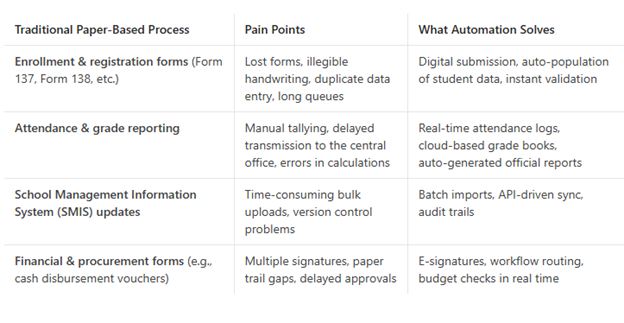
The pandemic forced many schools to go online, and DepEd’s “Digital Transformation Roadmap” (2020‑2025) accelerated the adoption of educational management applications that replace or augment these paper forms.
2. Flagship Applications Used by DepEd
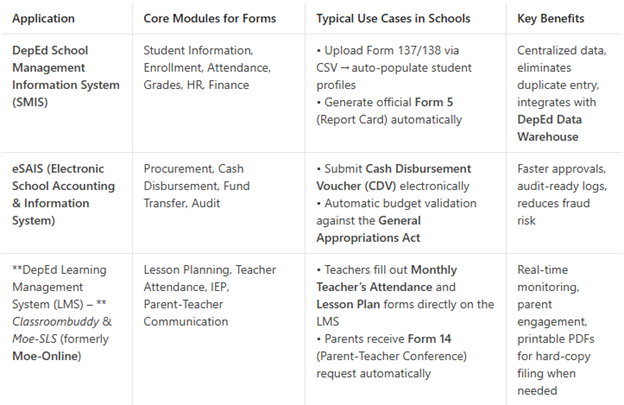
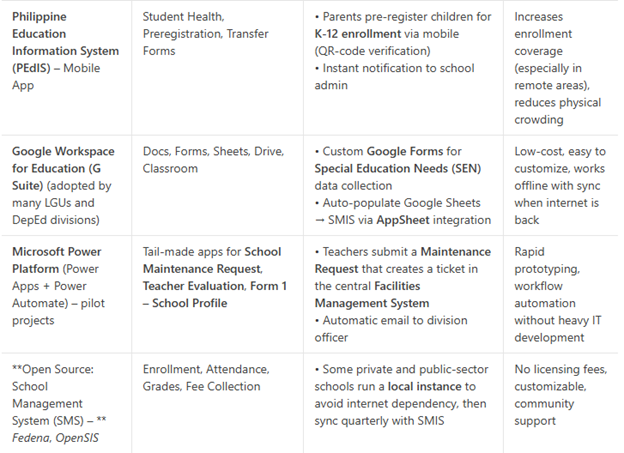
Quick tip for school admins: If you already have a Google Workspace account, start by building simple Google Forms for the “hardest” paperwork (e.g., Form 137 Release Request) and connect the responses to a Google Sheet. Use AppSheet or Power Automate to push data into SMIS via its import templates—this is a low‑cost “quick win” before a full‑scale system rollout.
3. Step‑by‑Step Example: Automating the Form 138 (Report Card) Generation
- Data Capture
- Teachers enter grades in the DepEd LMS (Classroombuddy) or directly in SMIS Grade Entry module.
- Attendance and remarks are auto‑linked via the Attendance table.
- Validation
- SMIS runs a business rule: “All subjects must have at least one grade before finalizing.”
- Errors trigger an email reminder to the teacher.
- Report Card Build
- Once validated, an XML file is generated per student.
- A PDF template (using iText or Microsoft Word via Power Automate) merges student data with the standard Form 138 layout.
- Distribution
- PDF is saved to the student’s folder in Google Drive / OneDrive and a QR code is sent to the parent via SMS (Twilio or local gateway).
- Parents can view/download the report card instantly, or request a printed copy at the school office.
- Archiving
- All PDFs are backed up to DepEd’s Cloud Storage (Google Cloud or Azure) for compliance with RA 10973 (Free and Accessible Education Act).
Result: What used to take 3–5 days of manual collation now happens in under an hour, with 99 % data accuracy and an audit trail for every revision.
4. Real‑World Impact (Numbers from DepEd Pilot Studies)
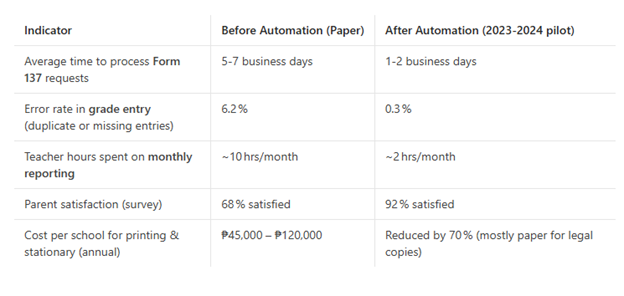
Source: DepEd “Digital Transformation Impact Report”, 2024 (available on the DepEd website, Section III‑4).
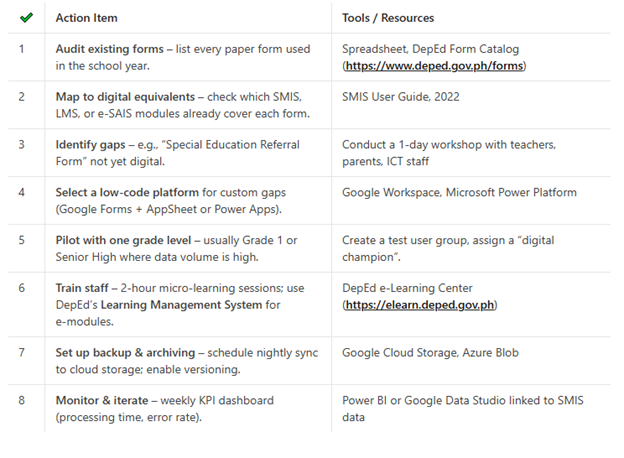
5. Getting Started – A Checklist for School Leaders
6. Challenges & How to Overcome Them
7. Looking Ahead – What’s Next for DepEd Forms?
- AI‑Powered Validation – Natural‑language processing to detect inconsistent remarks in Form 138 (e.g., “Passed” vs. a failing grade).
- Blockchain for Credential Issuance – Secure, tamper‑proof digital diplomas and Form 137 that can be verified by employers or universities.
- Voice‑Driven Data Capture – Teachers can dictate grades through Google Assistant or Microsoft Cortana, automatically populating SMIS.
- Inter‑agency Data Sharing – Live linkage of DepEd’s enrollment data with the Commission on Higher Education (CHED) for smoother transitions to tertiary education.
References
- DepEd (2022). School Management Information System (SMIS) User Manual. Manila: Department of Education.
- DepEd (2024). Digital Transformation Impact Report. Retrieved from https://www.deped.gov.ph/digital-transformation-report-2024/
- Republic of the Philippines (2012). Data Privacy Act of 2012 (RA 10173). Official Gazette.
- Mendoza, J. & Reyes, L. (2023). “From Paper to Cloud: Automating K‑12 Forms in the Philippines.” Philippine Journal of Education Technology, 8(2), 45‑61.
- Google for Education (2023). Using Google Forms & AppSheet for School Workflow Automation. Google Workspace Help Center.
- Microsoft (2023). Power Platform in Education – Case Studies. Retrieved from https://learn.microsoft.com/en-us/power-platform/education
Closing Thought
Automation isn’t about eliminating human touch; it’s about freeing teachers, administrators, and parents from repetitive paperwork so they can focus on what truly matters—teaching, learning, and nurturing our future Filipinos. By leveraging the applications already available—SMIS, e‑SAIS, LMS platforms, and low‑code tools—every DepEd school can take concrete steps toward a paper‑light, data‑smart environment.
Ready to start? Grab that first form, build a simple Google Form, and watch the transformation begin.
If you found this blog helpful, share it with your fellow educators and let’s keep the conversation going on the future of digital schooling in the Philippines!
Ed is the founder of DigiScape Toolbox, creating digital tools that help teachers automate tasks and improve efficiency.