

If you run a digital store like Digiscape Toolbox, you already know that teachers are constantly hunting for reliable, affordable tools that make online instruction smoother. One of the most underrated yet versatile solutions is a well‑designed Excel workbook—specifically a “teacher tools for remote classrooms Excel” template that doubles as an “excel spreadsheet for student progress tracking.” In this post, we’ll explore why this spreadsheet is a must‑have, how you can market it in your store, and step‑by‑step instructions for teachers who purchase it.
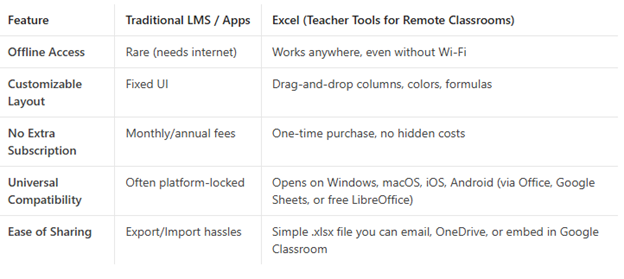
Why Excel Still Rules in a Cloud‑First World
What Makes a Great “Excel Spreadsheet for Student Progress Tracking”?
A high‑quality spreadsheet isn’t just a table of names and grades. Below are the essential components that turn a bland sheet into a teacher‑friendly powerhouse:
- Dashboard Overview
- A one‑page visual that uses conditional formatting, sparklines, and pivot charts to instantly show class‑wide performance, attendance trends, and upcoming deadlines.
- Individual Student Pages
- Auto‑populated sections for each learner with space for:
- Weekly assignments and scores
- Participation notes (chat, video, discussion board)
- Skill rubrics (e.g., reading fluency, coding logic)
- Personal goals & reflections
- Attendance Tracker
- Date‑column headers with dropdown “Present/Absent/Late” that feeds into the dashboard for quick absenteeism reports.
- Assignment Planner
- A calendar‑style sheet where teachers can list assignments, attach Google Classroom links, set weighting percentages, and automatically calculate the overall grade.
- Formula‑Driven Automation
- Pre‑built formulas (e.g., =IFERROR(AVERAGEIF(range, criteria),0)) that compute averages, weighted scores, and final grades without teachers having to write a single function.
- Data Validation & Protection
- Drop‑down lists, error alerts, and locked cells so students can’t accidentally overwrite formulas.
- Export‑Ready Reports
- One‑click “Print” or “Export PDF” buttons (via simple VBA macros) that generate individualized progress reports for parents.
- When you bundle these features into a single download, you’re essentially delivering a complete teacher toolkit that saves hours each week—exactly what remote educators need.
How to Position This Product in Digiscape Toolbox
1. SEO‑Friendly Product Title & Description
Title: Remote Classroom Master Sheet – Teacher Tools for Remote Classrooms Excel (Student Progress Tracker)
Meta Description:
“Download the ultimate Excel spreadsheet for student progress tracking. Designed for remote teachers, this all‑in‑one workbook offers dashboards, attendance logs, automated grading, and printable reports—no extra software required!”
Include both target keywords naturally: teacher tools for remote classrooms Excel and excel spreadsheet for student progress tracking. Google loves exact‑match phrases when they appear in titles, headings, and alt‑text.
2. Eye‑Catching Cover Image
Create a mock‑up showing the dashboard with colorful charts, a glimpse of a student page, and a “Print Report” button. Overlay the phrase “Plug‑and‑Play Excel Teacher Toolkit.”
3. Bonus Bundle Ideas (Upsell)
- Video Walk‑Through (15 min) – Quick tutorial on setting up the sheet.
- Google Sheets Compatibility Pack – Pre‑built formulas that automatically convert to Google Sheets for teachers who prefer the cloud.
- Template Customizer Service – Offer a 30‑minute Zoom session to tweak colors, school branding, or add subject‑specific rubrics.
4. Social Proof & Demonstrations
- Post a short Reel on Instagram/TikTok showing a teacher dragging a new assignment into the planner and the grade column updating instantly.
- Share a testimonial from a remote elementary teacher who cut grading time from 3 hours to 45 minutes per week.
5. Pricing Strategy
Because the product is a digital download, you can price it at a low ticket of $9.99 to encourage impulse buys, or bundle it in a “Remote Teaching Starter Pack” for $29.99 (adding the video walkthrough and Google Sheets pack). Offer a 30‑day money‑back guarantee—this builds trust and nudges hesitant shoppers.
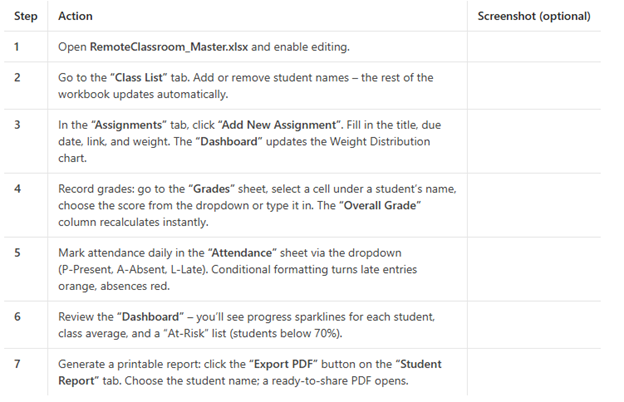
Step‑by‑Step: How a Teacher Uses the Spreadsheet (Mini‑Guide)
Final Thoughts – Turn One Spreadsheet into a Revenue Engine
Your Digiscape Toolbox store can become the go‑to destination for teachers who need practical, low‑cost tech solutions. By highlighting the dual‑purpose nature of the product—teacher tools for remote classrooms Excel and excel spreadsheet for student progress tracking—you tap into two high‑traffic search intents at once.
Takeaway actions:
- Publish a blog post (like this one) that naturally includes both keywords.
- Create a polished product listing with SEO‑rich copy, screenshots, and a clear value proposition.
- Offer a free mini‑guide or video to capture email leads, then funnel them to the purchase page.
- Promote via teacher communities (Facebook Groups, Reddit r/teaching, Twitter hashtags #remoteteaching #edtech).
- Collect and showcase testimonials to build credibility.
When you combine a high‑quality Excel tool with smart marketing, you’ll see not only more sales but also genuine appreciation from teachers who finally have a reliable, easy‑to‑use method for tracking student progress in remote classrooms.
Ready to add the ultimate Excel toolkit to your Digiscape Toolbox catalog?
Download the tool, customize the branding, and start helping remote educators thrive—one cell at a time.