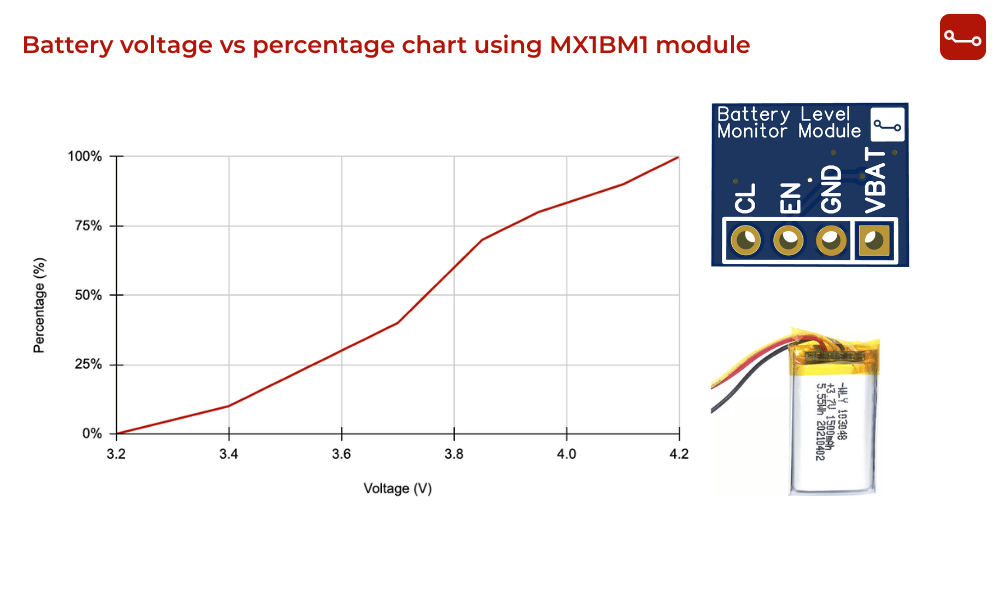
Want to show a battery percentage indicator on your Arduino or ESP32 project ?
With the MX1BM1 Battery Level Monitor Module, you can easily measure battery voltage and convert it into a battery percentage (0–100%).
This tutorial explains how to:
- Read the battery voltage using MX1BM1 module
- Convert the voltage into percentage
- Display it in Serial Monitor or on an OLED screen
What You’ll Need
Components:
- MX1BM1 Battery Level Monitor Module
- ESP32 or Arduino board
- 1S LiPo / Li-ion battery (3.0V – 4.2V range)
- Breadboard and jumper wires
- (Optional) OLED display for on-screen battery indicator
Download Gerber Files | Download Datasheet
How the Module Works
The MX1BM1 module safely scales your battery voltage (3.0 - 5.2V) down to a level your 3.3V ADC can read.
It uses a 100kΩ + 10kΩ resistor divider, meaning the output voltage is:

Then, your microcontroller reads VCL and reconstructs the actual battery voltage.
Battery Voltage vs Percentage Chart (1S LiPo Battery)
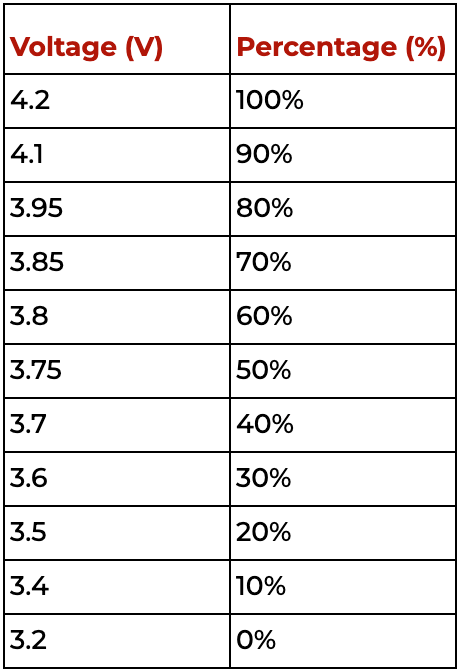
Note: LiPo cells are not perfectly linear, but this mapping gives a good approximation for battery indicators.
Circuit Setup
Connections (Arduino Example):
- VBAT → Battery +
- GND → Battery - & GND
- EN → D5 (or any GPIO)
- CL → A0 (ADC pin on arduino)
Example Arduino / ESP32 Code
#define EN_PIN 5
#define CL_PIN A0
void setup() {
pinMode(EN_PIN, OUTPUT);
digitalWrite(EN_PIN, LOW);
Serial.begin(9600);}
void loop() {
digitalWrite(EN_PIN, HIGH); // Enable module
delay(5); // Wait for stable output
int raw = analogRead(CL_PIN); // Read ADC value
digitalWrite(EN_PIN, LOW); // Disable module
// Voltage divider: R1 = 100k, R2 = 10k
// Divider ratio: CL = VBAT * (10 / 110) = VBAT * 0.0909
// So, VBAT = CL / 0.0909
float v_adc = raw * (3.3 / 4095.0);// ADC(assuming 12-bit ADC and 3.3Vref)
float battery_voltage = v_adc / 0.0909; // Reconstruct battery voltage
Serial.print("Battery Voltage: ");
Serial.print(battery_voltage, 2); // 2 decimal places
Serial.println(" V");
delay(1000);}
Applications
- Battery level monitoring in IoT sensors
- Smart gadgets with on-screen battery percentage
- Power banks or portable tools
- Robots, drones, and RC systems
- Battery-powered ESP32 or Arduino devices
Tips for Accurate Readings
- Use a 10µF capacitor (already on the MX1BM1 module) to stabilize readings.
- Calibrate your ADC reference if accuracy is critical.
- Take multiple readings and average them to reduce noise.
- Disable the divider (EN LOW) when not in use to save battery.
Conclusion
Using this MX1BM1 Battery Level Monitor Module you can easily measure battery voltage and display battery percentage in any Arduino or ESP32 project. It’s compact, accurate, and perfect for IoT, wearables, and battery-powered electronics.
Get the Gerber Files here | Read Full Datasheet