
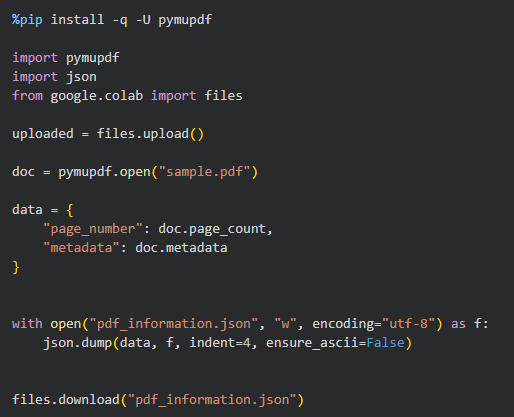
The Python script below uses PyMuPDF to read basic information from a PDF, saves that information as a JSON file, and downloads the file to your computer.
1. Install pymupdf
If pymupdf isn't already installed in your Colab environment, run:

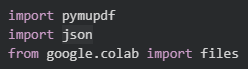
2. Import the dependencies
3. Upload the PDF

4. Open the PDF

This opens the PDF so Python can access its information.
Replace "sample.pdf" with the name of your PDF.
5. Collect the information
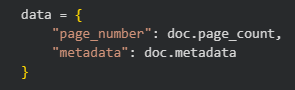
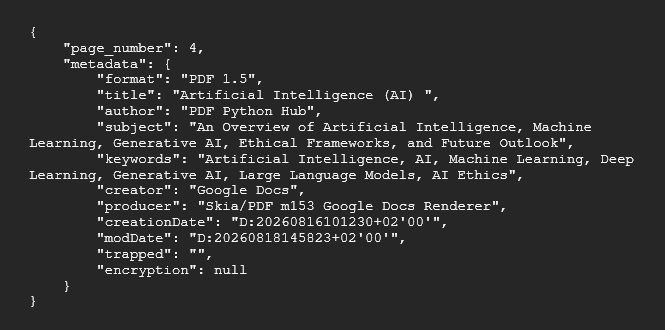
The script creates a dictionary containing:
- page_number — the total number of pages
- metadata — information such as the PDF title, author, subject, creator, and creation date
6. Save the information as JSON

- "w" — opens the file in write mode, meaning new content is written to the file.
- encoding="utf-8" — specifies UTF-8 character encoding, allowing the file to correctly handle characters from different languages and special characters.
- as f — gives the opened file a short name (f).
- json.dump() —writes Python data to JSON.
- indent=4 — formats the JSON with 4 spaces of indentation, making it easier for humans to read.
- ensure_ascii=False — keeps non-ASCII characters as they are instead of converting them into Unicode escape sequences. For example, é stays as é rather than becoming \u00e9.
- with — automatically closes the JSON file when the block finishes, even if something goes wrong while writing.
7. Download the JSON file
Because this is running in Google Colab, you can download the generated file directly:

Complete Example
Example Output
The resulting JSON might look like:
Open the notebook
Open the Google Colab notebook for this PDF mini-guide and run the code as you follow along.
🎁 Grab Your Free PyMuPDF Cheatsheet
Want to automate PDFs with Python? We've put together a free, interactive HTML cheatsheet covering everything from installing PyMuPDF to building a complete PDF workflow.
✅ Beginner-friendly explanations
✅ Copy-ready code snippets
✅ Google Colab instructions
✅ PDF metadata, page counts, JSON, and more
👉 Get the free cheatsheet here
More PDF Python Resources
Want to learn how to open a PDF file?
Check out this mini-guide: Open Your First PDF with PyMuPDF.
Comments ()