
PyMuPDF is a Python library for working with PDF files. The code below opens an existing PDF so you can read, extract, or modify its contents.
1. Import PyMuPDF

This imports the PyMuPDF library and makes its PDF tools available in your Python program.
2. Open the PDF

- pymupdf.open() opens the PDF file named data.pdf.
- The returned document is stored in the variable doc, which you can then use to access the PDF's pages and content.
Complete Example
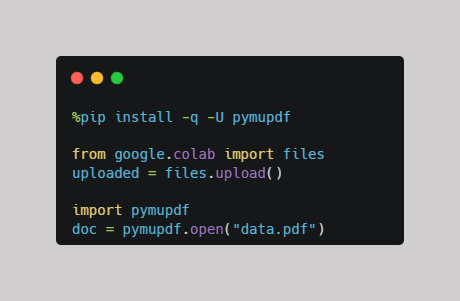
In short: import pymupdf loads the library, while pymupdf.open("data.pdf") opens the PDF and stores it in doc for further processing.
Note: Make sure the pymupdf package is installed and the PDF file (data.pdf) is uploaded to your Google Colab environment before running the following code.
-Want to learn how to install the pymupdf package in Google Colab?
Check out this mini-guide: How to Install PyMuPDF in Google Colab.
-Want to learn how to upload your PDF file in Google Colab?
Check out this mini-guide: Uploading Files in Google Colab.
Open the notebook
Open the Google Colab notebook for this PDF mini-guide and run the code as you follow along.
Practice with a Free PDF for Google Colab
Ready to try it yourself? Download the free PDF practice file and follow these simple steps:
- Download the PDF directly to your computer.
- Rename the downloaded file to data.
- Open the Google Colab notebook here
- First, install the pymupdf package. Then, upload your downloaded PDF using the file browser in Google Colab.
- Open the PDF by running the following code: doc = pymupdf.open("data.pdf")
Get the Free PDF Practice File →
Comments ()